Documentation / How-To Guides / How to Improve AI Search Visibility
How to Improve AI Search Visibility
Review AI answers to identify changes to your business descriptions, coverage, and content.
Read what AI answers say about your business, then identify information you can improve. OppAlerts helps you research sites named by AI models, pages covering your market, and gaps in your own content. Use the five workflows below to turn those findings into specific tasks.
- Which sites do AI models name in your market? Competitor LLM Recs.
- Which words do AI models use for your market? Keyword Research.
- Which pages describe your business? Brand Mentions.
- Which pages link to a competitor and not to you? Brand Link Gap.
- Does your own page speak to the buyer? Content Optimizer.
Before you start: read the AI answers and set up the campaign
- Write questions that your buyers ask when they decide. Add questions about your own brand.
- Put the conditions of the buyer into each question, for example the budget or the size of the business.
- Ask the questions in the AI service. Keep a copy of each answer, and keep the same words each time you ask again.
- Open your campaign in Edit Campaign, and open the Settings tab. Check that your own brand and your competitors have their hosts and their brand names.
An answer mentioning your product may describe a feature you have removed. A mention count records the appearance without revealing the error, so read the answer and check its claims against the current product.
1. See which sites AI models name in your market
- Open Competitor LLM Recs.
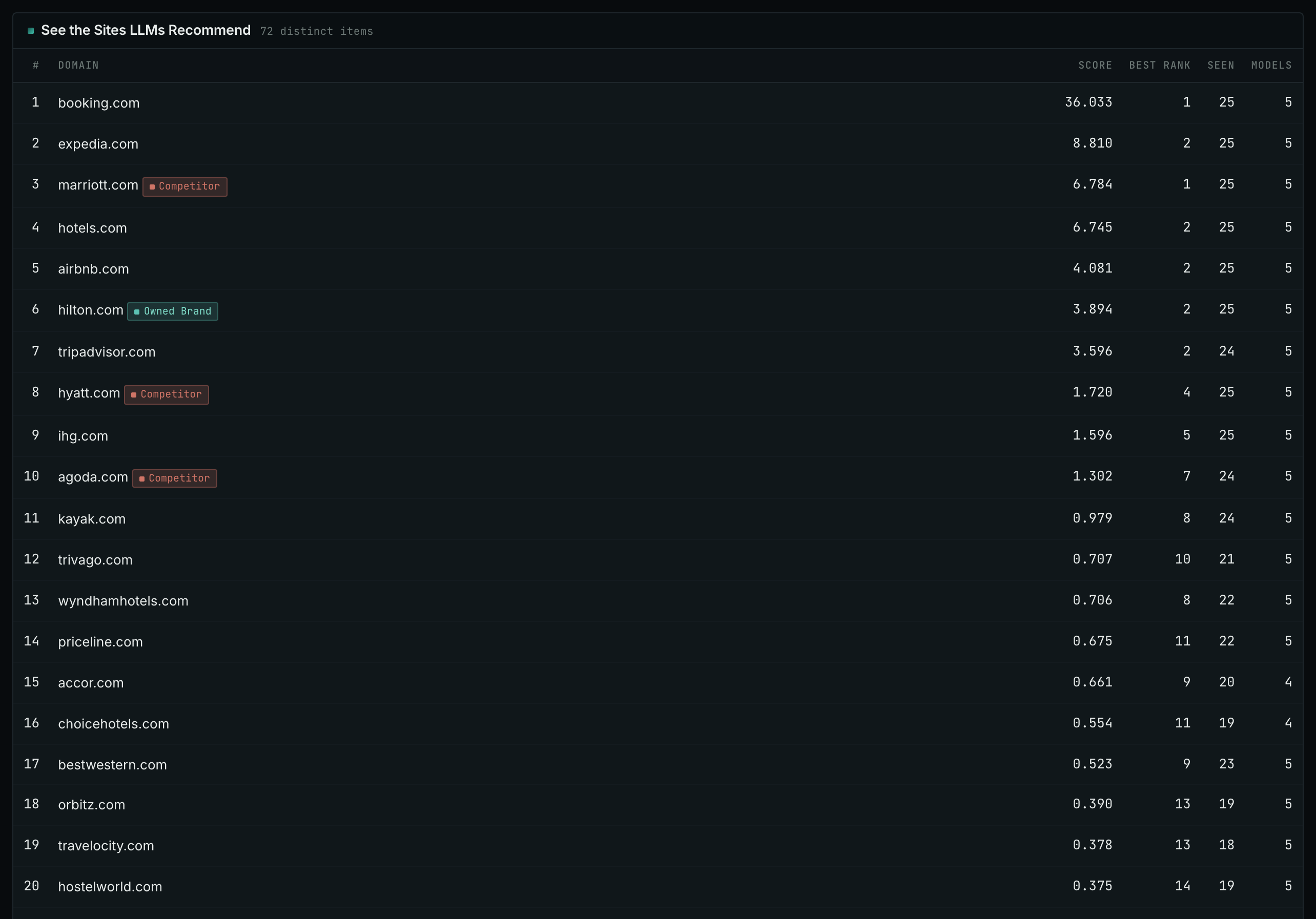
- Read the top 20 rows. These are the sites that the AI models name when they are asked who to use in your market.
- Find your own site and its position. A site that is absent has a different problem from a site at position 30.
- Read the Models column. It shows how many different models named the site.
- A site near the top that is not a competitor is often a publisher, a directory, or a review site. Find out what it accepts.
- MCP:
llm_answers_top_sites, with{"campaign": 3, "page": 1}. - API:
POST https://api.oppalerts.com/v1/llm_answers/top_sites, with the same JSON body.
2. Read the words that AI models use for your market
- Open Keyword Research.
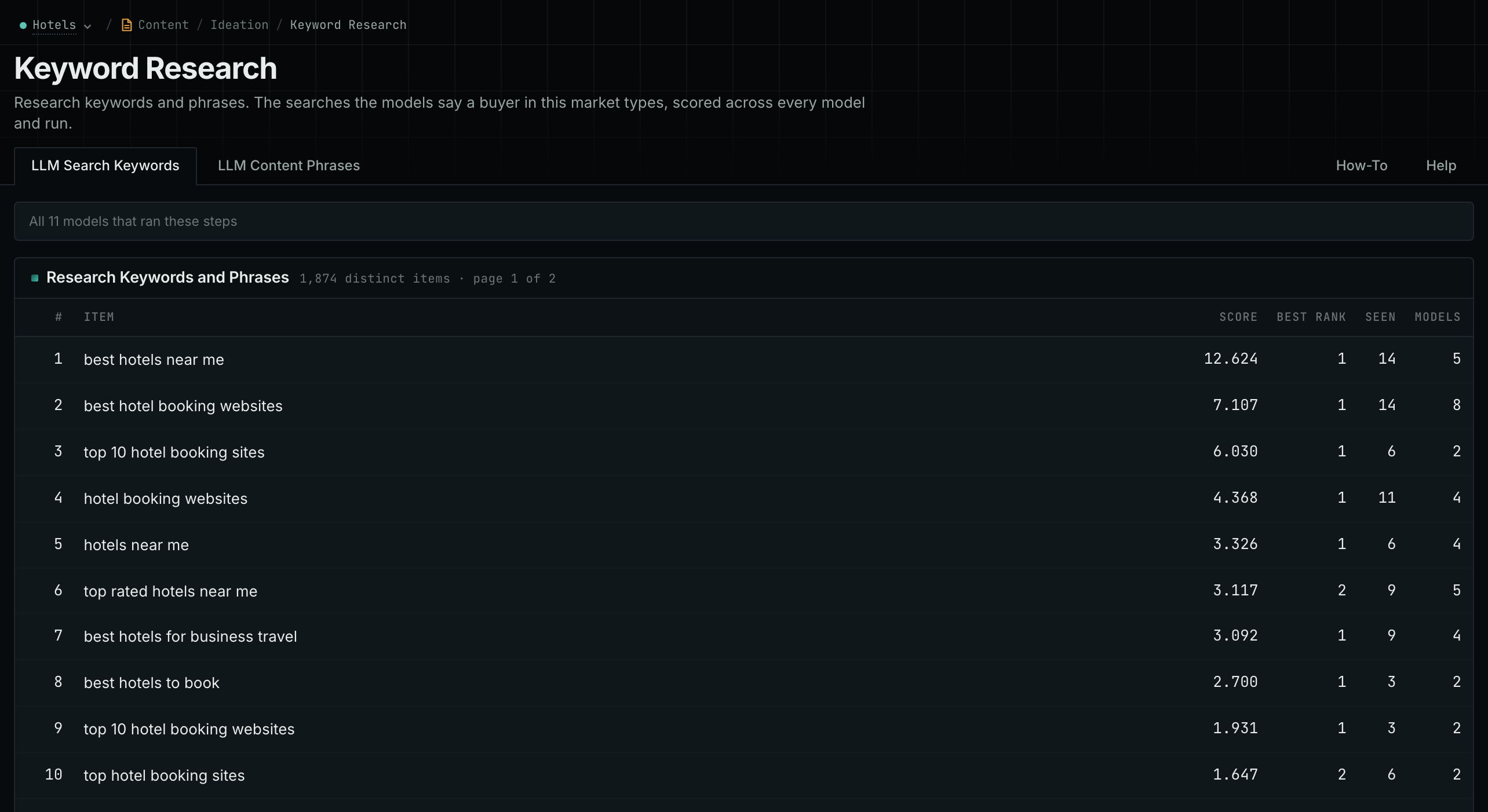
- Read the top 20 rows of the LLM Search Keywords tab. If they do not describe your market, the campaign description is not correct.
- Read the LLM Content Phrases tab when you write or change a page. It shows how the market writes.
- MCP:
llm_answers_search_keywordsandllm_answers_content_phrases, with{"campaign": 3, "page": 1}. - API:
POST https://api.oppalerts.com/v1/llm_answers/search_keywordsandPOST https://api.oppalerts.com/v1/llm_answers/content_phrases, with the same JSON body.
3. Find the pages that describe your business
- Open Brand Mentions.
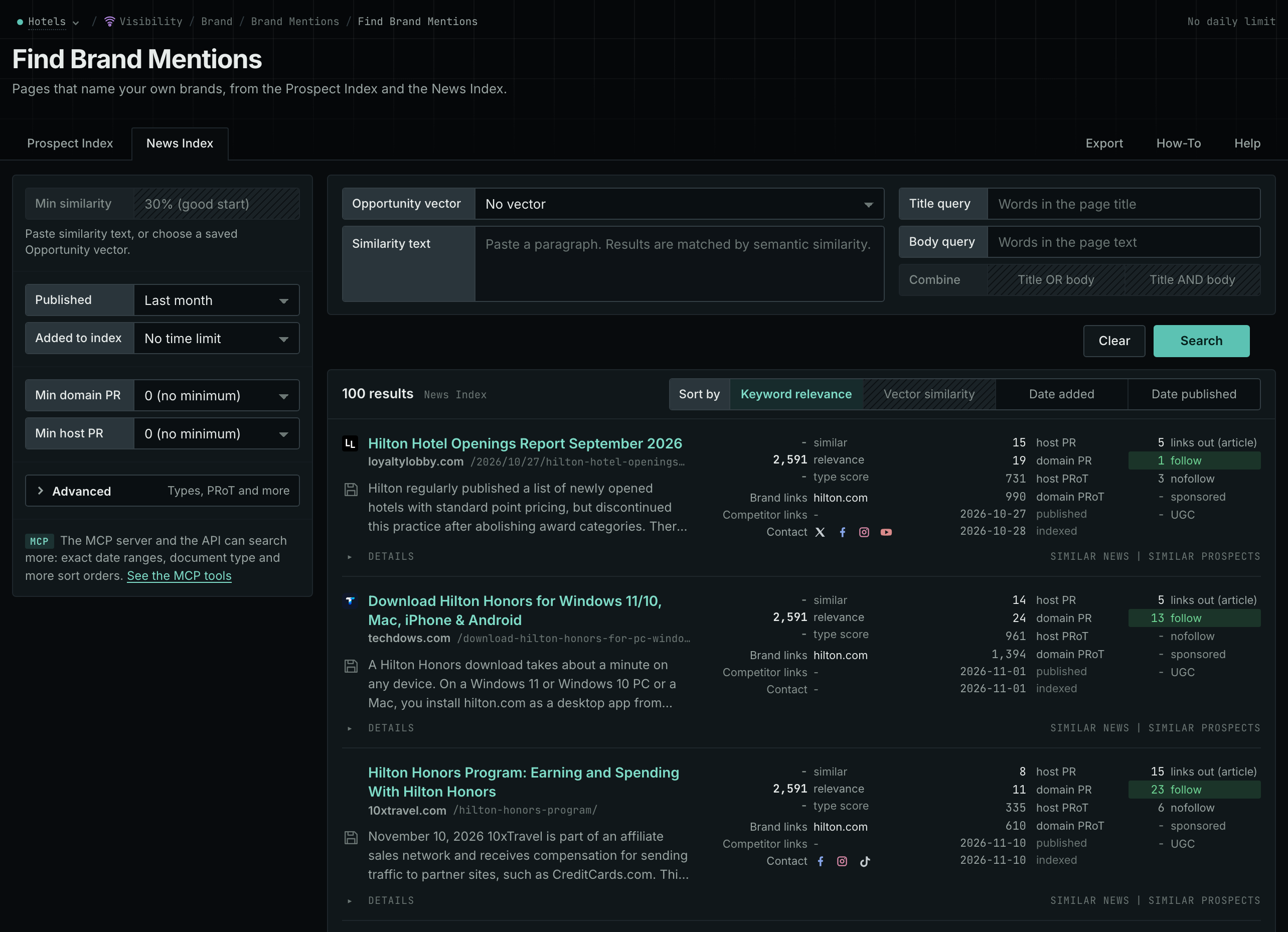
- Read the News Index tab. Set Published to the last few weeks to see the current coverage.
- Read the Prospect Index tab for pages such as directories, comparisons, and roundups. Use Added to index for a time window on this tab.
- Open each page, and read how it describes your business. If a third-party page repeats an old description, prepare a correction with the passage and the current evidence. If your own site has the same error, change it.
- MCP:
prospects_brand_mentionsandnews_brand_mentions, with{"campaign": 3, "relationship": "org_owned_brand", "indexed_days": 30, "similarity_target": "none", "sort": "relevance"}. Fornews_brand_mentions, sendpublished_daysin place ofindexed_days: it counts from the published date. - API:
POST https://api.oppalerts.com/v1/prospects/brand_mentionsandPOST https://api.oppalerts.com/v1/news/brand_mentions, with the JSON body of each tool.
4. Find the pages that link to a competitor and not to you
- Open Brand Link Gap.
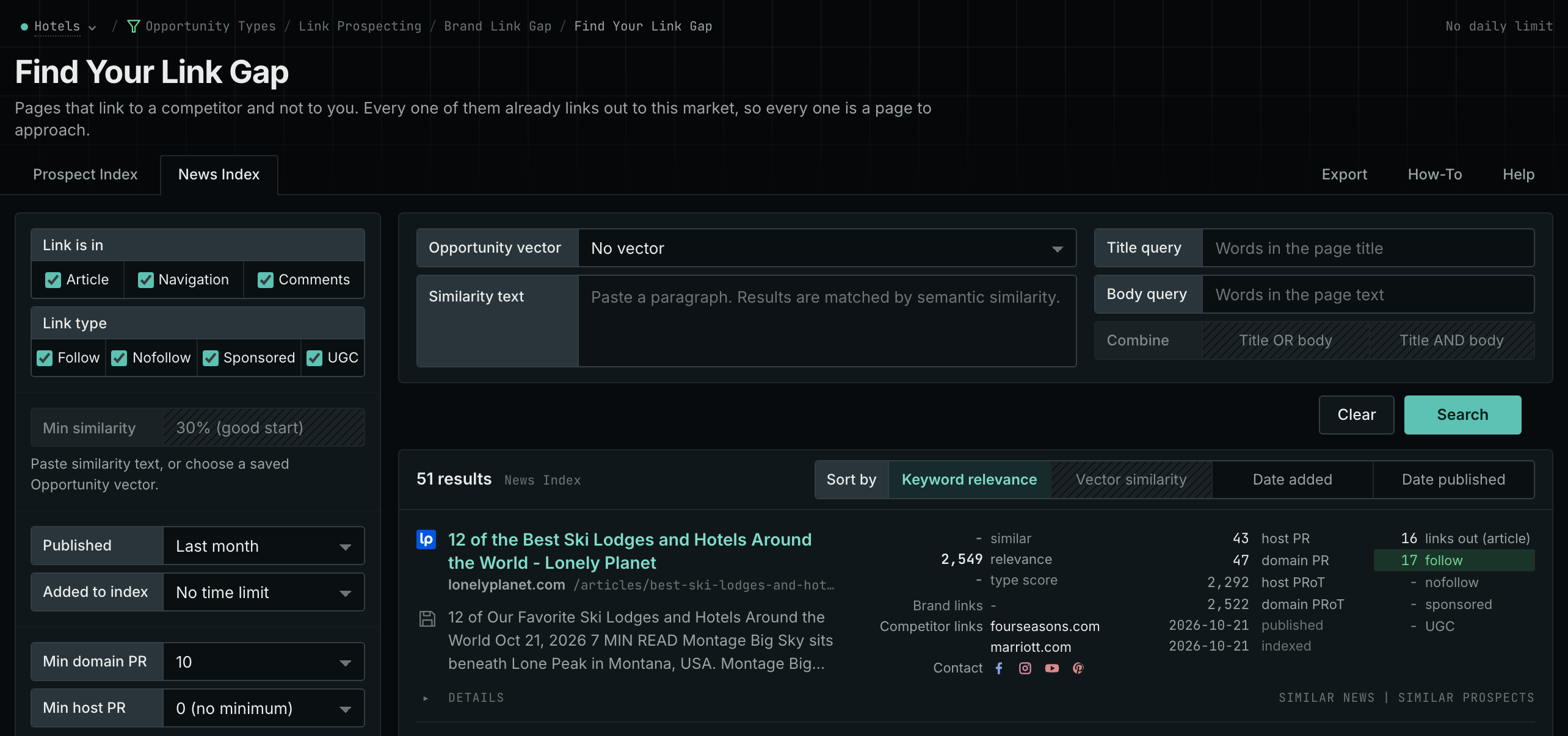
- Each row is a page that links to at least one competitor and to none of your hosts.
- Start with the pages that show more than one host under Competitor links. These are often comparisons and round-ups.
- Read why the page includes each competitor. Then decide whether your business meets the same criteria.
- MCP:
prospects_brand_link_gapandnews_brand_link_gap, with{"campaign": 3, "indexed_days": 30, "similarity_target": "none", "pr_domain_min": 10, "sort": "relevance"}. Fornews_brand_link_gap, sendpublished_daysin place ofindexed_days: it counts from the published date. - API:
POST https://api.oppalerts.com/v1/prospects/brand_link_gapandPOST https://api.oppalerts.com/v1/news/brand_link_gap, with the JSON body of each tool.
5. Check that your own page speaks to the buyer
- Open Content Optimizer.
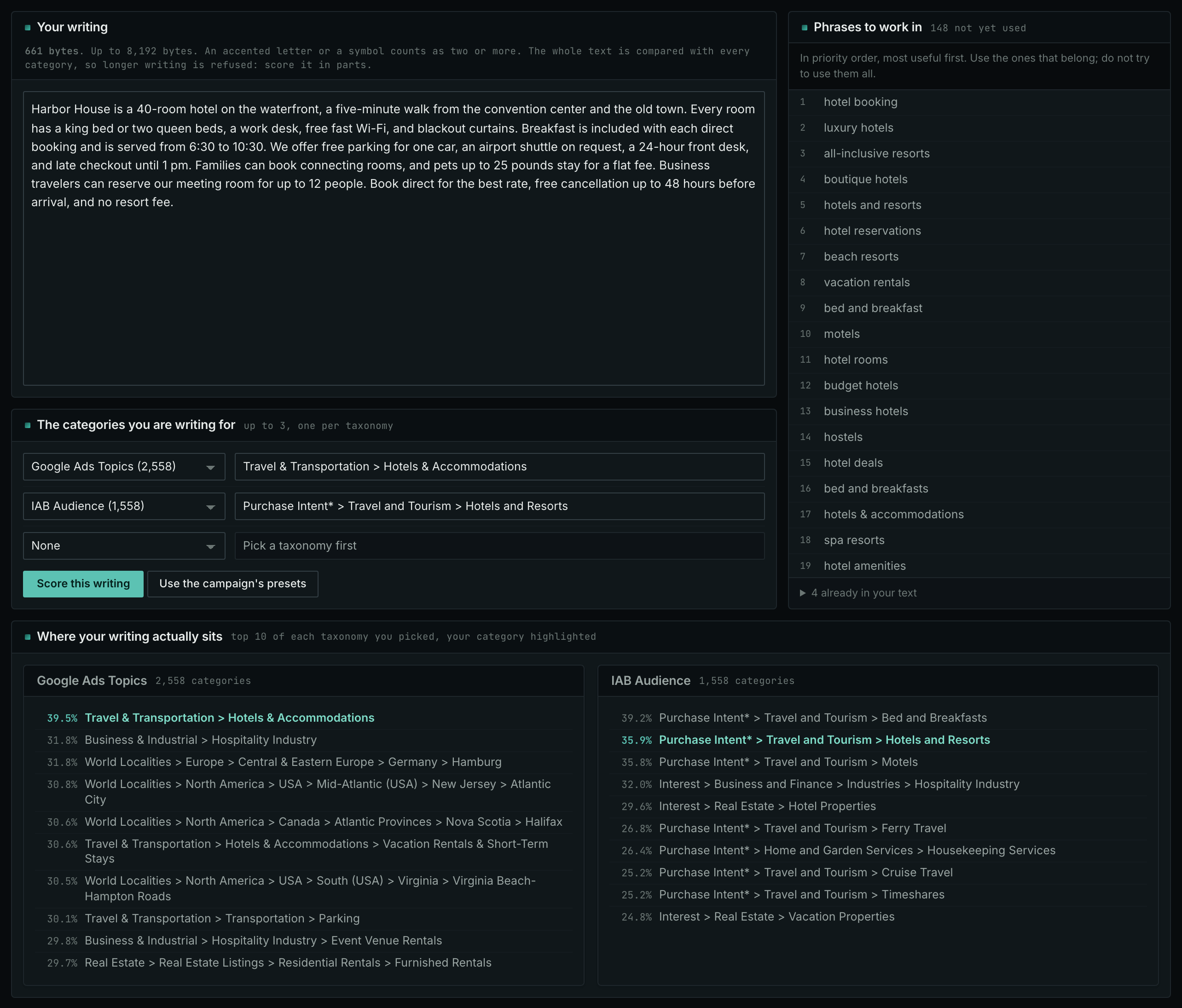
- Paste the text of your page into the Your writing box.
- In The categories you are writing for, choose a topic category in one row and an audience category, for example of IAB Audience, in a second row.
- Click Score this writing, and read Where your writing actually sits.
- On the page, explain where the product fits, which requirements it does not meet, and what evidence supports each claim.
Use your usual SEO checks to find technical problems on the site.
How to judge the results
- Read the answer, not the count. Read the description behind each mention; a count does not reveal outdated information.
- Different findings need different work. When competitors appear without your business, review the recommendations and comparisons to check whether you meet their criteria. When your page is cited without a brand recommendation, examine the information it supplies. A citation can support an answer without recommending a product.
- The conditions of the buyer change the answer. Check the conditions in each question when comparing buying situations. Keep those conditions the same when repeating the question.
- Competitor LLM Recs is not a search ranking. The report shows recommendations based on model training, with web search disabled. It does not identify pages cited by AI tools today.
- Timing is not proof. After a correction, repeat the same questions and save the later answers. A page change followed by a citation establishes the sequence, not that the correction caused the citation. Correcting a source cannot compel a service to recommend your business.
- Measure visits and revenue separately. The history of the answers does not show what caused a purchase.