Documentation / Opportunity Types / How to Find Business Directories to Join
How to Find Business Directories to Join
Find directories that list businesses like yours and pages where you can add or claim a listing.
What this type finds
This type finds directories of companies. The listing itself is the placement. It can find these kinds of pages:
- General business directories. Online lists of companies that you can search by name, category, or place.
- Trade and industry directories. Lists of companies in one trade or industry.
- Local business directories. Lists of businesses in one city or region, including local listing and citation sites.
- Submission pages. Pages with a form to add, list, or submit a business.
- Claim pages. Pages where a business takes control of a listing that already exists.
- Free listing pages. Pages that offer a free listing, often next to a paid listing with more features.
Member directories, vendor directories, and similar lists can also match. Each of them has its own type in the Directories group.
Why it matters
A directory listing gives your business a page with its name, its category, its place, and usually a link. Buyers use directories to find a company. Other sites use the same information.
This type fits a business that serves a place or a trade, and a new business that has no listings yet. Agencies can quickly build a list of places where a client needs to appear. Rows that show competitor links tell you which directories already list your competitors.
Find it in the web app
- Open Opportunity Types in the web app menu.
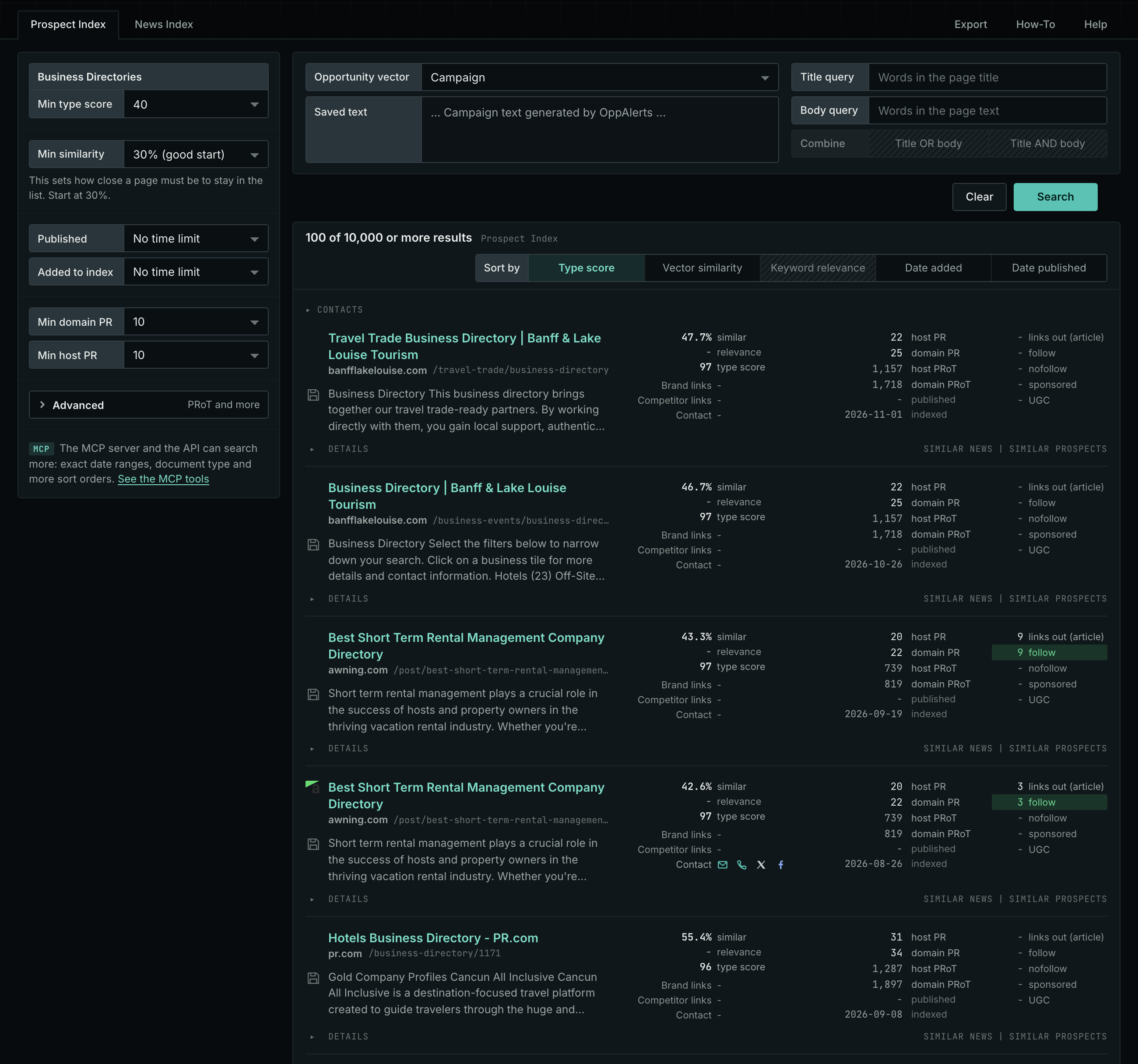
- Choose Directories, then choose Business Directories.
- Read the Prospect Index tab. It contains pages that OppAlerts collected over time. Many of these pages have no published date. Use Added to index and not Published on this tab.
- Read the News Index tab for the pages that were published recently. Set Published to the last few weeks to see the current pages. Few pages of this type are news, so this tab may have few results.
- Check Min type score. It starts at 40. Lower it to see more pages, and raise it to keep only the pages that match this type most closely.
- Click Vector similarity in Sort by to put the pages most relevant to your market first.
Get new pages every day
Save this type as an opportunity, and OppAlerts shows you the new pages each day.
- Open your campaign in Edit Campaign, and open the Opportunities tab.
- Add an opportunity. In Search for, choose Business Directories.
- In Opportunity vector, choose Campaign.
- Give it a Label, and save.
The Daily Email tab sends the new pages by email. Daily Monitoring and Alerts shows all the steps.
In MCP and the API
Two tools search this type. One request body works for both:
{
  "campaign": 3,
  "similarity_target": "campaign",
  "type_scores": [{"opportunity_type": "directories/business-directories", "type_score_min": 50}],
  "sort": "type_score"
}- MCP:
news_searchsearches the News Index.prospects_searchsearches the Prospect Index. - API:
POST https://api.oppalerts.com/v1/news/searchandPOST https://api.oppalerts.com/v1/prospects/search, with the same JSON body.
In type_scores, type_score_min sets the minimum type score, from 1 to 100. Sorting by type_score puts the highest type score first. To keep only the newest pages, add published_from or indexed_from with a date in YYYY-MM-DD format. The MCP pages list every parameter and include the full example response.
To connect your AI agent or to send API requests, read Use OppAlerts in Your AI Agent, Create an API Token, and Your First API Call.
How to judge the results
- Open the live page. Check that the directory is active, with recent listings and working links.
- Check the quality. A directory with a clear subject, an editor, and real businesses is better than a list of thousands of unrelated links.
- Check the price. Find out what is free and what is paid. Read what the paid listing adds.
- Check the link. See whether the listing links to your site, and whether the link is followed. The row shows the page's outbound links.
- Check the competitors. A directory that already lists your competitors is a good sign. A directory that lists no businesses in your market is not.
- Keep your details the same. Use the same business name, address, and phone number in every listing.