Documentation / App / Backlinks DB: Link Gap
Backlinks DB: Link Gap
Apphttps://oppalerts.com/app/opportunities/backlinks_link_gap
What you use it for
Sites that link to your competitors and never to you. The most direct target list in the application.
- Build an outreach list where every row already links out to this market.
- Group it by how many of your competitors each site links to.
- Prove a gap to a client with a list rather than an assertion.
How it works

Put the competitors in the first box and your own sites in the second.
A site that links to any of your sites is removed, even when it also links to every competitor. Every row that is left links out to this market and has never linked to you.
The rows arrive in groups by match count, the same as the Multi-Site page. The first group is the sites that link to every competitor and to none of yours.
Both boxes open filled from the campaign in the breadcrumb: every Competitor host in the first, every Owned Brand host in the second, from your organizations. The search then runs on its own. After you edit a box and press Search, the page sends what is in the boxes; nothing is filled in again.
Nothing is stored. Each search is a live read of the index.
The subtraction
A site that links to any of your sites is removed, even when it also links to every competitor. Every row that is left links out to this market and has never linked to you.
Results arrive in groups by match count, the same as the Multi-Site page. The first group is the sites that link to every competitor and to none of yours.
The boxes fill themselves
Both boxes open filled from the campaign in the breadcrumb: every Competitor host in the first, every Owned Brand host in the second, from your organizations. The search then runs on its own. After you edit a box and press Search, the page sends what is in the boxes; nothing is filled in again.
The one mistake that ruins the answer
Every domain you own has to be in the second box. Old domains, microsites, the marketing site, the app subdomain. A site that linked to a domain you forgot is not a gap, and it will be at the top of your list because it looks like one.
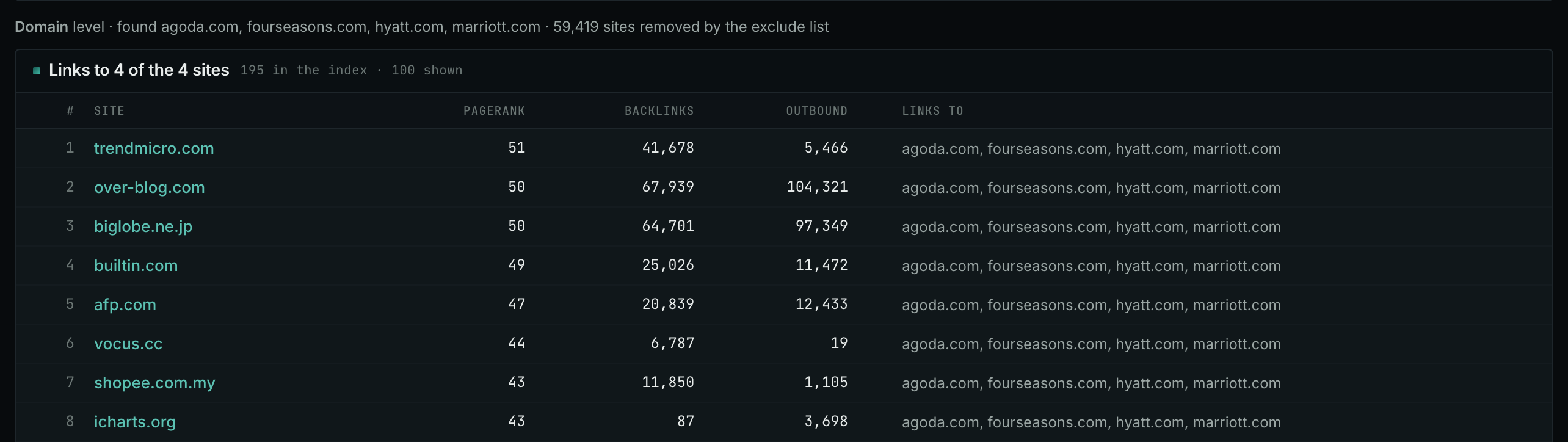
Reading the result
- Every row here already links out to your market and has never linked to you. That is the whole list, and it is why this page exists.
- Each group is named for how many of your competitors its sites link to. The Links to column names them. The first site links to all four. It is writing about the category, not about one company.
- Work the top group first, then down.
- A famous site missing from this list usually means it already links to one of your domains, which is worth knowing on its own.
Check the second box holds every domain you own before believing a row. A site that linked to a domain you forgot is not a gap, and it will be near the top and look like one.
On your own campaign
The order to work in
- Set up the organizations on the Settings tab first. Both boxes are filled from them. A campaign with fewer than two competitors or no owned brand cannot answer, and the page says so.
- Add every domain you own to the second box before you read anything.
- Work the top group down. Sites linking to every competitor are round-ups and are worth the most.
- Look each one up on Site Info: Site for the contact details.
- Check the promising ones on Link Graph: Site before spending time: a falling site is worth less than its number suggests.
What to say when you write
The row itself is the reason for the email: they wrote about this market and listed several companies in it, and you are one they missed. That is a better opening than anything generic, and it is true.
The other link gap page
Brand Link Gap, under Link Prospecting, asks the same question of our own two indexes and returns one row per PAGE with the competitors that page links to beside it. This page asks it of a web graph built from billions of links and returns one row per SITE. Use both: they find different things.
MCP
These MCP tools give the same data. Each page has every parameter and an example.
backlinks_link_gap: The link gap: sites that link to the sites named and do not link to any of your excluded sites.
API
These API routes give the same data.