Documentation / App / Brand Link Gap
Brand Link Gap
Apphttps://oppalerts.com/app/opportunities/brand_link_gap
What you use it for
- Find pages that link to a competitor and not to you. Every one already links out to this market, so every one can be approached.
- See which competitors each page links to, under Competitor links on the row. A page linking to four of them and none of you is the strongest target on the list.
How it works
One row per PAGE, not per site. Both indexes are searched for pages that carry an outbound link to any host of any organization marked Competitor, and the pages that also link to any of your own hosts are removed. A page is also removed when its site links to any of your own sites.
The competitors each page links to are its Competitor links on the row, one host on each line, so you can see at a glance whether it is a page about one rival or a page about the whole market.
Both lists come from the Settings tab of Edit Campaign. With no competitors entered there is nothing to compare against and the page is empty.
The search form is the same as on every index page, with 2 extra boxes at the top of the sidebar: where on the page the link to a competitor is, and which type of link it is.
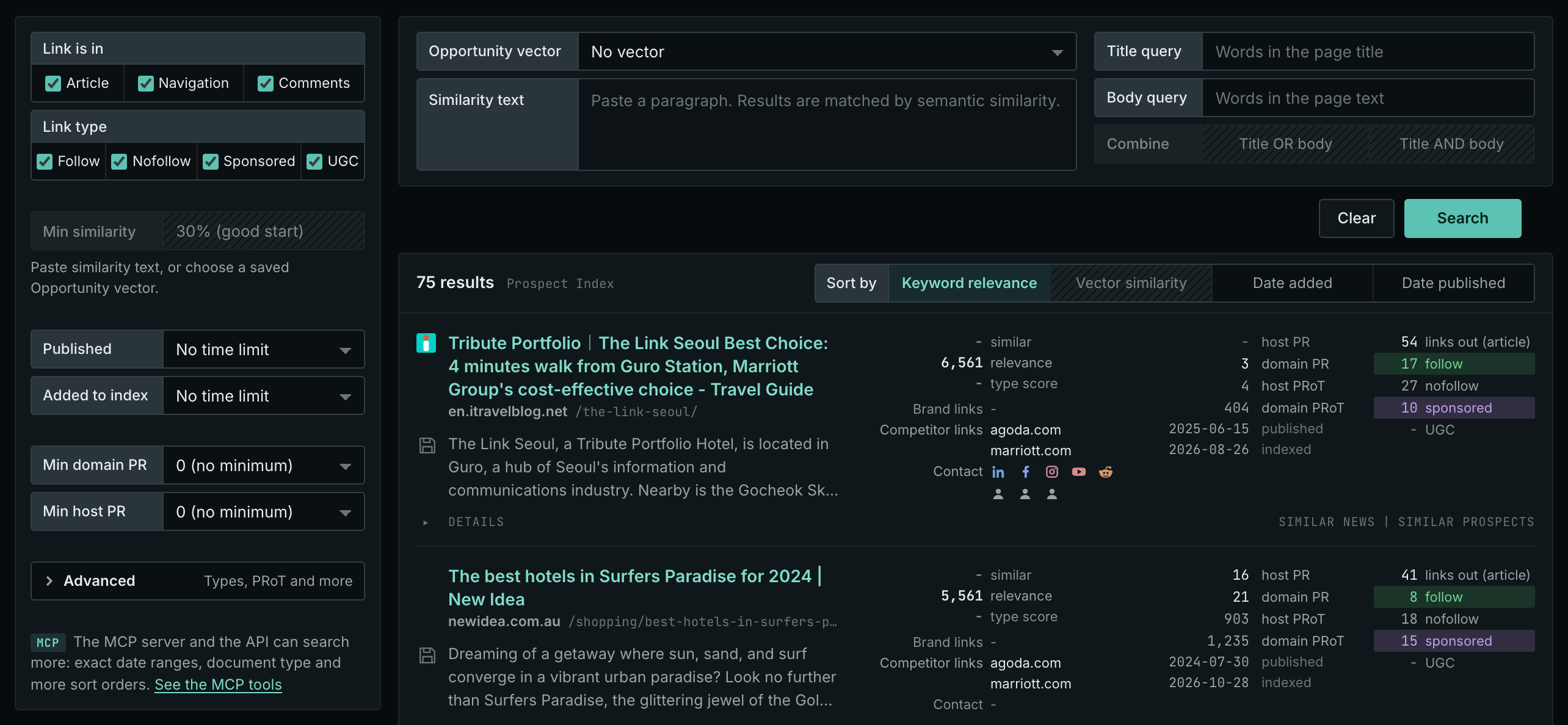
The search form
- Link is in is the part of the page the link to a competitor has to be in: Article, Navigation, Comments. Link type is the rel the link carries. Every box is ticked when the page opens.
- The page opens with no vector. Opportunity vector is No vector and the box is empty, so no row has a similarity and Min similarity is off. Sort by opens on Keyword relevance and stays there when you choose a vector.
- Published and Added to index open on No time limit. Min domain PR and Min host PR open at 0 (no minimum).
- Clear ticks every box again, puts every other box back to how the page opens, and runs the search again.
The words, the count line, and a search that did not run. Title query and Body query take the search operators. A query with a formatting error is not searched: the sentence names the box and the error. A number box takes digits only. The count line says how many rows the page shows, for example "100 results". "100 of 10,000 or more results" means that the search found 10,000 pages or more. When the search was sent and did not end, the count line says "The search did not finish", "The search was stopped", "No searches left today", or "Another search is running", and a sentence under it says what to do. The page opens at its own values: a value that you typed on another search page is not carried over.
Tabs
The page has 2 tabs.
Tab 1: Prospect Index
What it shows
One row per PAGE that links to a competitor and to none of your own hosts, with the competitors that page links to under Competitor links on the row.
Where the data comes from
The Prospect Index. Every page's stored outbound links are read, in the page sections and link types ticked under Link is in and Link type. All of them are ticked at first. A page is kept when it links to any host of any organization marked Competitor. It is removed when its site links to any of your own sites.
Most pages on this tab have no published date, so use Added to index for a time window: the date the page was added to the index.
Both lists come from the Settings tab of Edit Campaign. With no competitors entered there is nothing to compare against and the page is empty. With none of your own hosts entered, nothing is subtracted and every page looks like a gap.
How to use it
- Read Competitor links on each row. A page linking to four of them and none of you is a market round-up, and it is the strongest target on the list.
- Use Link is in to say where on the page the link has to be. A link in the article body is an editorial decision; one in the navigation is a site-wide template.
- Look each site up on Site Info: Site for the contact details.
Tab 2: News Index
What it shows
The same question over news, podcasts, and video.
Where the data comes from
The News Index, which keeps every document. Same two tests: links to a competitor, links to none of yours.
How to use it
- This is the urgent half of the page. A journalist who linked to a competitor last week is writing about this market now.
- Read it weekly and act the same week.
- The Prospect Index tab is the backlog; this tab is the inbox.
On your own campaign
- Enter your competitors and your own hosts on the Settings tab first. Both halves are needed: without your own hosts nothing can be subtracted.
- Look for the pages with the most hosts under Competitor links. The pages that link to several are round-ups and comparisons, and those are the pages to seek inclusion in.
- Raise Min domain PR to drop the sites too weak to be worth the email.
- Open the page and read what it actually says about them before you write. Details lists its contact data.
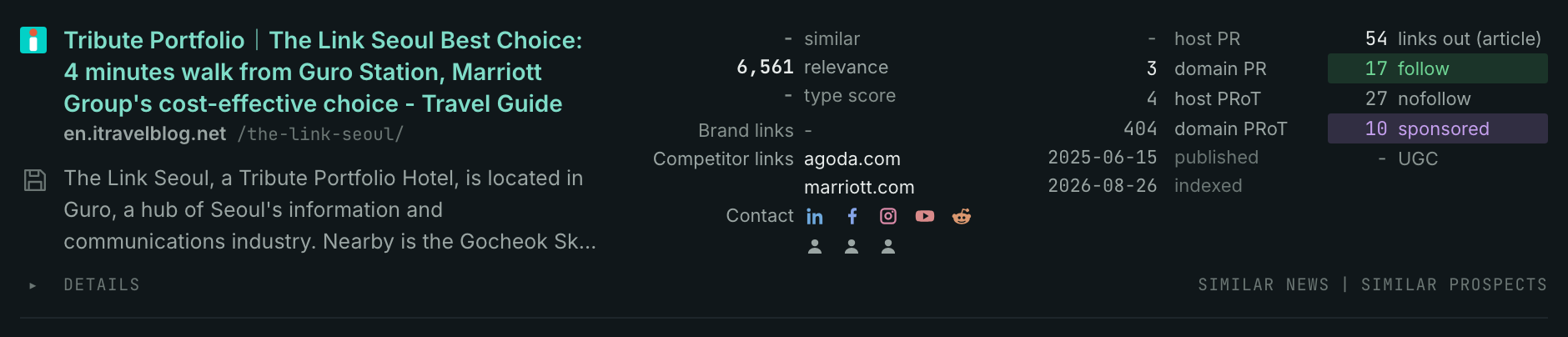
Reading one result row
Every page in the application that shows an index result displays this same row, with the same fields in the same order, so learning it once is enough. A hyphen means the row has no value there, or the value is 0.
- The title is the page itself. It opens in a new tab.
- The host under it is the site. Click it to open the site. The mark beside it says what the site is to your campaign, such as Competitor, when it is one of your organizations. The address after it is the page's path on that site.
- Save is the small button before the text. It puts a label on the result, such as Follow up. The label is not stored yet, so a reload clears it.
- The text is what the index stored, not a search engine's snippet. It is the beginning of the page's own writing, which is why it is worth reading before you approach anybody.
- similar, relevance, type score. similar is the semantic similarity of the page to the search text, 0 to 100 percent. relevance is how well the page matches the typed words; it has no upper end, so compare it only with the other rows of the list. type score is how well the page fits the opportunity type or content type, 0 to 100. Each one needs its part of the search, and without it the row prints a hyphen.
- Brand links and Competitor links say whether this page already links to you or to a competitor, from your Organizations list. Each line is one host it links to. Competitor links and no brand links is the target row.
- Contact is what the site publishes about itself: email addresses, phone numbers, and social accounts. Point at an icon to see them.
- host PR, domain PR, host PRoT, domain PRoT. They come from a link graph built from billions of links. PR is the PageRank of the newest month it holds, 0 to 100. PRoT is PageRank over Time: the PageRank of every month the graph holds, added up. So a site that has been strong for years is high on both, and a site that is strong only now is high on PR and low on PRoT. Host and domain differ, often by a lot: a strong domain can carry a weak subdomain, and these are the numbers the PageRank minimums filter on.
- published, then indexed. published is the date on the page, when it has one. Prospect pages usually do not, and the row prints a hyphen. indexed is the date the page came into the index. Both are dates in UTC.
- links out (article) is how many outbound links the page's own article carries, then follow, nofollow, sponsored, and UGC split them by type. A link with 2 types counts in both. A page with many followed outbound links links freely; a page with none does not link out at all, and asking it for a link is usually wasted effort.
- Details opens the hosts the page links to, in the article, the navigation, and the comments, and the site's contact routes: email addresses, phone numbers, social accounts, contact pages, and RSS feeds. It is always there, whatever the row holds.
- Similar news and Similar prospects find the pages nearest in semantic similarity to this one, in the News Index or the Prospect Index.
MCP
These MCP tools give the same data. Each page has every parameter and an example.
news_brand_link_gap: The link gap on the News Index: pages that link to this campaign's competitors and whose site links to none of your own sites.prospects_brand_link_gap: The link gap on the Prospect Index: pages that link to this campaign's competitors and whose site links to none of your own sites.
API
These API routes give the same data.