Documentation / Opportunity Types / How to Find Blogrolls and Recommended Blog Lists
How to Find Blogrolls and Recommended Blog Lists
Find lists of recommended blogs and sites maintained by other sites, including lists that accept new additions.
What this type finds
The Blogrolls type finds pages listing sites that the owner recommends. It includes several kinds of pages:
- Blogrolls: lists of blogs that a site owner reads and recommends, in a sidebar, in a footer, or on a page.
- Favorite blog pages: pages that name the blogs that the owner loves, reads, or follows.
- Recommended sites and useful links pages: lists of sites that the owner suggests to readers.
- Related site and partner blog lists: lists of sites that are close to the site, or that work with it.
- Blogroll submission pages: pages that tell you how to ask for an addition.
- Link exchange and link list pages: pages that work like a blogroll.
A page's type score indicates how closely it matches this type. The score does not depend on the subject. OppAlerts then keeps the pages most semantically similar to your campaign. See Opportunity Types and Content Types.
Why it matters
A blogroll is a list of links from one site to other sites in the same field. If your site is added, you get a link from a site covering your topic, and readers of the list can find you.
One blogroll link is a small gain. Its value comes from the relevance of the topic and the people who read the list.
This type fits a blog, a niche site, and a publisher that wants links from its own community.
Find it in the web app
- Open Opportunity Types in the web app menu.
- Choose Links, then choose Blogrolls.
- Read the Prospect Index tab first. It shows pages of all dates. Min type score starts at 40. To see only pages recently added to the index, set Added to index.
- Read the News Index tab for the pages published in the last few weeks. Set Published to the period you want.
- Click Vector similarity in Sort by to put the pages most relevant to your market first.
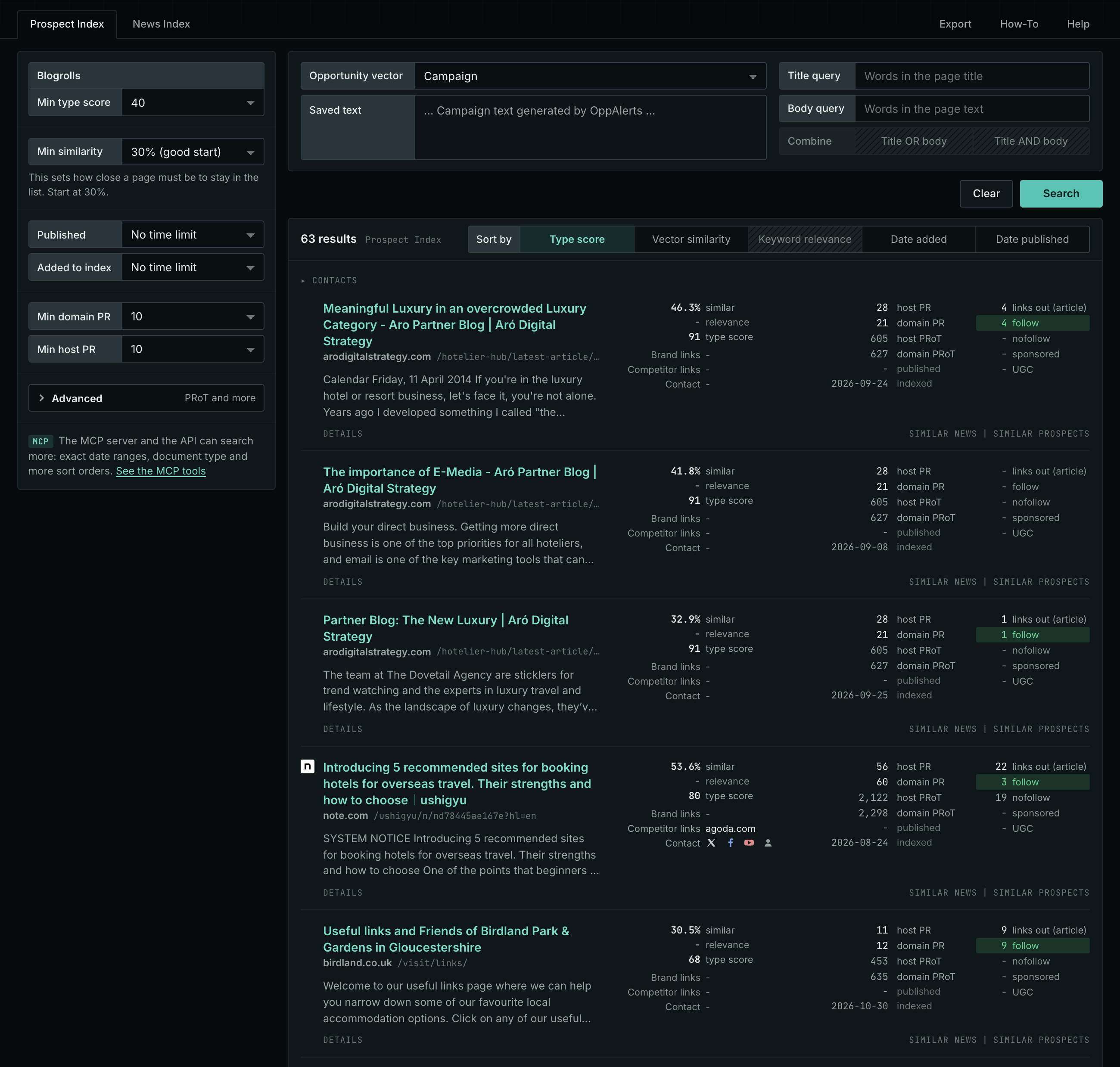
The web app documentation lists all search fields and explains how to read a result row: Blogrolls.
Get new pages every day
- In Edit Campaign, open the Opportunities tab.
- Add an opportunity. In Search for, choose Blogrolls in the Links group.
- In Opportunity vector, choose Campaign.
- Open the Daily Email tab, select the checkbox, choose the hour, and click Save.
Each day, the Dashboard tab and the daily opportunities email show the new pages. See Daily Monitoring and Alerts.
In MCP and the API
Two tools search this type. One request body works for both:
{
  "campaign": 3,
  "similarity_target": "campaign",
  "type_scores": [{"opportunity_type": "links/blogrolls", "type_score_min": 50}],
  "sort": "type_score"
}- MCP:
news_searchsearches the News Index.prospects_searchsearches the Prospect Index. - API:
POST https://api.oppalerts.com/v1/news/searchandPOST https://api.oppalerts.com/v1/prospects/search, with the same JSON body.
In type_scores, type_score_min sets the minimum type score, from 1 to 100. Sorting by type_score puts the highest type score first. To keep only the newest pages, add published_from or indexed_from with a date in YYYY-MM-DD format. The MCP pages list every parameter and include the full example response.
To connect your AI agent or to send API requests, read Use OppAlerts in Your AI Agent, Create an API Token, and Your First API Call.
How to judge the results
- Check the topic. The site must be in your field. A list of unrelated sites helps no one.
- Check that the site is alive. Look at the date of the last post and at broken links in the list.
- Count the links. A page with hundreds of links to unrelated sites is not a list that people read.
- Read the terms. Find out whether the owner accepts additions, whether a link back is required, and who to contact.
- Check the link type. See if the link is followed or nofollow. The result row shows the link counts.