Documentation / Opportunity Types / How to Find User-Generated Content Campaigns
How to Find User-Generated Content Campaigns
Find the campaigns and platforms that ask people to send photos, videos, stories, and tips, and join the ones that fit your business.
What this type finds
This type finds pages that invite the public to send content. These pages include:
- Photo and video campaigns. Pages that ask people to send their photos or videos, and photo or video contests.
- Story pages. Pages that ask customers or community members to share a story, and community story pages that show the submissions.
- Hashtag and social campaigns. Pages that ask you to tag the brand, use a hashtag, or join the conversation, so that your post can be featured.
- Reader and tip submissions. Pages where a publication takes reader submissions or tips.
- Review and demonstration invites. Pages that ask for a review, or ask you to show how you use a product.
- Community showcases. Pages that show fan content or customer content, and often explain how to be included.
The pages come from brands, platforms, communities, and publishers. Read each page to see who asks for the content, and what it offers in return.
Why it matters
A user-generated content campaign shows your work to an audience you do not yet reach. A featured photo, story, or video can bring your name and a link to a community or a brand page.
This type fits a business that has something to show: a customer, a product in use, a project, or an event. It also finds the brands in your market that run these campaigns. That is a way to see how your competitors and partners talk to their audience.
Find it in the web app
- Open Opportunity Types in the web app menu.
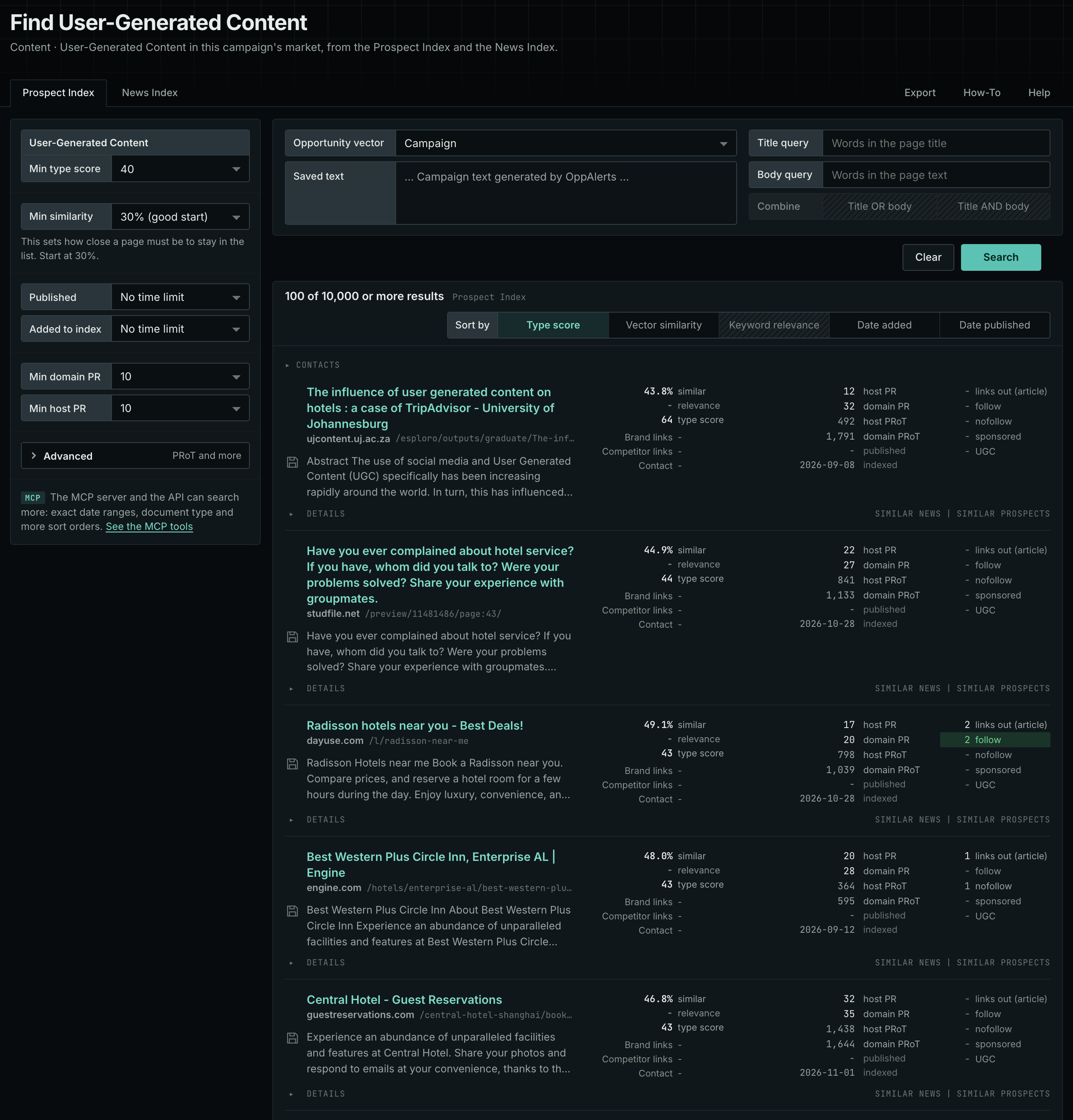
- Choose Content, then choose User-Generated Content.
- Read the Prospect Index tab. It holds the pages that OppAlerts collected over time. Many of these pages have no published date. Use Added to index and not Published on this tab.
- Read the News Index tab for the pages that were published recently. Set Published to the last few weeks to see campaigns that are open now. A contest page can have a deadline, so read the date.
- Check Min type score. It defaults to 40. Lower it to see more pages, and raise it to keep only the pages that match this type most closely.
- Click Vector similarity in Sort by to put the pages most similar to your market first.
Get new pages every day
Save this type as an opportunity, and OppAlerts shows you the new pages each day.
- Open your campaign in Edit Campaign, and open the Opportunities tab.
- Add an opportunity. In Search for, choose User-Generated Content.
- In Opportunity vector, choose Campaign.
- Give it a Label, and save.
The Daily Email tab sends the new pages by email. Daily Monitoring and Alerts shows all the steps.
In MCP and the API
Two tools search this type. One request body works for both:
{
  "campaign": 3,
  "similarity_target": "campaign",
  "type_scores": [{"opportunity_type": "content/user-generated-content", "type_score_min": 50}],
  "sort": "type_score"
}- MCP:
news_searchsearches the News Index.prospects_searchsearches the Prospect Index. - API:
POST https://api.oppalerts.com/v1/news/searchandPOST https://api.oppalerts.com/v1/prospects/search, with the same JSON body.
In type_scores, type_score_min sets the minimum type score, from 1 to 100. Sorting by type_score puts the highest type score first. To keep only the newest pages, add published_from or indexed_from with a date in YYYY-MM-DD format. The MCP pages list every parameter and a full example response.
To connect your AI agent or send API requests, read Use OppAlerts in Your AI Agent, Create an API Token, and Your First API Call.
How to judge the results
- Check the dates. Look for a deadline or a campaign end date. A closed campaign shows what the brand does, but you cannot join it.
- Open the live page. Check that the submission form or the hashtag still works.
- Read the rules. Find out who owns the content after you send it, how long the brand may use it, and whether it must name you.
- Check the audience. The brand or platform must reach your audience too.
- Check the reward. Look for a feature, a link, a prize, or only a thank you. Decide if the work is worth it.
- Check the fit. Send only content that you are happy to have associated with the brand, and that follows its guidelines.