Documentation / Content Types / How to Find Analysis and Opinion Pieces in Your Market
How to Find Analysis and Opinion Pieces in Your Market
Find arguments and expert analysis about a market and the writers and outlets that publish them.
What this type finds
This type finds pages where a writer gives a point of view or explains what facts mean. It groups these kinds of pages together:
- Op-eds and opinion pieces. A named writer argues a position.
- Editorials. The view of the editors of a publication, and the pages of the editorial board.
- Columns. Regular commentary by one writer.
- Market and industry analysis. Pages that study a sector, a trend, or a company, in financial, economic, technical, or business terms.
- Deep dives and explainers. Long pages that say what an event means for a reader.
- Thought leadership. Pages in which a company or an executive gives a point of view, such as "the case for" or "the case against" a choice.
Some pages say "our take" or "our view". They are the opinion of a company about its own market, not of an independent editor.
Why it matters
This type is for research. In an unfamiliar market, it shows you which questions the market argues about, which positions exist, and which outlets publish commentary on the subject.
It also finds experts. A person who writes opinion pieces and analysis about a market is an expert that the market already listens to. The outlet that prints them is a publisher worth knowing. Note who they quote and who they argue with.
Find it in the web app
- Open Content in the web app menu.
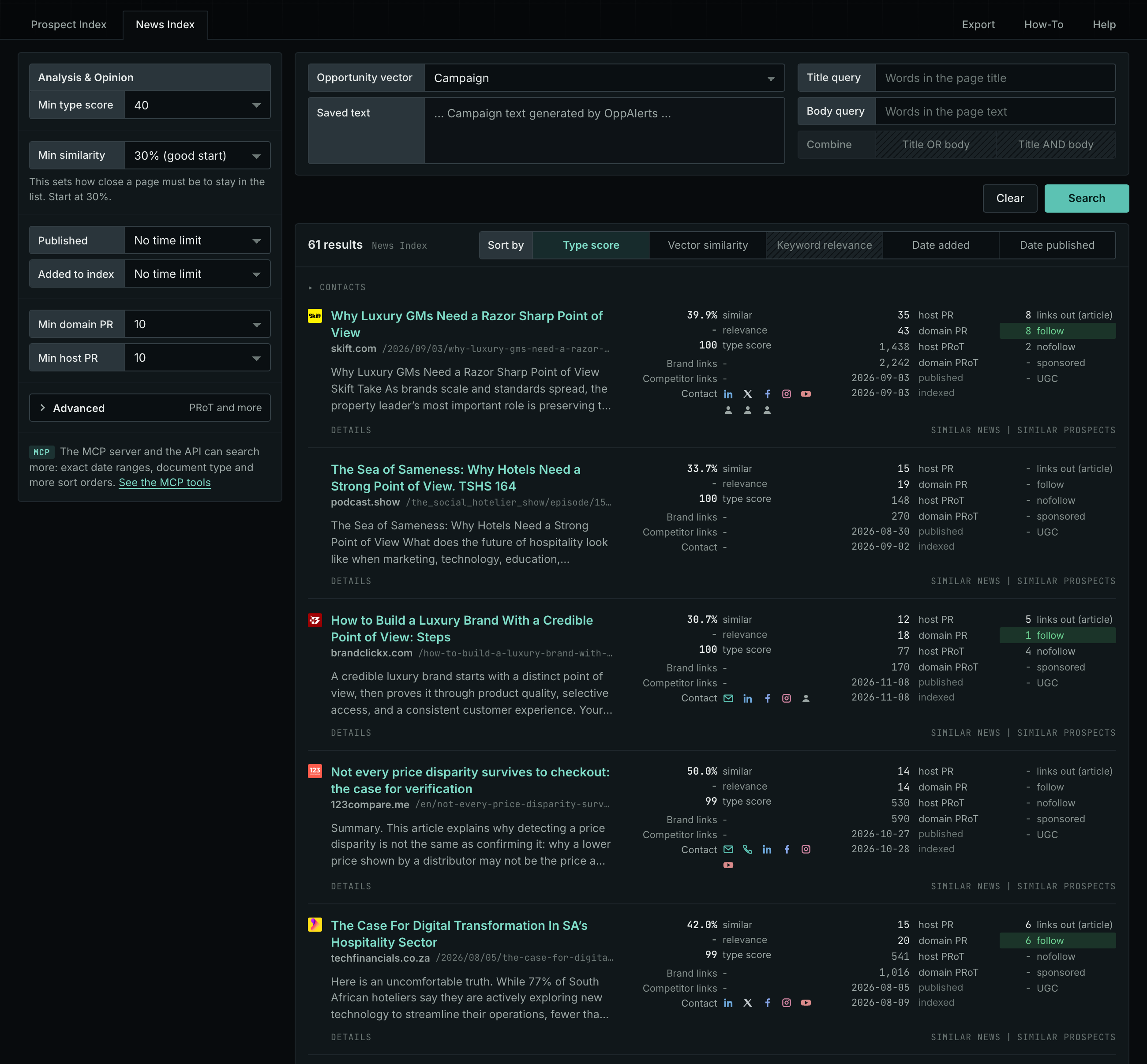
- Under Content Types, choose Analysis & Opinion.
- Start with the Prospect Index tab. It shows pages of this type from the OppAlerts index, with the closest semantic matches to your campaign first. To filter by date, use Added to index. Most pages on this tab have no published date, so using Published filters them out.
- Open the News Index tab. It shows what news sources, podcasts, and videos publish now.
- Read the first ten results of each tab. Note the writers and the outlets that appear more than once.
Min type score starts at 40, and Min similarity starts at 30%. Raise Min domain PR if the list includes sites that nobody in your market knows.
See the new pages
The Search for menu on the Opportunities tab of Edit Campaign lists the brand searches and the opportunity types. To see new pages of this content type, open Content Types again and set Added to index to Last day. The tab then shows only pages added to the index in the last day.
For details about the daily opportunities email and the saved opportunities it uses, read Daily Monitoring and Alerts.
In MCP and the API
Two tools search this type. One request body works for both:
{
  "campaign": 3,
  "similarity_target": "campaign",
  "type_scores": [{"content_type": "analysis-and-opinion", "type_score_min": 50}],
  "sort": "type_score"
}- MCP:
news_searchsearches the News Index.prospects_searchsearches the Prospect Index. - API:
POST https://api.oppalerts.com/v1/news/searchandPOST https://api.oppalerts.com/v1/prospects/search, with the same JSON body.
In type_scores, type_score_min sets the minimum type score, from 1 to 100. Sorting by type_score puts the highest type score first. To keep only the newest pages, add published_from or indexed_from, with a date in YYYY-MM-DD format. The MCP pages list every parameter and include the full example response.
To connect your AI agent or to send API requests, read Use OppAlerts in Your AI Agent, Create an API Token, and Your First API Call.
How to judge the results
- Separate fact from opinion. Read who wrote the page and for whom. An editorial and a paid company page can look alike.
- Check the date. An analysis from last year can be wrong now. The News Index tab shows what is current.
- Check the writer. Look for the name, the role, and other work by the same person.
- Read the evidence. Look for data, sources, and links in the page. A page with none gives only an opinion.
- Check the rules of the outlet. If you want to write for it, find its page on how to submit an opinion piece.
- Check the audience. Check who the outlet serves. A strong site with the wrong readers does not help you.