Documentation / App / Backlinks DB: Site
Backlinks DB: Site
Apphttps://oppalerts.com/app/siteinfo/backlinks_site
What you use it for
Who links to a site. Yours, a competitor's, or a prospect's.
- Find the sites worth asking for a link, by dropping the giants and the sites made only to link out.
- Check a competitor's link profile without an outside tool.
- Check your own, and find out who has linked to you that you never knew about.
- Qualify a prospect before you write to them: a site nobody links to will not pass anything on.
How it works

The backlink index uses a web graph built by analyzing billions of links to answer "who links to this site".
- Level is what one row counts as. Domain merges every host of a domain into one row; host keeps them apart.
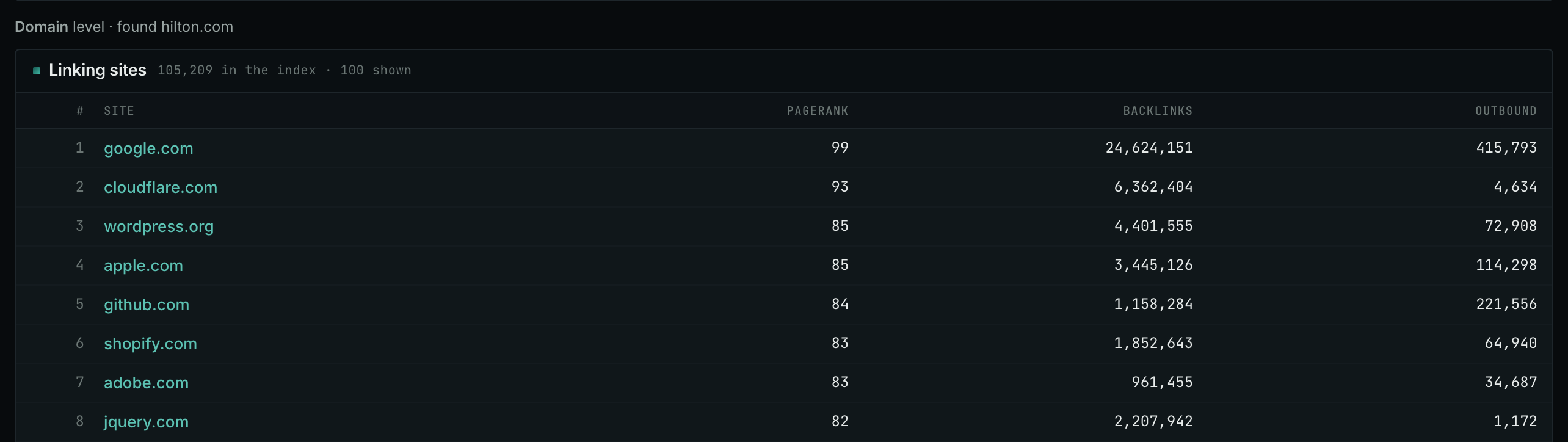
- PageRank is 0 to 100 in the web graph.
- Backlinks is how many links point in to that row.
- Outbound is how many links point out of that row.
The maximum filters are there to drop the giants. A site with two million backlinks links to everybody, and a site that links out to millions is a directory or a site made only to link out. Neither will answer an email.
Nothing here is per campaign and nothing is stored. Each search is a live read.
Reading the columns
- PageRank, 0 to 100. It comes from the sites that link to it. It is a log-like scale: 60 is not twice 30.
- Backlinks, how many links point IN to that row.
- Outbound, how many links point OUT of that row. A high number here is the strongest warning sign on the page.
Level: domain or host
Domain merges every host of a domain into one row. Host keeps them apart. Use domain for a picture of who links to a company, and host when a big site's subdomains behave differently, which they usually do.
What it is not
It is not live and it is not complete. It is a web graph built from billions of links. A link made last week is not here, and a site the collection never reached is not either. It is very wide and it is not exhaustive.
Reading the result
- Rows 1 and 2 are noise. Google and GoDaddy link to everything. That is what the maximum PageRank and maximum backlinks filters are for.
- Row 5 is a site made only to link out. 88,410 outbound links against 240 inbound. Outbound is the column that spots these, and a maximum on it removes them faster than any other filter.
- Rows 3 and 4 are the answer. Real sites, a real PageRank, a sane amount of outbound linking, in the market.
- Backlinks and PageRank often differ. A site with few backlinks from strong sites outranks one with many from weak ones, which is the whole point of PageRank.
The useful list is usually rows 3 to 50, not rows 1 to 10. Filter the top off before you read.
On your own campaign
The order to work in
- Start at domain level for the picture. Drop to host level when a big site is involved.
- Set a MAXIMUM on outbound first. It removes the directories and the sites made only to link out faster than any other filter, and those are most of the noise.
- Then set a minimum PageRank for the PageRank you actually need.
- Then a maximum PageRank if you are looking for sites that will answer an email. A site at 90 will not.
- Run a competitor, then run yourself, and compare the two lists side by side.
- Look up the interesting ones on Site Info: Site for contact details.
Three ways to use it
- Audit. Run your own site and read what is linking to you. Unpleasant surprises are common.
- Prospecting. Run a competitor and work down their list. Every row is a site that links to somebody like you.
- Qualification. Run a site somebody has offered you a link from, and check it is not a site made only to link out.
Backlinks DB: Link Gap does the prospecting version of this automatically, and removes anybody who already links to you.
MCP
These MCP tools give the same data. Each page has every parameter and an example.
backlinks: The sites that link to one or more of the sites named, from the stored link graph, with the PageRank, the backlink count, and the outbound link count of each linking site.
API
These API routes give the same data.