Documentation / Opportunity Types / How to Find Trade Magazines and Industry Publications
How to Find Trade Magazines and Industry Publications
Find print and digital magazines covering your market, and learn how to get a placement.
What this type finds
The Trade Magazines type includes these kinds of pages:
- Trade and industry magazines. The publications that people in your market read for their work.
- Consumer and business magazines. Magazines for customers in your market or for a related interest.
- Advertising pages. Media kits, rate cards, editorial calendars, and special issue plans. These show what a placement costs and when each issue closes.
- Calls for articles and author guidelines. Pages where a magazine or journal explains how to submit a piece. Some journals are peer reviewed, and the type finds those pages too.
- Digital editions, archives, and magazine directories. Pages that list the current issue, past issues, or many magazines in one place.
Why it matters
A trade magazine speaks to a focused audience that already cares about your market. A placement can give you readers, a byline or a mention, and often a link on the magazine site. It fits a company that sells to a professional audience, and an expert who wants to be known by it.
- Editorial placements and special issues can build your name with the people who buy from you.
- Advertising and sponsorship pages give you a paid route when an editorial route is closed.
- The list of magazines also tells you which publications your competitors might use.
Find it in the web app
- Open Opportunity Types in the web app menu.
- Choose Media.
- Choose Trade Magazines. The search runs immediately, with your campaign as the Opportunity vector.
- Read the Prospect Index tab first. It contains pages that OppAlerts collected itself. Most have no published date. Min type score starts at 40. Raise it to see fewer pages that match this type more closely. Lower it to see more.
- Read the News Index tab for news, podcasts, and video published in the last few weeks. This tab has few results for most types, and an empty tab is normal.
- Click Vector similarity in Sort by to show the pages most relevant to your market first.
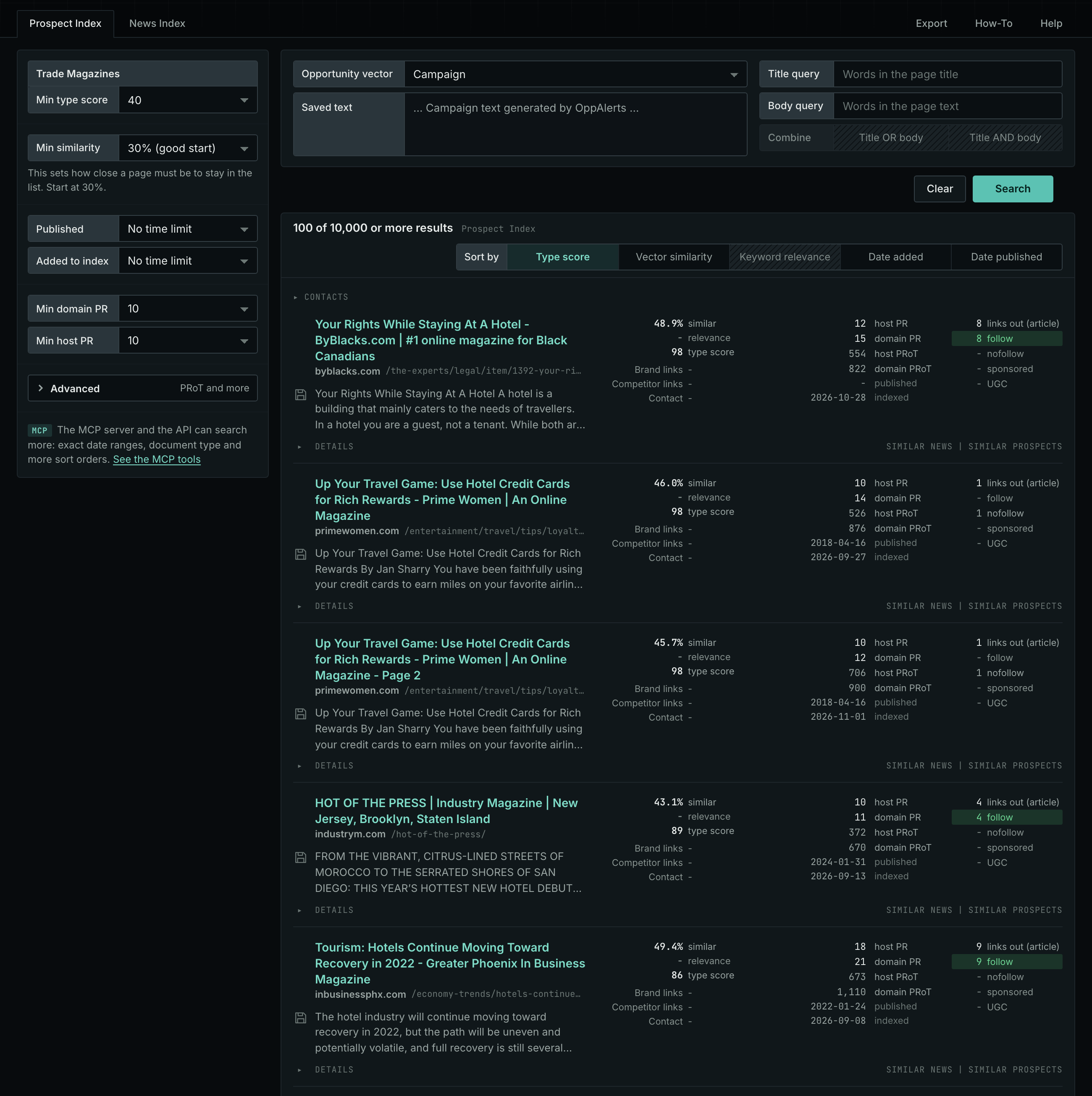
The Trade Magazines page in the app docs shows this type in the app.
Get new pages every day
- Open your campaign in Edit Campaign, and open the Opportunities tab.
- Add an opportunity. In Search for, choose Trade Magazines under Media.
- In Opportunity vector, choose Campaign.
- Open the Daily Email tab, select the checkbox, choose the hour, and click Save.
Each day, the Dashboard tab and the daily opportunities email show the pages added to the indexes in the last 24 hours. Read Daily Monitoring and Alerts for the full steps.
In MCP and the API
Two tools search this type. One request body works for both:
{
  "campaign": 3,
  "similarity_target": "campaign",
  "type_scores": [{"opportunity_type": "media/magazines", "type_score_min": 50}],
  "sort": "type_score"
}- MCP:
news_searchsearches the News Index.prospects_searchsearches the Prospect Index. - API:
POST https://api.oppalerts.com/v1/news/searchandPOST https://api.oppalerts.com/v1/prospects/search, with the same JSON body.
In type_scores, type_score_min sets the minimum type score, from 1 to 100. Sorting by type_score puts the highest type score first. To keep only the newest pages, add published_from or indexed_from with a date in YYYY-MM-DD format. The MCP pages list every parameter and include the full example response.
To connect your AI agent or to send API requests, read Use OppAlerts in Your AI Agent, Create an API Token, and Your First API Call.
How to judge the results
A high type score indicates that a page matches this type. It does not tell you whether the page is a good fit for you. Check these points before you act:
- Check the date of the latest issue. A magazine with no new issue for a long time may have closed.
- Read the editorial calendar. A theme that matches your subject gives you a reason to write to the editor. The deadline tells you when.
- Read the media kit. Find the circulation, the audience, and the rates. Compare the cost with the reach.
- Find out if the magazine takes outside articles. Look for author guidelines. Some magazines write everything themselves.
- Separate magazines from journals. A peer reviewed journal has academic rules, so contributing to one is a different task from contributing to a trade magazine.
- Check the website. A print placement can give you no link. Look at the standing of the site and at what the page links to.