Documentation / Opportunity Types / How to Find Op-Ed Opportunities
How to Find Op-Ed Opportunities
Find the publications that print opinion pieces from outside experts, and read their submission rules.
What this type finds
An op-ed is an opinion piece written by someone outside the newsroom. This type finds the pages where publications explain how to send one.
- Op-ed submission pages. The opinion section tells you the length, the format, and the address for a submission.
- Guest commentary and guest column pages. Publications invite outside experts to write commentary or a regular column.
- Letters to the editor pages. Pages that say how a reader can send a letter, and what the editor needs.
- Contributor programs and expert networks. A publication builds a group of outside writers. Some of these programs have rules for who may join.
- Editorial submission and guidelines pages. General pages that explain what the editors accept and how they decide.
Why it matters
An op-ed puts your view in front of a publication's readers under your own name. It can influence debate in your industry, build an expert's reputation, and bring a link in the author's biography.
This type fits experts, founders, and executives who have a clear view on a subject in their market, and PR teams that place those views. It does not fit a sales message: editors reject advertisements.
Find it in the web app
- Open Opportunity Types in the web app menu.
- Choose Media.
- Choose Op-Eds.
- Read the Prospect Index tab first. It contains pages that OppAlerts fetched and offers the broader set of results. Min type score defaults to 40. Raise it to see only the pages that fit the type best.
- Read the News Index tab for news, podcasts, and video. It has fewer results and shows what is current. Few results for a type here are normal.
- Raise Min domain PR to drop the sites with little standing. Click Vector similarity in the Sort by buttons to see the pages most similar to your market first.
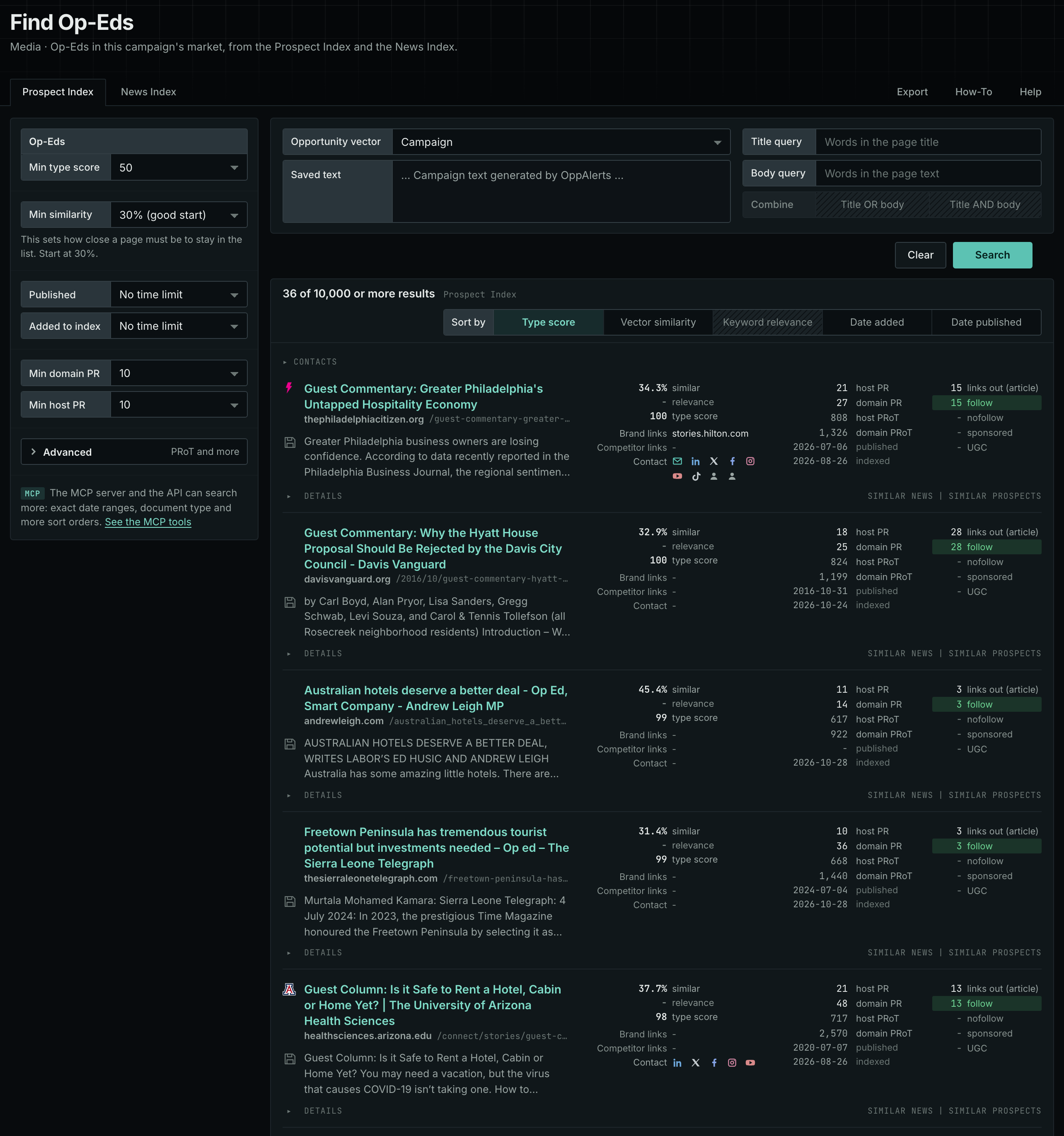
Each page's type score is based on the words in its address, title, and opening text. The score does not describe the page's subject. Your campaign supplies the subject. See Opportunity Types and Content Types.
Get new pages every day
- Open your campaign in Edit Campaign, and open the Opportunities tab.
- Add an opportunity. In Search for, choose Op-Eds, under Media.
- In Opportunity vector, choose Campaign.
- Give it a Label, and click Add opportunity.
Each day, the Dashboard and the daily opportunities email show the new pages of this type. Read Daily Monitoring and Alerts to set up the daily opportunities email.
In MCP and the API
Two tools search this type. One request body works for both:
{
  "campaign": 3,
  "similarity_target": "campaign",
  "type_scores": [{"opportunity_type": "media/op-eds", "type_score_min": 50}],
  "sort": "type_score"
}- MCP:
news_searchsearches the News Index.prospects_searchsearches the Prospect Index. - API:
POST https://api.oppalerts.com/v1/news/searchandPOST https://api.oppalerts.com/v1/prospects/search, with the same JSON body.
In type_scores, type_score_min sets the minimum type score, from 1 to 100. Sorting by type_score puts the highest type score first. To keep only the newest pages, add published_from or indexed_from with a date in YYYY-MM-DD format. The MCP pages list every parameter and a full example response.
To connect your AI agent or send API requests, read Use OppAlerts in Your AI Agent, Create an API Token, and Your First API Call.
How to judge the results
- Read the guidelines. Check the length, the format, the deadline, and what the publication refuses.
- Check that the page is live. Some pages stay online after the publication has stopped taking submissions.
- Read recent op-eds. Does the publication print pieces like yours, by writers like you? Use the News Index tab to see recent pieces.
- Check the audience. The readers must be the people that you want to influence.
- Check the cost. A real op-ed section does not charge. A program that charges for a column is a paid placement. Know which one you want.
- Check who may write. Some publications accept only experts with a title or a track record. Others accept submissions from any reader.
- Check the exclusivity rule. Many editors want a piece that no other outlet has. Do not send the same piece to several outlets at once unless the page allows it.