Documentation / Opportunity Types / How to Find Wiki Contribution Opportunities
How to Find Wiki Contribution Opportunities
Find the wikis and knowledge bases where outside contributors can add a reference, and read their rules first.
What this type finds
A wiki is a site that many people edit. This type finds wikis and knowledge bases that accept new references, and the pages that explain how to take part.
- Community wikis. Open sites that any registered person can edit, on one subject or on many.
- Community-edited encyclopedia articles. Articles that ask for better sources, and the help pages that explain how to cite them.
- Product and company knowledge bases. Documentation sites that let users suggest a change or add a link.
- Pages that accept edits. Pages with a feature that lets outside people propose a change to the text.
- Contribution guidelines. Pages that explain how to take part, which sources are allowed, and how to get an account.
- Community portals. Hub pages with the recent changes, the open tasks, and the people who run the wiki.
Why it matters
A reference in a wiki article gives readers a source, and it can give your page a link from a site that many people read. This type fits a business that holds real facts: a study, a dataset, an official page, or a standard.
It is the hardest type in the Links group. Wiki communities remove edits that look like advertising. Many ask you to disclose a connection to the subject. Use this type to add real value to an article, not to place a link.
Find it in the web app
- Open Opportunity Types in the web app menu.
- Choose Links.
- Choose Wiki Contributions.
- Read the Prospect Index tab first. It contains pages that OppAlerts fetched and offers the broader set of results. Min type score defaults to 40. Raise it to see only the pages that fit the type best.
- Read the News Index tab for news, podcasts, and video. It has fewer results and shows what is current. Few results for a type here are normal.
- Raise Min domain PR to drop the sites with little standing. Click Vector similarity in the Sort by buttons to see the pages most similar to your market first.
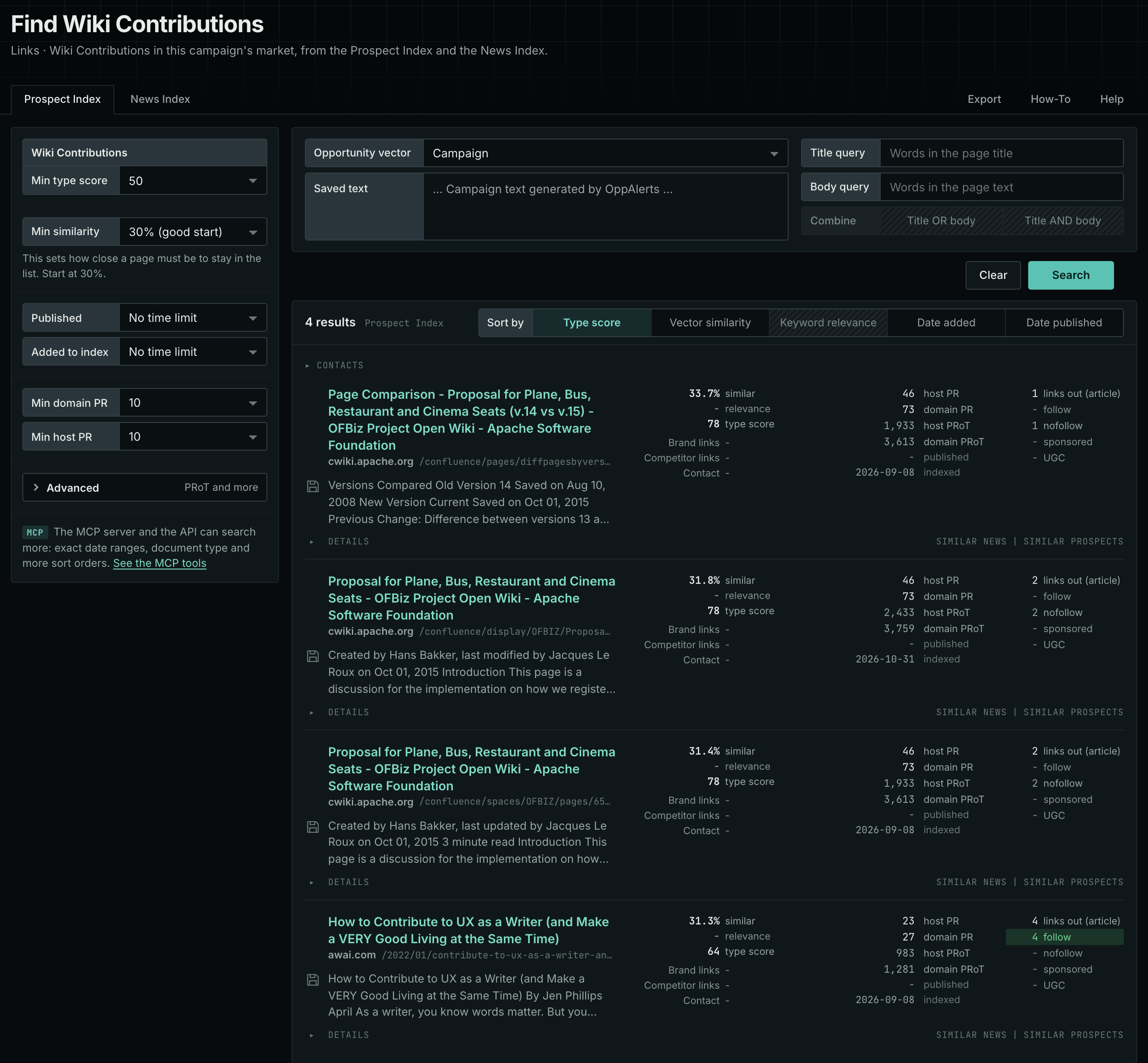
Each page's type score is based on the words in its address, title, and opening text. The score does not describe the page's subject. Your campaign supplies the subject. See Opportunity Types and Content Types.
Get new pages every day
- Open your campaign in Edit Campaign, and open the Opportunities tab.
- Add an opportunity. In Search for, choose Wiki Contributions, under Links.
- In Opportunity vector, choose Campaign.
- Give it a Label, and click Add opportunity.
Each day, the Dashboard and the daily opportunities email show the new pages of this type. Read Daily Monitoring and Alerts to set up the daily opportunities email.
In MCP and the API
Two tools search this type. One request body works for both:
{
  "campaign": 3,
  "similarity_target": "campaign",
  "type_scores": [{"opportunity_type": "links/wiki-contributions", "type_score_min": 50}],
  "sort": "type_score"
}- MCP:
news_searchsearches the News Index.prospects_searchsearches the Prospect Index. - API:
POST https://api.oppalerts.com/v1/news/searchandPOST https://api.oppalerts.com/v1/prospects/search, with the same JSON body.
In type_scores, type_score_min sets the minimum type score, from 1 to 100. Sorting by type_score puts the highest type score first. To keep only the newest pages, add published_from or indexed_from with a date in YYYY-MM-DD format. The MCP pages list every parameter and a full example response.
To connect your AI agent or send API requests, read Use OppAlerts in Your AI Agent, Create an API Token, and Your First API Call.
How to judge the results
- Read the rules of the wiki. Find the rules for sources, for edits by a person with a connection to the subject, and for paid edits. Follow them exactly.
- Check that you can edit. Some wikis require an account, a waiting period, or an invitation. Some pages are locked.
- Check that your source helps the article. Ask whether a neutral reader would learn something from it. If it only repeats a sales claim, do not add it.
- Check the link type. In the result row, read the numbers of followed and not-followed links. Many wikis mark outside links as not followed. A not-followed link still gives readers a path to you.
- Check the date of the page. An active page has recent changes. A page that nobody edits may be unmonitored or abandoned.
- Expect a revert. Other editors can remove your edit. Keep a record of what you changed.