Documentation / App / Site Info: Site
Site Info: Site
Apphttps://oppalerts.com/app/siteinfo/site
What you use it for
Everything a site says about itself, in one record: how to contact it, what it publishes, and how it is put together.
- Find how to contact a site before you write to it: email addresses, phone numbers, social accounts.
- Find the right PAGE to approach: Contact pages, About pages, Partner pages, and Affiliate pages are cards of their own.
- Find the other hosts under a domain. The blog is often on its own subdomain, and that is where the writers are.
- Check a site is alive before you spend time on it.
- Find its feeds to follow it properly.
How it works

Billions of pages were read, and what each said about its own site was kept: the title, the meta tags, the link tags, the feeds, the email addresses, the phone numbers, the social accounts, and the paths.
The record is five sections, in the order you use them: How to reach them, Who they are, Programs and events, Where they publish, and Addresses and hosts. Every card holds one field and scrolls independently, so a site with 9,000 phone numbers is still one screen.
One row of the database is one host. Asking for example.com answers with that host's own row alone, plus a list of every other host under it. Asking for help.example.com answers with that host alone. Nothing is blended across hosts, so every path shown really exists on the host on screen.
Pages is page RECORDS across the collection, not how many pages the site has. The collection is added together and most pages are read again every month, so a page seen in three months counts three times. Every count is inflated the same way, so the ORDER inside a field is still right.
Each field returns its strongest members unless Full record is ticked. Nothing here is per campaign and nothing is stored: each search is a live read.
One row is one host, and nothing is blended
Asking for example.com answers with that host's own row alone, plus the list of every other host under it. Asking for help.example.com answers with that host alone.
Every path shown really exists on the host on screen. Nothing is merged across hosts, which is what makes the paths usable.
Reading Pages
Pages is page RECORDS across the collection, not how many pages the site has. Most pages are read again every month, so a page seen in three months counts three times. Every count is inflated the same way, so the ORDER inside a field is still right and the absolute number is not.
Show and Full record
Each field returns its strongest members unless Full record is ticked. Show is how many of them this page displays. Tick Full record when the short list has cut off what you need.
Where it comes from
Billions of pages were read, and what each said about its own site was kept: the title, the meta tags, the link tags, the feeds, the email addresses, the phone numbers, the social accounts, and the paths. It is not live. A site that changed last week has not changed here.
Reading the result
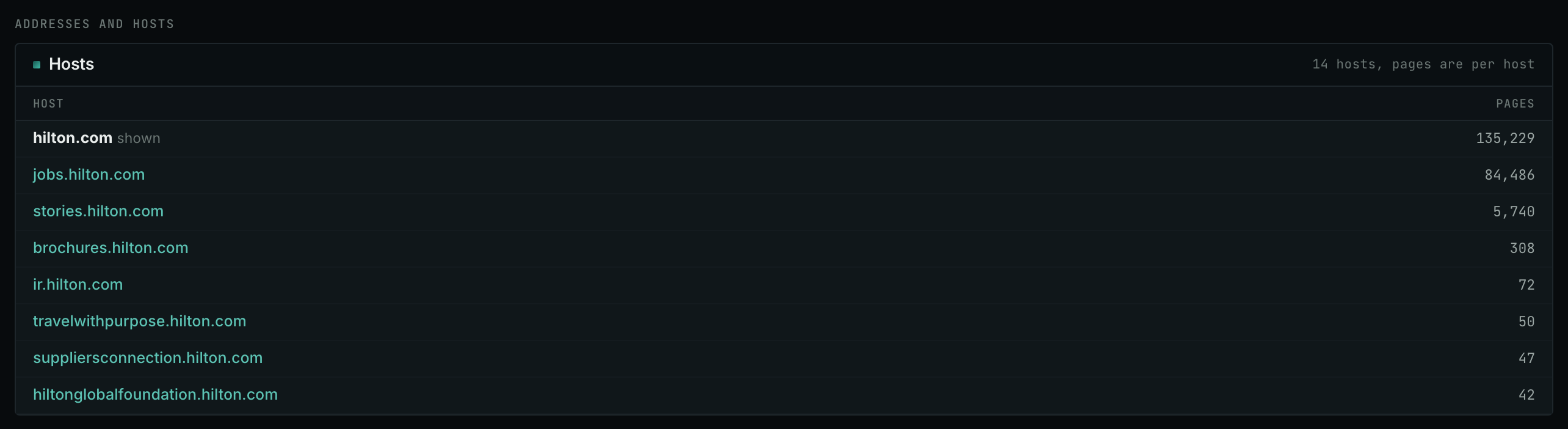
This table is the last card on the page: every host under the domain. The host on screen is marked "shown". Each other host is a click away.
- The main host is nearly always the biggest, by a long way.
- A separate blog, research, or jobs host is where the writing usually lives, and it often accepts contributions when the main site does not.
- Pages is page RECORDS across the collection, so the numbers are inflated. Compare them with each other, never on their own.
- Click through to a subdomain and you get that host's own record, with its own contacts and its own paths.
On your own campaign
The order to work in
- Look up the site before you contact it. Two minutes here saves a wasted email.
- Read How to reach them first. Social accounts, email addresses, phone numbers, and Contact pages are the whole first section. A named person beats
info@every time. - Then Programs and events for the partner, affiliate, and event pages, which is where a proposal is read.
- Check the other hosts under the domain. A separate blog host is often the one that accepts writing.
- Tick Full record if what you need has been cut off.
Reading the record
- Many feeds and many paths. A real publisher.
- No email anywhere. Contact form only, or a site that does not want to be contacted.
- Many social accounts. A site with somebody looking after it, which means somebody will read your message.
- Almost nothing. Either abandoned, or blocked to automated readers. Check it in a browser before deciding.
What it is not
- Not live. The data is weeks or months old.
- Not complete. A page the collection never reached is not here.
- Not a quality judgment. Link Graph: Site shows the PageRank.
MCP
These MCP tools give the same data. Each page has every parameter and an example.
siteinfo_site: Who owns one site and how to reach them: titles, meta tags, social accounts, email addresses, phone numbers, feeds, paths, and street addresses, merged from the stored page data.
API
These API routes give the same data.