Documentation / Opportunity Types / How to Find Sponsorship Packages
How to Find Sponsorship Packages
Find the sites that publish a sponsorship package, a prospectus, or a rate sheet, or that name their sponsors.
What this type finds
Sponsorship Packages finds pages from any group that sells sponsorships or names its sponsors. It groups several kinds of pages:
- Package pages. A group lists what a sponsor gets, at each level, and what each level costs.
- Prospectus and deck pages. A group gives a sponsorship prospectus, a brochure, or a pitch deck, often as a PDF.
- Rate sheets and media kits. A site gives its rates for ads, logo placement, and other sponsor benefits.
- Sponsor lists. A page names the official sponsors, the title sponsor, or the presenting sponsor of an event or a group.
- Calls for sponsors. A group says that it looks for sponsors, or says how to ask about sponsoring.
- Sponsorship request forms. A group provides a form or an address to start a conversation.
The type score comes from the address, the title, and the start of the text of a page. So a page can fit the type without one exact word.
Why it matters
A sponsorship gives your business a named place with an audience: on a page, at an event, or in a publication. The sponsor page can give a mention and a link.
It fits a business that has a budget for sponsorships and wants to compare the prices and benefits of many groups. A group's sponsor lists also show which competitors sponsor it.
For teams, clubs, and schools, use Local Sponsorships.
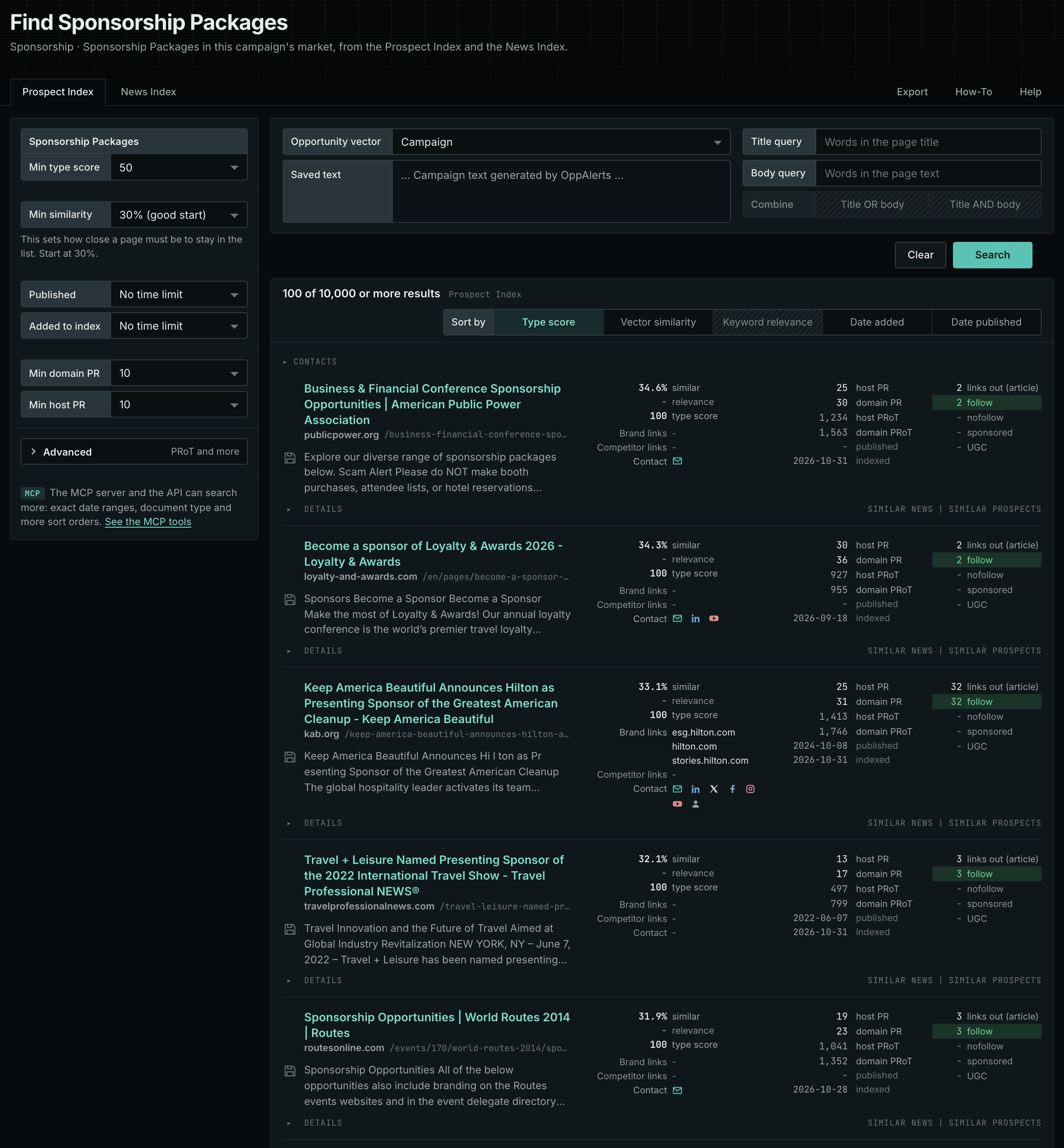
Find it in the web app
- Open Opportunity Types in the menu of the web app.
- Choose Sponsorship, and then choose Sponsorship Packages.
- Read the Prospect Index tab first. It holds pages that the index collected over time. Min type score defaults to 40. Raise it to see the pages that fit the type best.
- Read the News Index tab for pages from the last few weeks. Set Published to a recent time period.
- Raise Min domain PR to drop the sites with little standing. Click Details on a row to see how to reach the site.
Get new pages every day
Save this type as an opportunity. In Edit Campaign, open the Opportunities tab, and add an opportunity. In Search for, choose Sponsorship Packages. In Opportunity vector, choose Campaign. The Dashboard tab and the daily opportunities email then show the new pages of this type each day. See Daily Monitoring and Alerts.
In MCP and the API
Two tools search this type. One request body works for both:
{
  "campaign": 3,
  "similarity_target": "campaign",
  "type_scores": [{"opportunity_type": "sponsorship/sponsors", "type_score_min": 50}],
  "sort": "type_score"
}- MCP:
news_searchsearches the News Index.prospects_searchsearches the Prospect Index. - API:
POST https://api.oppalerts.com/v1/news/searchandPOST https://api.oppalerts.com/v1/prospects/search, with the same JSON body.
In type_scores, type_score_min sets the minimum type score, from 1 to 100. Sorting by type_score puts the highest type score first. To keep only the newest pages, add published_from or indexed_from with a date in YYYY-MM-DD format. The MCP pages list every parameter and a full example response.
To connect your AI agent or send API requests, read Use OppAlerts in Your AI Agent, Create an API Token, and Your First API Call.
How to judge the results
- Check the date. A prospectus is often for one year or one event. Check that it is current.
- Compare the packages. Put the price, the benefits, and the audience of several groups side by side.
- Check the audience. Ask for the number of visitors, members, or attendees.
- Check the sponsor list. Look at the current sponsors, and whether your competitors are on it.
- Check for exclusivity. Some packages limit the number of sponsors in a category.
- Open the live page. Read the page itself before you write. The index contains the text captured when the page was indexed.