Documentation / Opportunity Types / How to Find Award Submission Opportunities
How to Find Award Submission Opportunities
Find the award programs in your market that accept entries and nominations now.
What this type finds
The Award Submissions type finds pages for award programs that accept entries. It groups several kinds of pages:
- Calls for entries, nominations, and applications for an award program.
- Entry forms and nomination forms.
- Pages with the rules: the categories, the eligibility, the judging criteria, the fees, and the deadlines.
- Programs for company, product, campaign, executive, and individual entries.
- Industry, business, marketing, product, and advertising award programs.
- Pages that announce finalists, shortlists, and winners.
The type identifies the page's form, not its subject. Your campaign decides which subject comes first.
Why it matters
An award gives a business third-party proof of quality. A finalist or a winner can get press coverage, a page on the award's site, and a badge for its own site. The award page often links to the winner.
The type fits a business with a product, a campaign, a team, or a person that can win in a category. It also fits an agency that builds a yearly entry plan for a client.
Find it in the web app
- Open Opportunity Types in the web app menu.
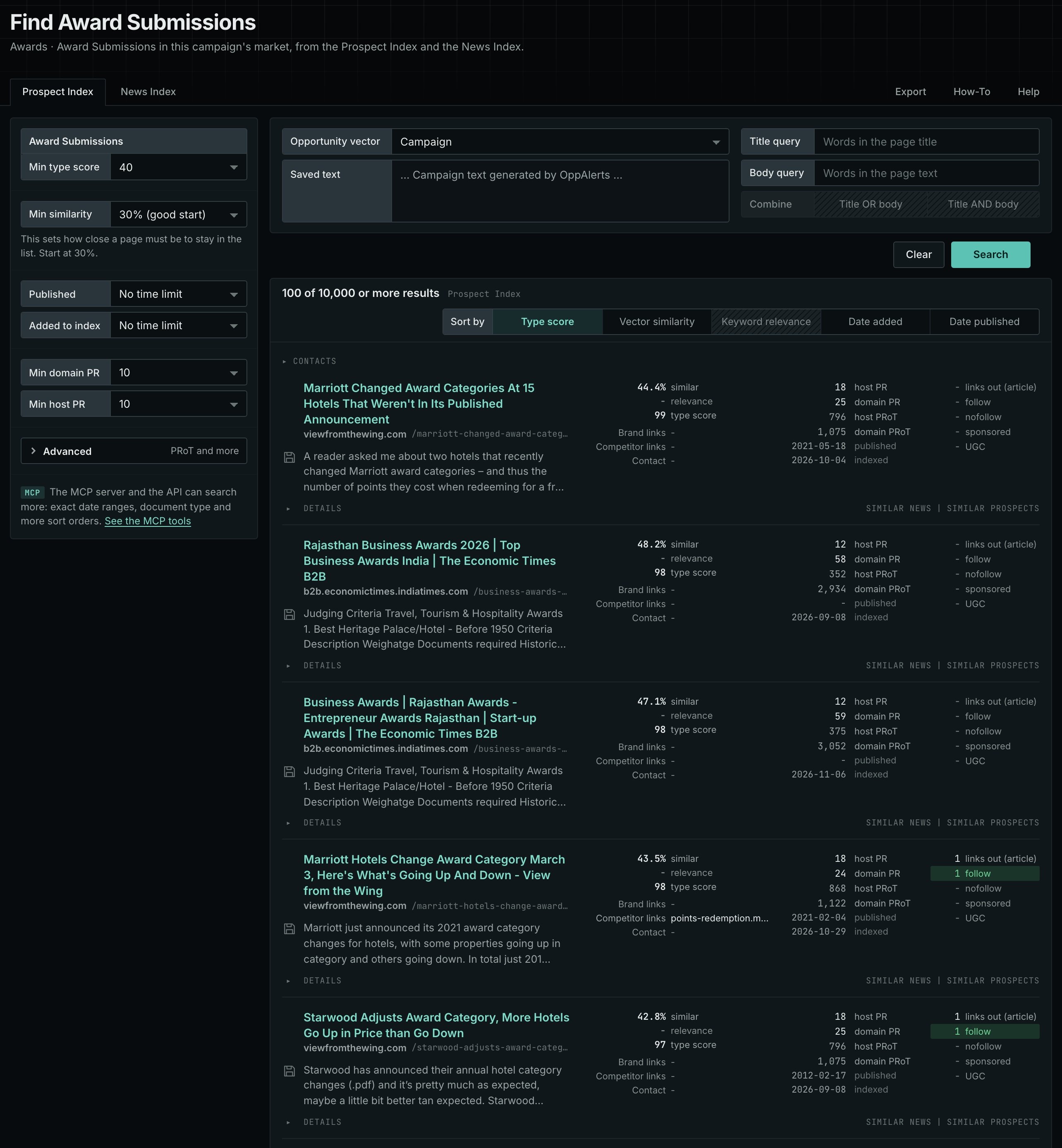
- Choose Awards, then choose Award Submissions.
- Read the Prospect Index tab first. It holds the pages of all dates. Min type score defaults to 40. Raise it to see only the pages that match this type most closely.
- Click Vector similarity in Sort by to put the pages most similar to your market first.
- Open the pages of programs that fit your business. Read the categories and the rules before anything else.
- Read the News Index tab for current pages. Set Published to the last few weeks.
Get new pages every day
- Open your campaign in Edit Campaign, and open the Opportunities tab.
- In Search for, choose Award Submissions, in the Awards group. In Opportunity vector, choose Campaign. Click Add opportunity.
- Open the Daily Email tab, select the checkbox, choose the hour, and click Save.
Each day, the pages added to the indexes in the last 24 hours appear on the Dashboard tab and in the daily opportunities email. See Daily Monitoring and Alerts.
In MCP and the API
Two tools search this type. One request body works for both:
{
  "campaign": 3,
  "similarity_target": "campaign",
  "type_scores": [{"opportunity_type": "awards/submissions", "type_score_min": 50}],
  "sort": "type_score"
}- MCP:
news_searchsearches the News Index.prospects_searchsearches the Prospect Index. - API:
POST https://api.oppalerts.com/v1/news/searchandPOST https://api.oppalerts.com/v1/prospects/search, with the same JSON body.
In type_scores, type_score_min sets the minimum type score, from 1 to 100. Sorting by type_score puts the highest type score first. To keep only the newest pages, add published_from or indexed_from with a date in YYYY-MM-DD format. The MCP pages list every parameter and a full example response.
To connect your AI agent or send API requests, read Use OppAlerts in Your AI Agent, Create an API Token, and Your First API Call.
How to judge the results
A high type score indicates that the page matches this type. It does not tell you whether the page is a good fit for you. Check these points before you act:
- Check the deadline and the year. A page can stay online after the program closes. Find the date of the current round.
- Read the eligibility rules. Check the country, the size of the business, the date range of the work, and the type of entry.
- Check the cost. Many programs charge an entry fee, and some charge more for a late entry. Count the staff time too.
- Check who judges and who won before. Read the list of past winners. If the winners are all large companies, a small business may have little chance.
- Check what a winner gets. Look for a page, a badge, a press release, or an event. Decide if the value is worth the entry.
- Check that the program is real. Some programs ask for money just for the title. Look for a clear judging process.