Documentation / Content Types / How to Find Certifications and Accreditation Programs
How to Find Certifications and Accreditation Programs
Find the credentials in a market and the organizations that award them.
What this type finds
This type finds pages about credentials: who awards them, who needs them, and how a person or a company gets one. It groups these kinds of pages together:
- Certification program pages. The page of a professional, industry, or product certification.
- Certification body pages. The organizations that set the rules and give the credential.
- Requirements and application pages. What a candidate must do, and how to apply.
- Exam and prep pages. Exam descriptions, practice exams, study guides, and prep courses.
- Certification directories. Lists of certified people, companies, or providers.
- Accreditation pages. Programs, standards, and boards that accredit schools, providers, or companies.
- Authorized training partner pages. Companies that can teach for a certification body.
- Badge pages. Pages about the marks that a certified person or company can show.
Many results are pages from training companies. They sell prep for a certification that another body awards.
Why it matters
This type is for research. In an unfamiliar market, the certifications show you what the market treats as proof of skill. You learn which credentials buyers ask for, which ones are required by law or by contract, and which bodies have authority.
It also finds experts. A certifying body is the authority of a field. The people who write its exams and its standards are experts. A provider that the body authorizes is a publisher worth knowing. A directory of certified companies can also list you or your client.
Find it in the web app
- Open Content in the web app menu.
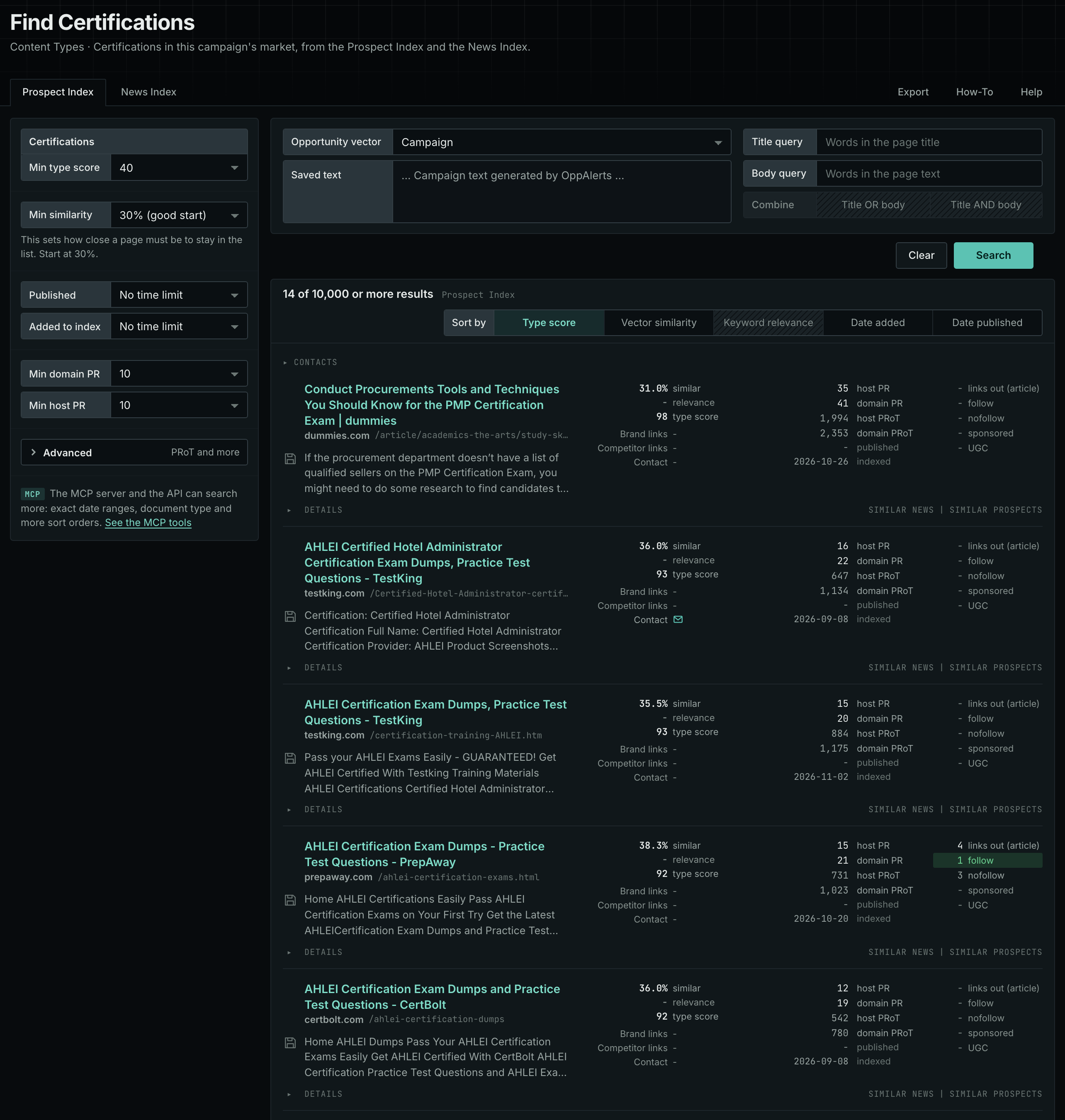
- Under Content Types, choose Certifications.
- Start with the Prospect Index tab. It shows pages of this type from the OppAlerts index, with the closest semantic matches to your campaign first. To filter by date, use Added to index. Most pages on this tab have no published date, so using Published filters them out.
- Open the News Index tab. It shows what news sources, podcasts, and videos publish now.
- Read the first ten results of each tab. Note the certification names and the bodies that appear more than once.
Min type score starts at 40, and Min similarity starts at 30%. Raise Min domain PR if the list includes sites that nobody in your market knows.
See the new pages
The Search for menu on the Opportunities tab of Edit Campaign lists the brand searches and the opportunity types. To see new pages of this content type, open Content Types again and set Added to index to Last day. The tab then shows only pages added to the index in the last day.
For details about the daily opportunities email and the saved opportunities it uses, read Daily Monitoring and Alerts.
In MCP and the API
Two tools search this type. One request body works for both:
{
  "campaign": 3,
  "similarity_target": "campaign",
  "type_scores": [{"content_type": "certifications", "type_score_min": 50}],
  "sort": "type_score"
}- MCP:
news_searchsearches the News Index.prospects_searchsearches the Prospect Index. - API:
POST https://api.oppalerts.com/v1/news/searchandPOST https://api.oppalerts.com/v1/prospects/search, with the same JSON body.
In type_scores, type_score_min sets the minimum type score, from 1 to 100. Sorting by type_score puts the highest type score first. To keep only the newest pages, add published_from or indexed_from, with a date in YYYY-MM-DD format. The MCP pages list every parameter and include the full example response.
To connect your AI agent or to send API requests, read Use OppAlerts in Your AI Agent, Create an API Token, and Your First API Call.
How to judge the results
- Check the body. Find out who awards the certification and if the market respects it.
- Check the requirements. Review the cost, time commitment, exam, and renewal rules.
- Check if it is required. A required credential and an optional one have different value for your client.
- Check for pay-to-play. A certification that anyone can buy gives little proof. Look for an exam or a review.
- Check the date. Programs change. Read the date of the page and the version of the exam.
- Check a directory. If a directory lists certified companies, check how a company gets listed and whether the listing has a link.