Documentation / Opportunity Types / How to Find Link Directories
How to Find Link Directories
Find the directories that accept a site submission and publish a link or a citation, then choose the few that are worth your time.
What this type finds
This type finds directories and listing pages that publish an outbound link or a business citation. Most of them are open to submissions. It can find these kinds of pages:
- Web and link directories. General lists of sites, sorted by category.
- Niche, blog, and resource directories. Lists of sites covering one subject, one kind of site, or one industry.
- Submission pages. Pages with a form to submit a site, add a URL, or suggest a website.
- Business listing sites. Directories that list a business with its name, address, and website.
- Pages of useful links. Lists of links that the owner of a site collects, sometimes with a rule that asks for a link in return.
- Featured listing pages. Pages that sell a prominent place in a directory.
The quality of these pages varies widely. This type finds them all, so you need to assess each one.
Why it matters
A directory listing is a link or a citation on another site. Some listings help a new site to be found and show that the business exists. Many link directories have little value, so this type is a list of candidates and not a to-do list.
It fits a new site, a local business, and a niche business that needs a few relevant listings. For an agency, it replaces the work of building a directory list by hand. The PR numbers and link columns in each row help you quickly remove weak candidates.
Find it in the web app
- Open Opportunity Types in the web app menu.
- Choose Directories, then choose Link Directories.
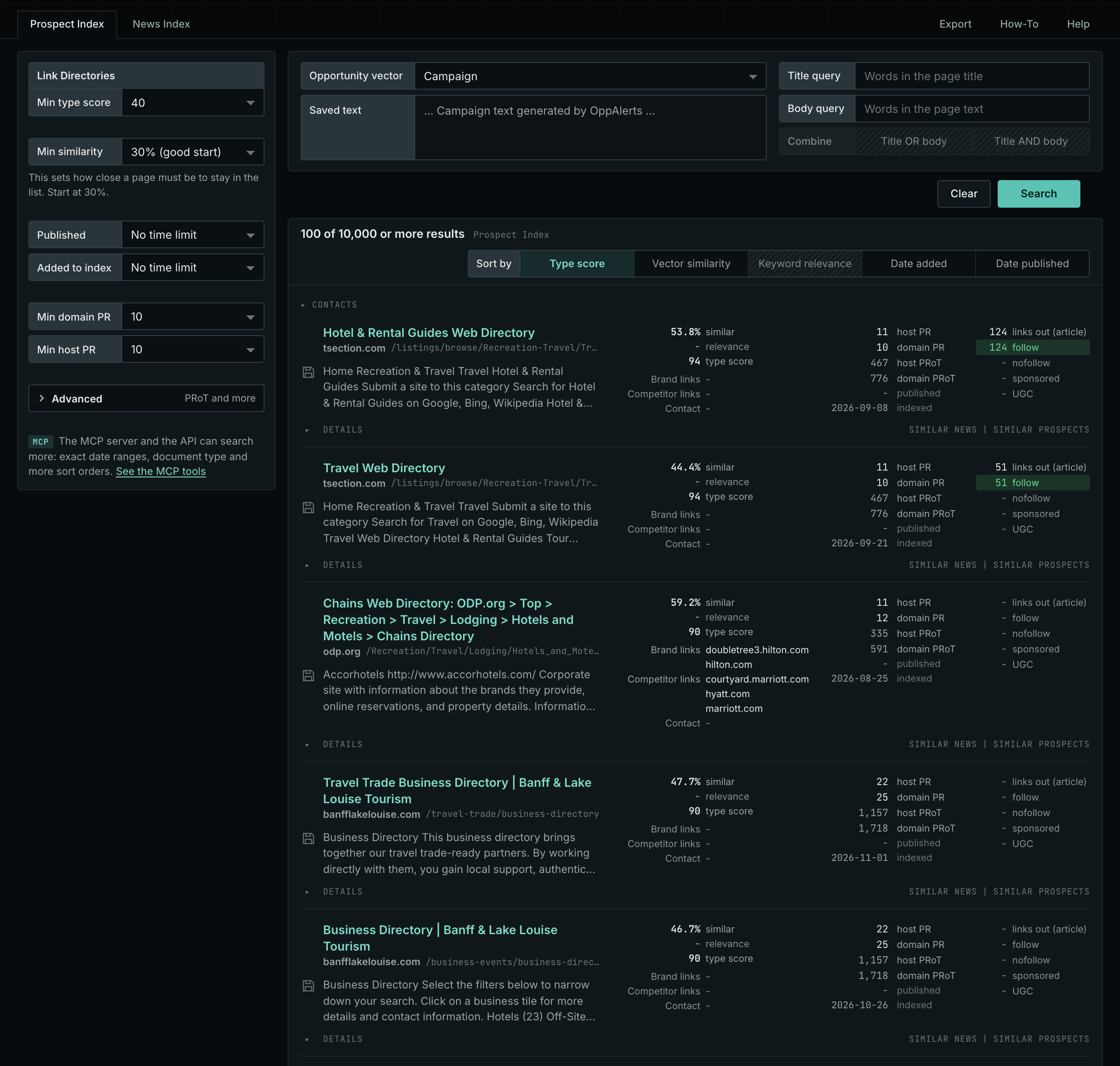
- Read the Prospect Index tab. It contains pages that OppAlerts collected over time. Many of these pages have no published date. Use Added to index and not Published on this tab.
- Read the News Index tab for the pages that were published recently. Set Published to the last few weeks to see the current pages. Few pages of this type are news, so this tab may have few results.
- Check Min type score. It starts at 40. Lower it to see more pages, and raise it to keep only the pages that match this type most closely.
- Click Vector similarity in Sort by to show the pages most relevant to your market first.
Get new pages every day
Save this type as an opportunity, and OppAlerts shows you the new pages each day.
- Open your campaign in Edit Campaign, and open the Opportunities tab.
- Add an opportunity. In Search for, choose Link Directories.
- In Opportunity vector, choose Campaign.
- Give it a Label, and save.
The Daily Email tab sends the new pages by email. Daily Monitoring and Alerts shows all the steps.
In MCP and the API
Two tools search this type. One request body works for both:
{
  "campaign": 3,
  "similarity_target": "campaign",
  "type_scores": [{"opportunity_type": "directories/link-directories", "type_score_min": 50}],
  "sort": "type_score"
}- MCP:
news_searchsearches the News Index.prospects_searchsearches the Prospect Index. - API:
POST https://api.oppalerts.com/v1/news/searchandPOST https://api.oppalerts.com/v1/prospects/search, with the same JSON body.
In type_scores, type_score_min sets the minimum type score, from 1 to 100. Sorting by type_score puts the highest type score first. To keep only the newest pages, add published_from or indexed_from with a date in YYYY-MM-DD format. The MCP pages list every parameter and include the full example response.
To connect your AI agent or to send API requests, read Use OppAlerts in Your AI Agent, Create an API Token, and Your First API Call.
How to judge the results
- Check the subject. The directory must serve your subject, your trade, or your place. A general directory with no subject is a weak choice.
- Read the page. Look for an editor, review rules, and a clear list of categories. Be careful with a directory that accepts any site.
- Check the links. The row shows the page's outbound links, split into followed and not followed. A directory with only not followed links gives less value.
- Look for a reciprocal link rule. A directory that asks for a link back trades links. It does not choose sites on their merit.
- Check the PR numbers. Raise Min domain PR to remove the sites with little standing.
- Count the cost. Check the price of a featured listing and the time needed to fill out each form.