Documentation / Opportunity Types / How to Find Calls for Papers
How to Find Calls for Papers
Find conferences, journals, and workshops in your field that invite papers, abstracts, and posters, and see their deadlines.
What this type finds
This type finds pages where a gathering or a publication asks for formal work from outside authors. It can find these kinds of pages:
- Conference calls for papers. Pages that invite full papers or extended abstracts for an academic or a technical conference.
- Calls for abstracts, posters, and presentations. Shorter calls that ask for a summary, a poster, or a talk.
- Journal calls. Pages of a journal that invite manuscripts, including calls for a special issue.
- Workshop and symposium calls. Calls from smaller gatherings that focus on one subject.
- Submission guideline pages. Pages with the important dates, the author guidelines, the format rules, and the review process.
- Calls for proposals and speakers. Calls that ask for talks and sessions in addition to papers.
This type finds calls across many fields. The market you specify in your campaign determines which ones come first.
Why it matters
A paper, an abstract, or a poster at a respected event puts your research and your name on the program page and in the proceedings. It brings you into contact with the experts of the field. A published paper can also earn links and citations.
This type fits companies and experts that conduct original research, such as a data team, a lab, a consultant, or a technical founder. It also shows you which events and journals your market respects, and which deadlines are approaching.
Find it in the web app
- Open Opportunity Types in the web app menu.
- Choose Events, then choose Calls for Papers.
- Read the Prospect Index tab. It contains pages that OppAlerts collected over time. Many calls have no published date, so use Added to index and not Published on this tab.
- Read the News Index tab for the pages that were published recently. Set Published to the last few weeks to find newly announced calls. A call has a deadline, so read it before you open the page.
- Check Min type score. It starts at 40. Lower it to see more pages, and raise it to keep only the pages that match this type most closely.
- Click Vector similarity in Sort by to put the pages most relevant to your market first.
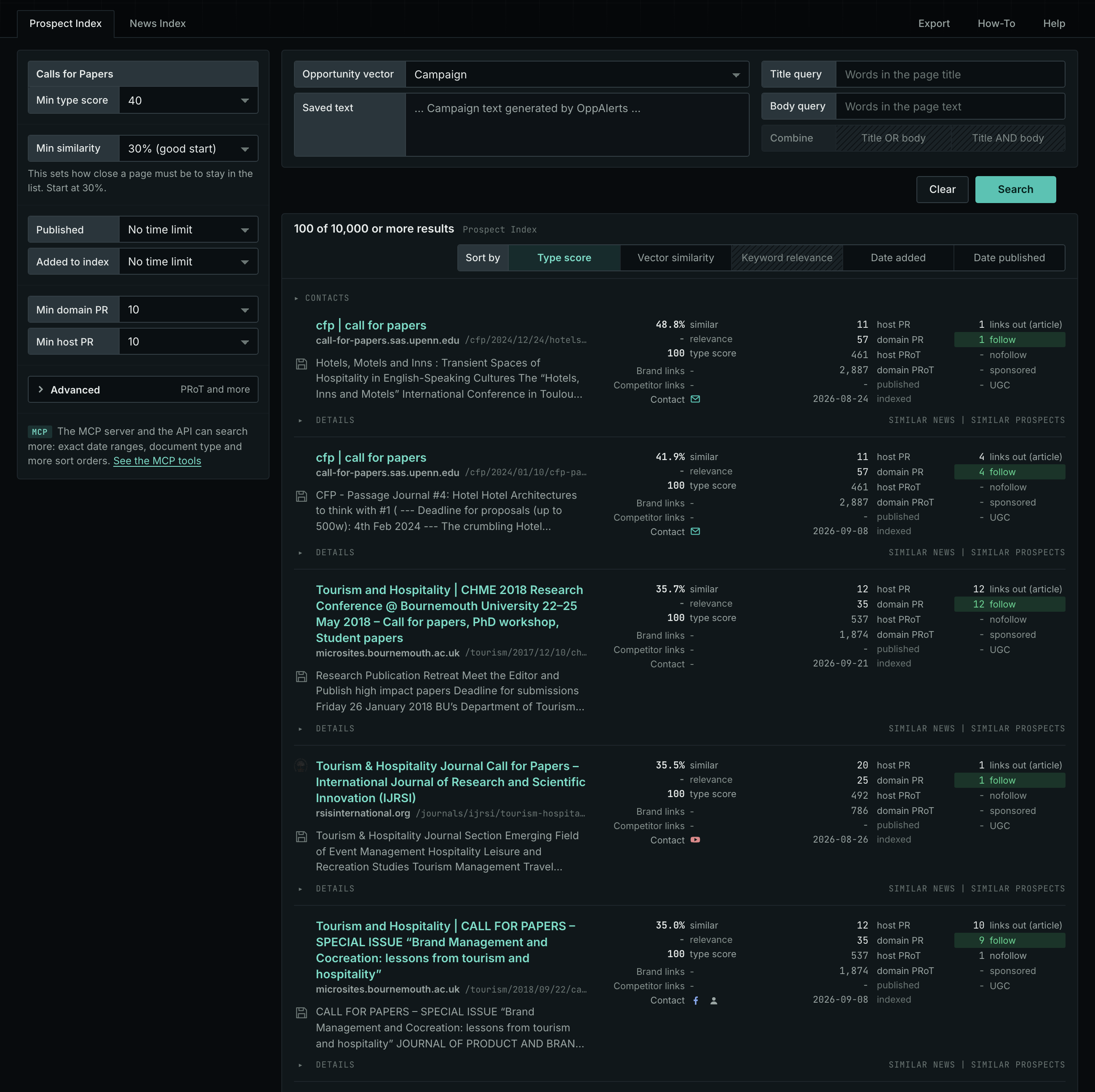
Get new pages every day
Save this type as an opportunity, and OppAlerts shows you the new pages each day.
- Open your campaign in Edit Campaign, and open the Opportunities tab.
- Add an opportunity. In Search for, choose Calls for Papers.
- In Opportunity vector, choose Campaign.
- Give it a Label, and save.
The Daily Email tab sends the new pages by email. Daily Monitoring and Alerts shows all the steps.
In MCP and the API
Two tools search this type. One request body works for both:
{
  "campaign": 3,
  "similarity_target": "campaign",
  "type_scores": [{"opportunity_type": "events/calls-for-papers", "type_score_min": 50}],
  "sort": "type_score"
}- MCP:
news_searchsearches the News Index.prospects_searchsearches the Prospect Index. - API:
POST https://api.oppalerts.com/v1/news/searchandPOST https://api.oppalerts.com/v1/prospects/search, with the same JSON body.
In type_scores, type_score_min sets the minimum type score, from 1 to 100. Sorting by type_score puts the highest type score first. To keep only the newest pages, add published_from or indexed_from with a date in YYYY-MM-DD format. The MCP pages list every parameter and include the full example response.
To connect your AI agent or to send API requests, read Use OppAlerts in Your AI Agent, Create an API Token, and Your First API Call.
How to judge the results
- Read the deadline first. Look for the abstract deadline, the full paper deadline, and any deadline extension. An old call is of no use.
- Open the live page. Check that the submission system still accepts work.
- Check the quality. Look for a peer review process, a committee of named experts, and an organizer that you know. Be careful with a journal that promises fast publication for a fee.
- Check the topic. Your work must fit the scope of the call. Work on the wrong topic is rejected.
- Check the cost. Look for a submission fee, a registration fee that the author must pay, and the travel cost of a talk.
- Read the author rules. Find out who owns the paper after publication and whether you may post it on your own site.