Documentation / Opportunity Types / How to Find Research Partnership Opportunities
How to Find Research Partnership Opportunities
Find the universities, companies, and labs that look for research partners, and read how to join them.
What this type finds
Research Partnerships finds pages about people who do research together. It groups several kinds of pages:
- Partnership program pages. A university or a company explains how an outside organization can join its research.
- Sponsored research pages. A university describes how a company pays for a study, and what the agreement covers.
- Technology transfer pages. A university office explains how a company can use or license its research.
- Consortium and alliance pages. A group conducts joint research and accepts new members.
- Calls for proposals. A page asks for a research proposal from a partner.
- Announcements. A news page announces a new joint research project between a company and a university, or between two industry groups.
The type score comes from the address, the title, and the start of the text of a page. So a page can fit the type without one exact word.
Why it matters
A research partner can give you data, expertise, and a joint publication. It can also give you a mention on the site of a university or a lab.
It fits a business that has data or field knowledge that researchers want, and a business that needs a study done and does not have the staff for it.
It also shows who in your market pays for research, and which universities work with which companies.
Find it in the web app
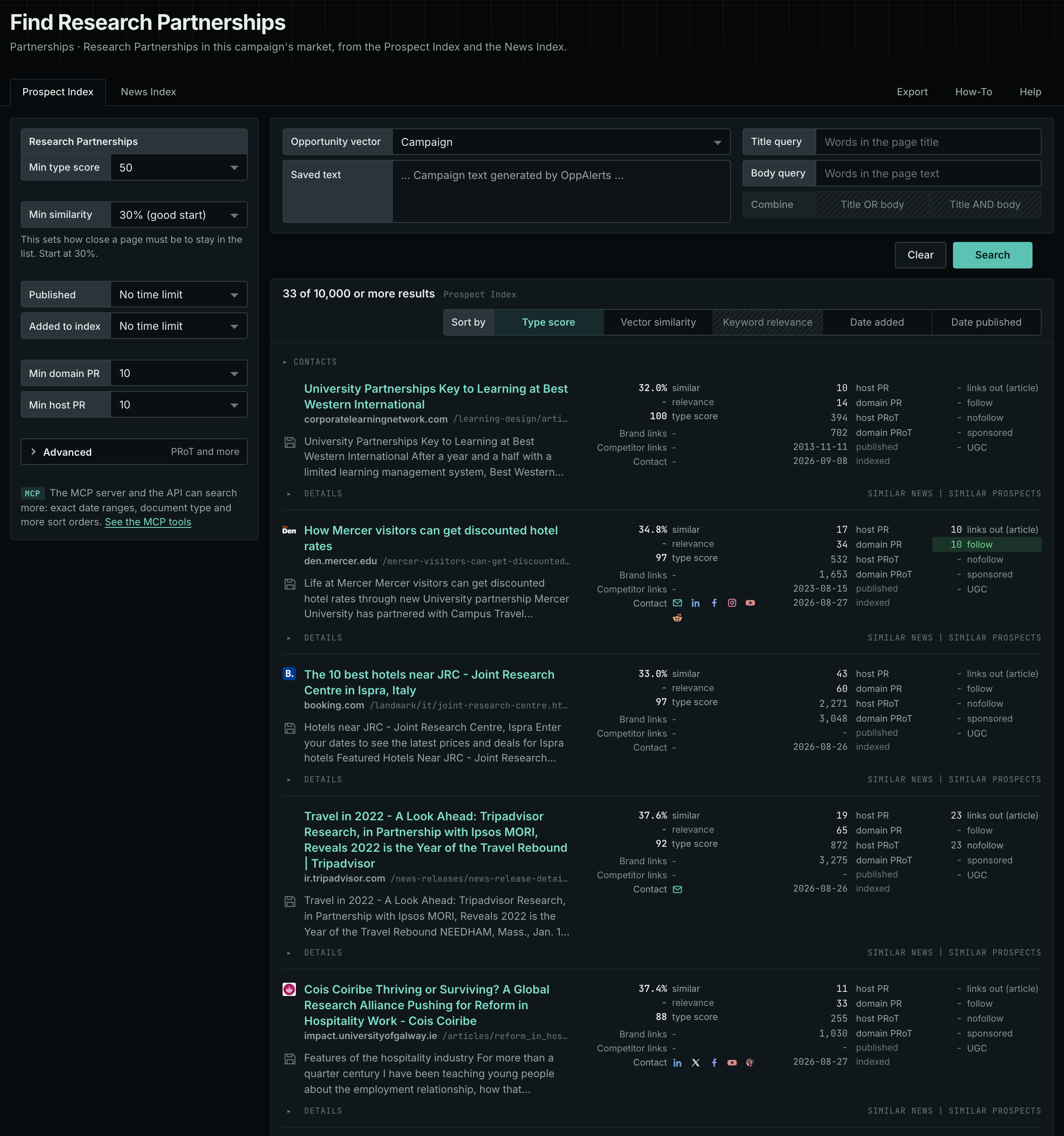
- Open Opportunity Types in the menu of the web app.
- Choose Partnerships, and then choose Research Partnerships.
- Read the Prospect Index tab first. It holds pages that the index collected over time. Min type score defaults to 40. Raise it to see the pages that fit the type best.
- Read the News Index tab for pages from the last few weeks. Set Published to a recent time period.
- Raise Min domain PR to drop the sites with little standing. Click Details on a row to see how to reach the site.
Get new pages every day
Save this type as an opportunity. In Edit Campaign, open the Opportunities tab, and add an opportunity. In Search for, choose Research Partnerships. In Opportunity vector, choose Campaign. The Dashboard tab and the daily opportunities email then show the new pages of this type each day. See Daily Monitoring and Alerts.
In MCP and the API
Two tools search this type. One request body works for both:
{
  "campaign": 3,
  "similarity_target": "campaign",
  "type_scores": [{"opportunity_type": "partnerships/research-partnerships", "type_score_min": 50}],
  "sort": "type_score"
}- MCP:
news_searchsearches the News Index.prospects_searchsearches the Prospect Index. - API:
POST https://api.oppalerts.com/v1/news/searchandPOST https://api.oppalerts.com/v1/prospects/search, with the same JSON body.
In type_scores, type_score_min sets the minimum type score, from 1 to 100. Sorting by type_score puts the highest type score first. To keep only the newest pages, add published_from or indexed_from with a date in YYYY-MM-DD format. The MCP pages list every parameter and a full example response.
To connect your AI agent or send API requests, read Use OppAlerts in Your AI Agent, Create an API Token, and Your First API Call.
How to judge the results
- Check the date. A call for proposals has a deadline. An old call gives you a contact, but the opportunity has closed.
- Check the type of partner. A university, a company, a government agency, and a nonprofit want different things from a partner.
- Read the terms. Look for who pays, who owns the results, and who can publish them.
- Check the topic. A research group close to your market gives a result that your buyers care about.
- Find the right office. A technology transfer office, a department, and a lab each have their own contact.
- Open the live page. Read the page itself before you write. The index contains the text captured when the page was indexed.