Documentation / Opportunity Types / How to Find Guest Post Opportunities
How to Find Guest Post Opportunities
Find sites that accept articles from outside writers and pages that explain how to pitch them.
What this type finds
The Guest Posts type finds pages that tell outside writers how to contribute. It can find:
- Pages from sites seeking guest writers.
- Contributor and author guidelines.
- Editorial guidelines and rules for article submissions.
- Calls for contributors and pages seeking writers.
- Pitch guidelines that tell you how to send an idea to an editor.
- Guest column pages of news and trade publications.
These pages come from many kinds of sites: business blogs, community sites, and trade publications. The type score depends on the type of page, not on its subject. A page on a subject you do not cover can score as high as one on your subject.
Why it matters
A guest post gives you a byline, an audience, and sometimes a link to your site. It shows your expertise to readers who do not know you yet. The type fits businesses and experts who can write about their field, and agencies that build links for them.
For a full process, read How to Find Relevant Guest Post Opportunities.
Find it in the web app
- Open Opportunity Types in the menu.
- Choose the group Content. Its types open in a third column.
- Choose the type Guest Posts.
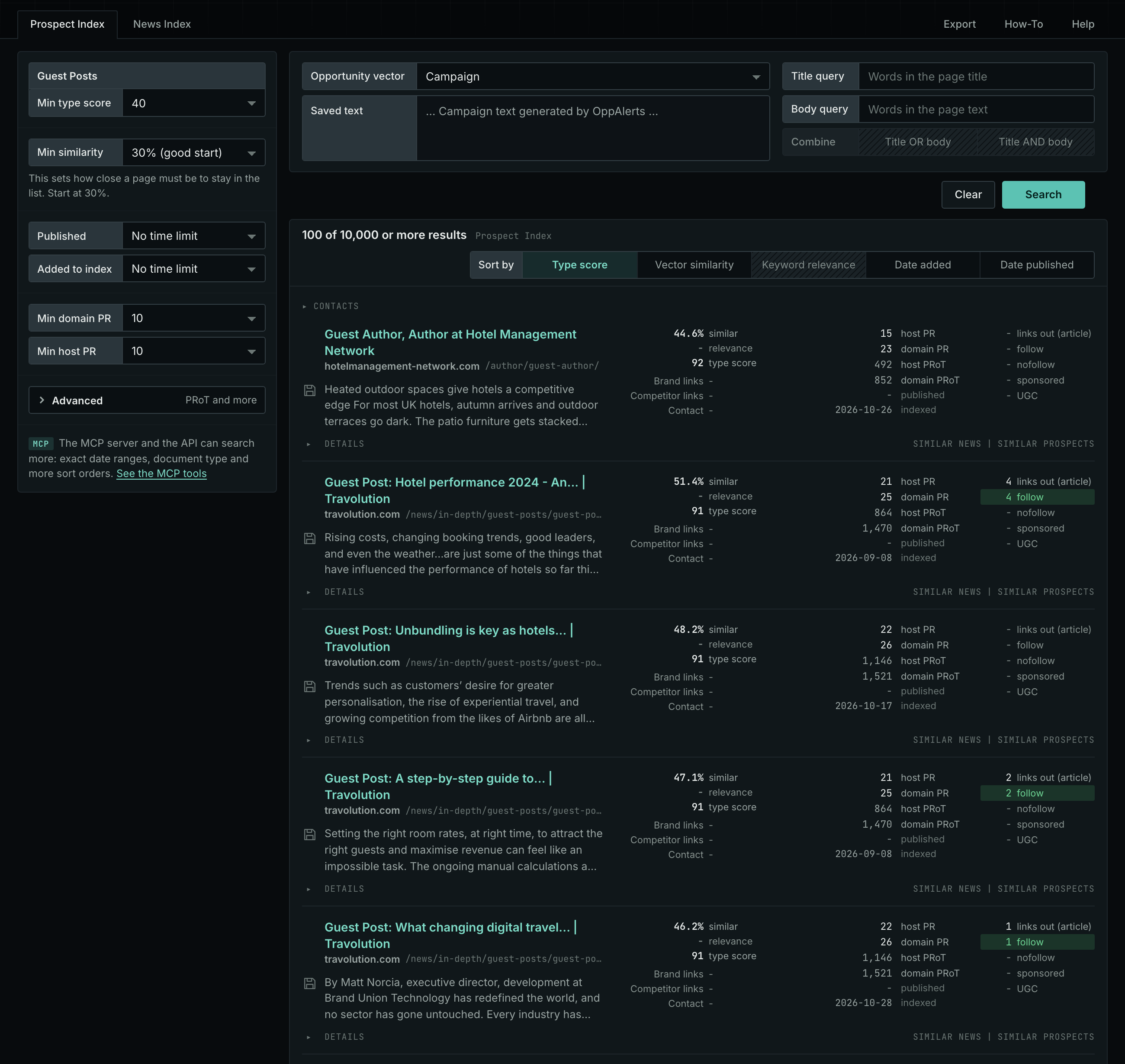
- Leave Min type score at 40, its starting value. Raise it to see only the strongest pages. Lower it to see more pages.
- Read the Prospect Index tab first. It shows both new and old pages. Raise Min domain PR to exclude sites with little standing.
- Read the News Index tab for pages published in recent weeks. Set Published to a recent period. It is normal for this tab to have few results for this type.
- The results are initially sorted by Type score. Click Vector similarity to show the pages most relevant to your market first.
Get new pages every day
- Open your campaign in Edit Campaign, and open the Opportunities tab.
- Add an opportunity. In Search for, choose Guest Posts under Content.
- In Opportunity vector, choose Campaign.
- Give it a Label, and save it.
The Dashboard and the daily opportunities email then show the new pages of this type. Daily Monitoring and Alerts has the steps.
In MCP and the API
Two tools search this type. One request body works for both:
{
  "campaign": 3,
  "similarity_target": "campaign",
  "type_scores": [{"opportunity_type": "content/guest-posts", "type_score_min": 50}],
  "sort": "type_score"
}- MCP:
news_searchsearches the News Index.prospects_searchsearches the Prospect Index. - API:
POST https://api.oppalerts.com/v1/news/searchandPOST https://api.oppalerts.com/v1/prospects/search, with the same JSON body.
In type_scores, type_score_min sets the minimum type score, from 1 to 100. Sorting by type_score puts the highest type score first. To keep only the newest pages, add published_from or indexed_from with a date in YYYY-MM-DD format. The MCP pages list every parameter and include the full example response.
To connect your AI agent or to send API requests, read Use OppAlerts in Your AI Agent, Create an API Token, and Your First API Call.
How to judge the results
- The date. Check the date of the latest posts. A site that does not publish any more will not publish yours.
- The live page. Open the guidelines. Check that they are still current and that the site accepts new writers.
- The rules. Read the requirements for length, topics, original content, and links in the text and author box.
- The audience. Check that the readers are the people that you want to reach.
- The cost. Some sites charge a fee or mark a post as sponsored. Read the page before you pitch.
- The quality. Read two or three posts. Check the standing of the site with Min domain PR and Min host PR.
- The contact. Open Details on a row to see how to contact the site.