Documentation / Opportunity Types / How to Find Link Exchange Opportunities
How to Find Link Exchange Opportunities
Find the sites that offer or ask for a link in return for a link, and read their terms before you reply.
What this type finds
A link exchange is an agreement between two sites: each site links to the other. This type finds pages where a site says it takes part in such an agreement.
- Link exchange pages. A site says that it trades links with other sites, and it tells you how to apply.
- Link partner pages. A list of partner sites that link to each other. Many of these pages have a form that you fill in to join.
- Reciprocal link requests. A page that asks other sites to add its link. It often asks you to send back the address of the page where you placed the link.
- Link swap programs and networks. A group of sites whose members swap links with one another.
- Partner link sections. The part of a company site that names the firms it works with and links to them.
- Wanted-link pages. A site states which kinds of links it looks for and which it refuses.
Why it matters
A link exchange can give you a link from a site in your own field, with little work. It fits small businesses, local businesses, niche sites, and agencies that need a first set of links for a new client.
It also carries a risk. A few links between real businesses that serve the same buyers are not the same as a network of unrelated sites that swap links. Choose only partners that you would work with if there were no link.
Find it in the web app
- Open Opportunity Types in the web app menu.
- Choose Links.
- Choose Link Exchanges.
- Read the Prospect Index tab first. It contains pages that OppAlerts fetched and has more results. Min type score starts at 40. Raise it to see only the pages that fit the type best.
- Read the News Index tab for news, podcasts, and video. It has fewer results and shows current content. It is normal for a type to return few results here.
- Raise Min domain PR to exclude sites with little standing. Click Vector similarity in the Sort by buttons to see the pages most relevant to your market first.
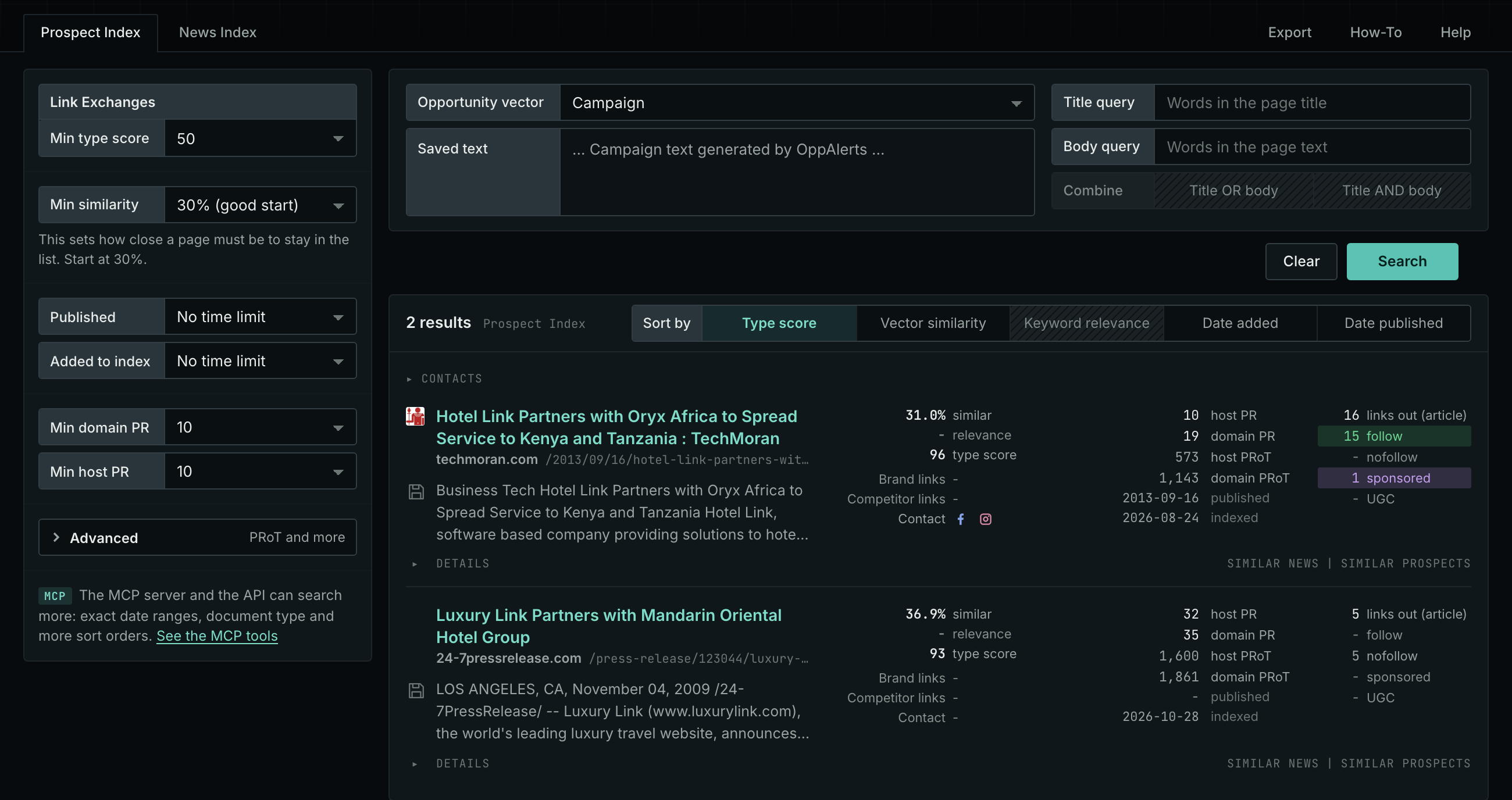
Each page receives a type score based on the words in its address, title, and opening text. The score does not indicate what the page is about. Your campaign supplies the subject. See Opportunity Types and Content Types.
Get new pages every day
- Open your campaign in Edit Campaign, and open the Opportunities tab.
- Add an opportunity. In Search for, choose Link Exchanges under Links.
- In Opportunity vector, choose Campaign.
- Give it a Label, and click Add opportunity.
Each day, the Dashboard and the daily opportunities email show the new pages of this type. Read Daily Monitoring and Alerts to set up the daily opportunities email.
In MCP and the API
Two tools search this type. One request body works for both:
{
  "campaign": 3,
  "similarity_target": "campaign",
  "type_scores": [{"opportunity_type": "links/link-exchange", "type_score_min": 50}],
  "sort": "type_score"
}- MCP:
news_searchsearches the News Index.prospects_searchsearches the Prospect Index. - API:
POST https://api.oppalerts.com/v1/news/searchandPOST https://api.oppalerts.com/v1/prospects/search, with the same JSON body.
In type_scores, type_score_min sets the minimum type score, from 1 to 100. Sorting by type_score puts the highest type score first. To keep only the newest pages, add published_from or indexed_from with a date in YYYY-MM-DD format. The MCP pages list every parameter and include the full example response.
To connect your AI agent or to send API requests, read Use OppAlerts in Your AI Agent, Create an API Token, and Your First API Call.
How to judge the results
- Check the date. Look at the newest partner on the page. The owner of a page that has not changed for years often does not respond.
- Check that the page is live. Open it. Make sure that the form works and that the listed partner links still exist.
- Check the partner list. If the list contains many sites from unrelated markets, do not join. A link from such a page does not help your audience.
- Check the links out. In the result row, read the numbers of followed and not-followed links. A page with no followed links gives you no link value.
- Read the rules. Some pages ask you to create a page for the link or pay a fee. Decide before you write whether you accept these terms.
- Check the audience. Ask one question: would a visitor of this site want to read about your business? If not, skip it.