Documentation / Opportunity Types / How to Find Expos, Trade Shows, and Vendor Booth Opportunities
How to Find Expos, Trade Shows, and Vendor Booth Opportunities
Find exhibitions and vendor events where you can rent a booth, show your product, and meet buyers.
What this type finds
The Expos, Vendor Booths type finds pages where an exhibition seeks vendors. It includes several kinds of pages:
- Exhibitor prospectus pages: documents that list the booth sizes, the prices, and the rules.
- Exhibitor application and registration pages: pages where a vendor applies for booth space.
- Calls for exhibitors: pages announcing that an event is currently seeking vendors.
- Exhibitor lists and directories: pages that name who exhibits. They show which companies in your market attend and which are competitors.
- Vendor fairs, trade fairs, and commercial exhibitions: events for vendors of many sizes.
- Product showcases, startup showcases, and demo days: events where you present a product and do not only rent a booth.
- Exhibitor service pages: floor plans, move-in times, and booth rules.
A page's type score indicates how closely it matches this type. The score does not depend on the subject. OppAlerts then keeps the pages most semantically similar to your campaign. See Opportunity Types and Content Types.
Why it matters
A booth puts your product in front of buyers who came to look for products. You can show it, collect leads, and meet buyers in person.
Exhibitor lists from past years show who else exhibits. Use them to judge the event and to find peers and competitors.
This type fits a business that sells a product or a service to buyers who visit trade events. It also fits an agency that plans events for a client.
Find it in the web app
- Open Opportunity Types in the web app menu.
- Choose Events, then choose Expos, Vendor Booths.
- Read the Prospect Index tab first. It shows pages of all dates. Min type score starts at 40. To see only pages recently added to the index, set Added to index.
- Read the News Index tab for the pages published in the last few weeks. Set Published to the period you want.
- Click Vector similarity in Sort by to show the pages most relevant to your market first.
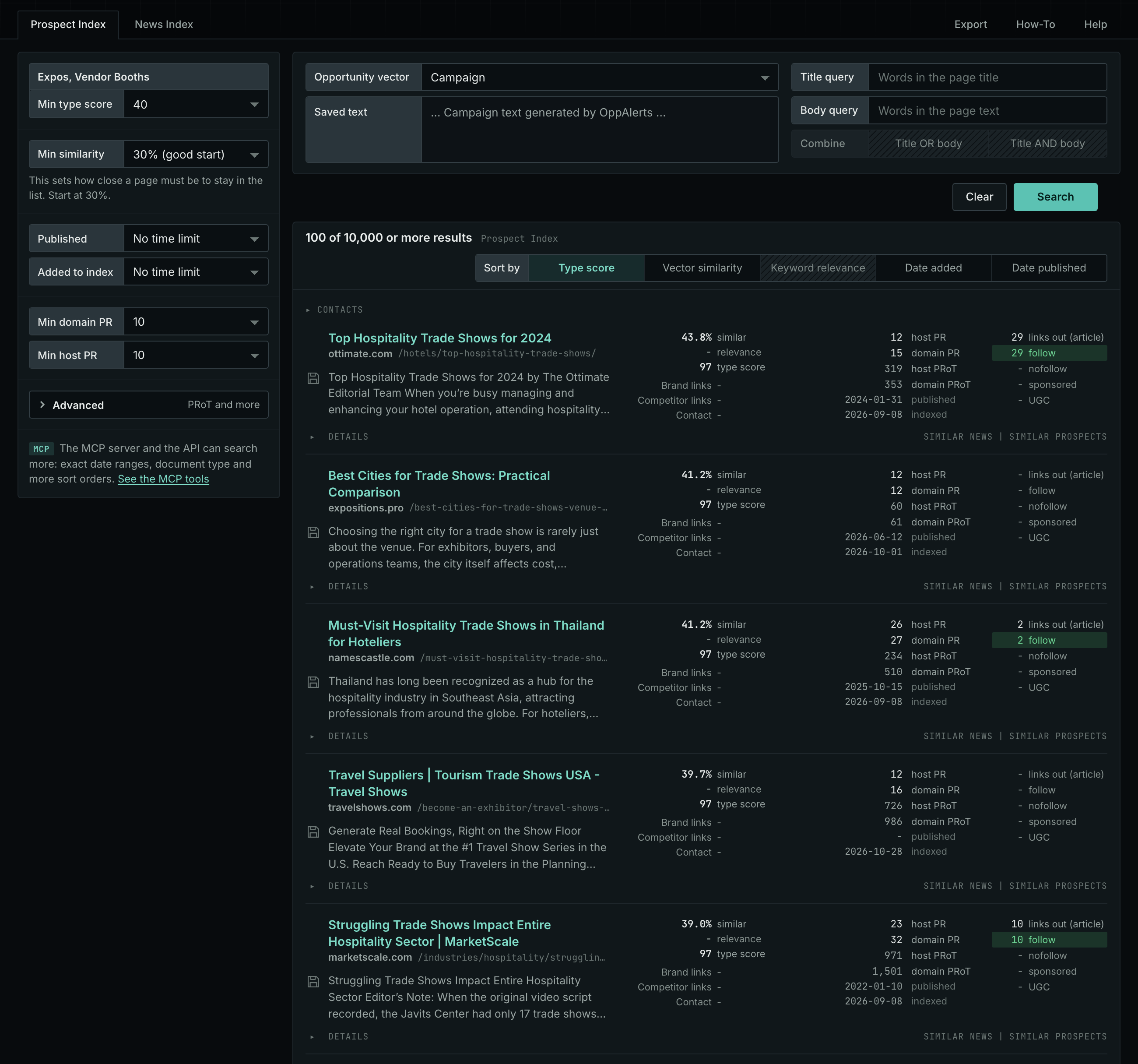
The web app documentation lists all search fields and explains how to read a result row: Expos, Vendor Booths.
Get new pages every day
- In Edit Campaign, open the Opportunities tab.
- Add an opportunity. In Search for, choose Expos, Vendor Booths in the Events group.
- In Opportunity vector, choose Campaign.
- Open the Daily Email tab, select the checkbox, choose the hour, and click Save.
Each day, the Dashboard tab and the daily opportunities email show the new pages. See Daily Monitoring and Alerts.
In MCP and the API
Two tools search this type. One request body works for both:
{
  "campaign": 3,
  "similarity_target": "campaign",
  "type_scores": [{"opportunity_type": "events/expos-and-booths", "type_score_min": 50}],
  "sort": "type_score"
}- MCP:
news_searchsearches the News Index.prospects_searchsearches the Prospect Index. - API:
POST https://api.oppalerts.com/v1/news/searchandPOST https://api.oppalerts.com/v1/prospects/search, with the same JSON body.
In type_scores, type_score_min sets the minimum type score, from 1 to 100. Sorting by type_score puts the highest type score first. To keep only the newest pages, add published_from or indexed_from with a date in YYYY-MM-DD format. The MCP pages list every parameter and include the full example response.
To connect your AI agent or to send API requests, read Use OppAlerts in Your AI Agent, Create an API Token, and Your First API Call.
How to judge the results
- Read the dates. Check the event date and the last day to apply. A prospectus for a past year is old.
- Compare the cost with the lead value. Add the booth price, the travel, and the staff time. Then decide how many leads you need.
- Read the exhibitor list. Check that the companies on the list sell products like yours or to the same buyers.
- Check the audience. Make sure the visitors are buyers and not only other vendors.
- Read the rules. Look for limits on products, booth setup, and sales on the floor.