Documentation / Opportunity Types / How to Find Collaboration Opportunities
How to Find Collaboration Opportunities
Find the pages where companies ask for case studies, partners, projects, and proposals.
What this type finds
The Collaboration type groups three kinds of requests, all of which invite an outside party to work with the site. It can find:
- Calls for case studies, customer stories, and success stories.
- Partner program pages and pages from companies seeking partners or collaborators.
- Open submission portals that accept projects, ideas, and proposals.
- Requests for proposals and calls for applications.
- Project spotlight pages that feature work from outside the company.
Each kind of page serves a different purpose. A call for case studies fits a business with customer results. A partner program fits a service or a software business. An open portal fits a team that has a project or an idea to show.
Why it matters
A collaboration can give your business a feature on another site, a listing on a partner page, a published case study, or a working relationship. The type fits businesses that have customer results, services that partners can sell or use, or research and projects.
For research work with other organizations, read How to Find Research Partnerships.
Find it in the web app
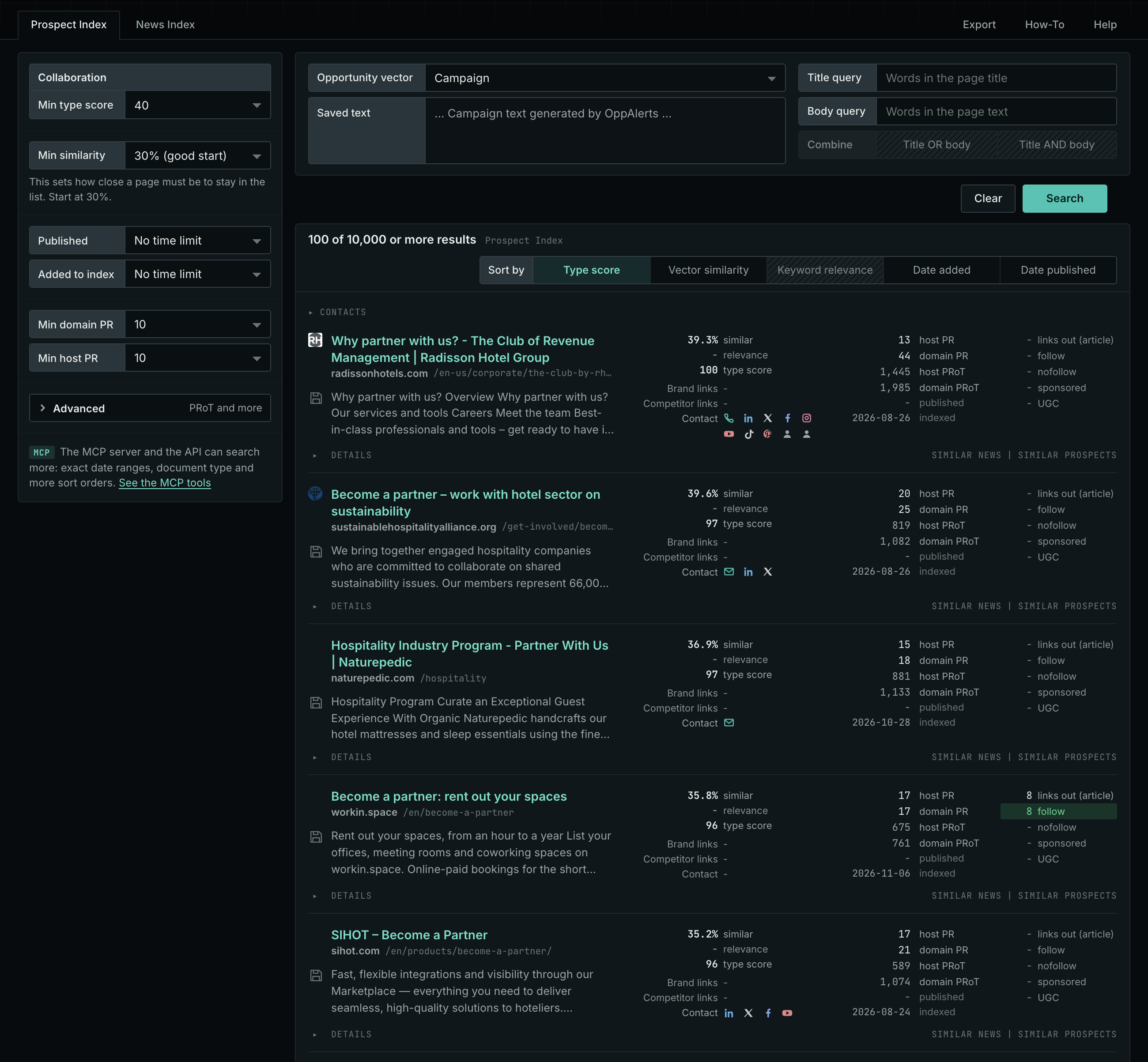
- Open Opportunity Types in the menu.
- Choose the group Content. Its types open in a third column.
- Choose the type Collaboration.
- Leave Min type score at 40, its starting value. Raise it to see only the strongest pages. Lower it to see more pages.
- Read the Prospect Index tab first. It shows both new and old pages. Raise Min domain PR to exclude sites with little standing.
- Read the News Index tab for pages published in recent weeks. Set Published to a recent period. It is normal for this tab to have few results for this type.
- The results are initially sorted by Type score. Click Vector similarity to put the pages most relevant to your market first.
Get new pages every day
- Open your campaign in Edit Campaign, and open the Opportunities tab.
- Add an opportunity. In Search for, choose Collaboration under Content.
- In Opportunity vector, choose Campaign.
- Give it a Label, and save it.
The Dashboard and the daily opportunities email then show the new pages of this type. Daily Monitoring and Alerts has the steps.
In MCP and the API
Two tools search this type. One request body works for both:
{
  "campaign": 3,
  "similarity_target": "campaign",
  "type_scores": [{"opportunity_type": "content/collaboration", "type_score_min": 50}],
  "sort": "type_score"
}- MCP:
news_searchsearches the News Index.prospects_searchsearches the Prospect Index. - API:
POST https://api.oppalerts.com/v1/news/searchandPOST https://api.oppalerts.com/v1/prospects/search, with the same JSON body.
In type_scores, type_score_min sets the minimum type score, from 1 to 100. Sorting by type_score puts the highest type score first. To keep only the newest pages, add published_from or indexed_from with a date in YYYY-MM-DD format. The MCP pages list every parameter and include the full example response.
To connect your AI agent or to send API requests, read Use OppAlerts in Your AI Agent, Create an API Token, and Your First API Call.
How to judge the results
- The date. A call can have a deadline. Check the dates, and check whether the call is still open.
- The live page. Open the page. Check that the program is real and that someone still reads the submissions.
- The rules. Read the criteria. Check that your business is eligible before you write the submission.
- The audience. Check who reads the published case studies or the partner list.
- The cost. Check what the other organization asks in return: a fee, exclusivity, shared marketing, or data about your customers.
- The fit. Check that the partner is a business you want your name associated with.