Documentation / Opportunity Types / How to Find Advertising Opportunities and Media Kits
How to Find Advertising Opportunities and Media Kits
Find sites in your market that sell advertising, and review their rates and audience information before you buy.
What this type finds
This type finds pages where a site tells advertisers how to buy from it. It can find these kinds of pages:
- Advertise pages. Pages that explain how to advertise on a site and who to contact.
- Media kits and media packs. Pages or downloadable files that describe the site, its audience, and its ad products.
- Rate cards and rate pages. The prices of ads, sponsorships, and other placements.
- Ad format pages. Ad sizes, file requirements, and specifications for each ad.
- Audience profile pages. The readers of the site: who they are, how many there are, and where they live.
- Sponsorship and partnership offers. Pages that invite a brand to sponsor the site or to work with it.
Some press kit and media center pages can also match. They are for journalists, not for advertisers. Read each page before you act on it.
Why it matters
- You buy reach. An advertising page shows what a site sells, to whom, and at what price. You do not have to guess if the site takes paid work.
- You get a list of sellers. A site with a media kit takes paid placements. The results for this type therefore list publishers in your market that you can pay.
- It fits businesses with a budget and agencies building a media plan for a client. It also fits a business that wants an audience fast and has no relationships with publishers yet.
Find it in the web app
- Open Opportunity Types in the web app menu.
- Choose Advertising, then choose Advertising Media Kits.
- Read the Prospect Index tab first. Pages of this kind often have no published date, so do not set Published on this tab. Min type score starts at 40. Raise it to keep only the pages that match this type most closely.
- Click Vector similarity in Sort by to show the pages most relevant to your market first.
- Open the News Index tab, and set Published to the last few weeks. This tab shows the pages that are current.
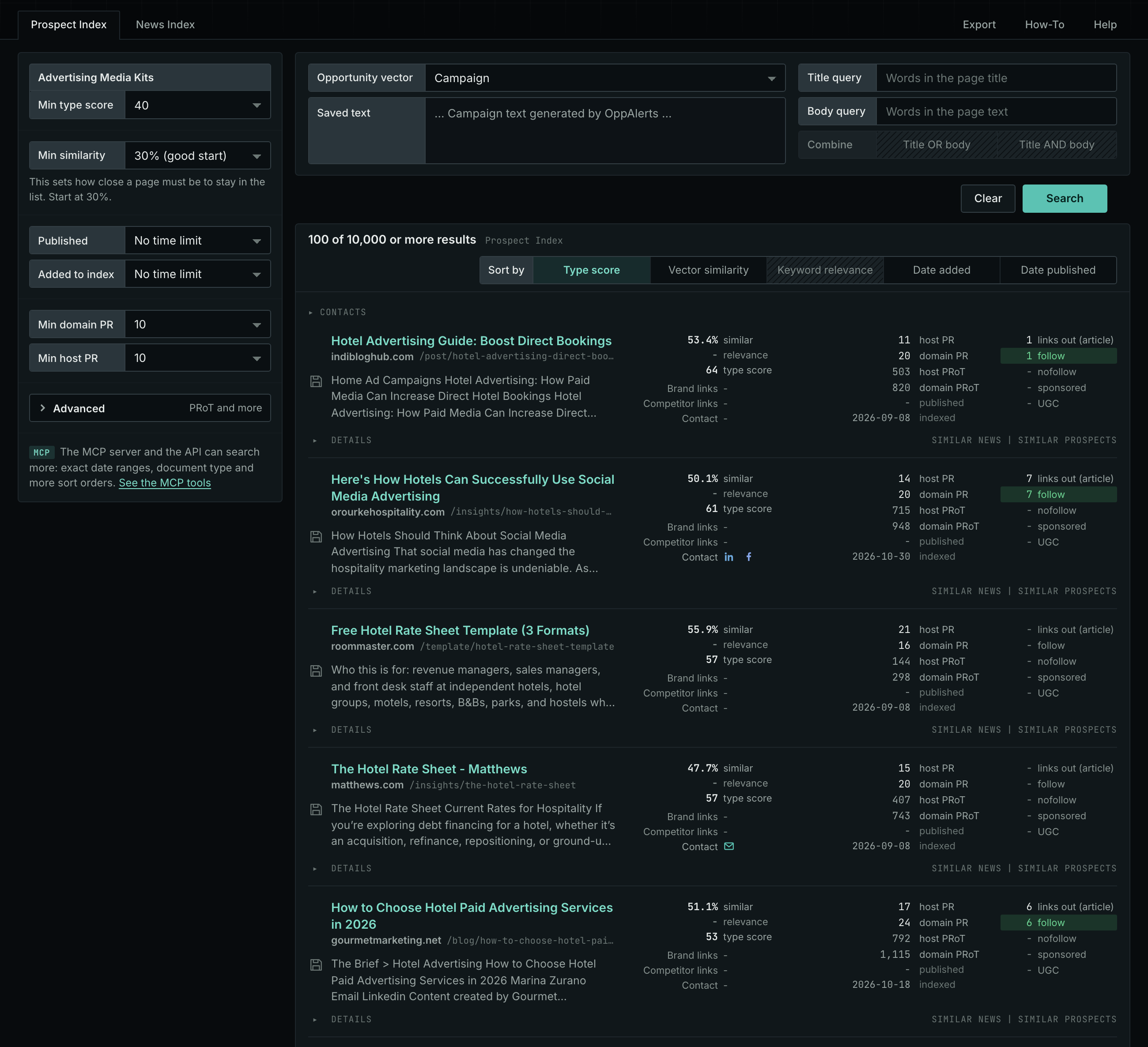
The Advertising Media Kits page in the app docs describes every field in the search form.
Get new pages every day
- Open your campaign in Edit Campaign, and open the Opportunities tab.
- In Search for, choose Advertising Media Kits in the Advertising group. In Opportunity vector, choose Campaign. Click Add opportunity.
- Open the Daily Email tab, select the checkbox, choose the hour, and click Save.
Each day, the Dashboard tab and the daily opportunities email show the pages added to the indexes in the last 24 hours. See Daily Monitoring and Alerts.
In MCP and the API
Two tools search this type. One request body works for both:
{
  "campaign": 3,
  "similarity_target": "campaign",
  "type_scores": [{"opportunity_type": "advertising/advertise-with-us", "type_score_min": 50}],
  "sort": "type_score"
}- MCP:
news_searchsearches the News Index.prospects_searchsearches the Prospect Index. - API:
POST https://api.oppalerts.com/v1/news/searchandPOST https://api.oppalerts.com/v1/prospects/search, with the same JSON body.
In type_scores, type_score_min sets the minimum type score, from 1 to 100. Sorting by type_score puts the highest type score first. To keep only the newest pages, add published_from or indexed_from with a date in YYYY-MM-DD format. The MCP pages list every parameter and include the full example response.
To connect your AI agent or to send API requests, read Use OppAlerts in Your AI Agent, Create an API Token, and Your First API Call.
How to judge the results
- The date of the rates. A rate card can be years old. Ask the site for the current prices.
- The live page. Open the page. Some media kit pages are old, and the offer may no longer be available.
- The audience facts. The site reports its own numbers. Ask how it counts visitors and subscribers, and who it includes.
- The audience fit. A big site in another market costs money and sends you readers that you do not need. Check the similar value of the row.
- The ad formats and the link. Check which formats the site offers and how it marks a paid link.
- The cost and the contact route. Compare the price with the reach. Open Details on the row for the email address or the contact page.