Documentation / Content Types / How to Find How-To Guides and Tutorials
How to Find How-To Guides and Tutorials
See which tasks a market teaches, and which publishers teach them best.
What this type finds
The How-To Guides type finds pages that teach a reader to do something. It includes these kinds of pages:
- Step-by-step tutorials. A numbered list of actions that leads to one result.
- Field guides and practical guides. Longer pages that cover a whole task, with the reasons for each step.
- Implementation guides. Pages that show how to set up or roll out a product, a method, or a process.
- Troubleshooting pages. Pages that name a common problem and show how to fix it.
- Tip pages for beginners and experts. Short lists of advice for one task.
- Instruction and safety pages. Pages with operating steps, warnings, and rules for the safe use of something.
A content type describes the format of a page rather than its subject. The same subject can appear in many formats. The search keeps pages that match this format and are semantically similar to your market.
Why it matters
How-to guides show you what a market teaches. When you enter an unfamiliar market, read guides from strong sites as well as new guides. You see the tasks that buyers need to do, the steps that are hard, and the order in which a field explains its work.
They also show you the experts. A person or a company that writes a clear guide for a hard task knows the task. Note the authors and the publishers. They are good sources for a quote, a review of your own guide, or a joint article.
Content types are for research. Use them when you take on a new client or enter an unfamiliar market. They show you what people in the market write and who writes it.
Find it in the web app
- Open Content in the web app menu.
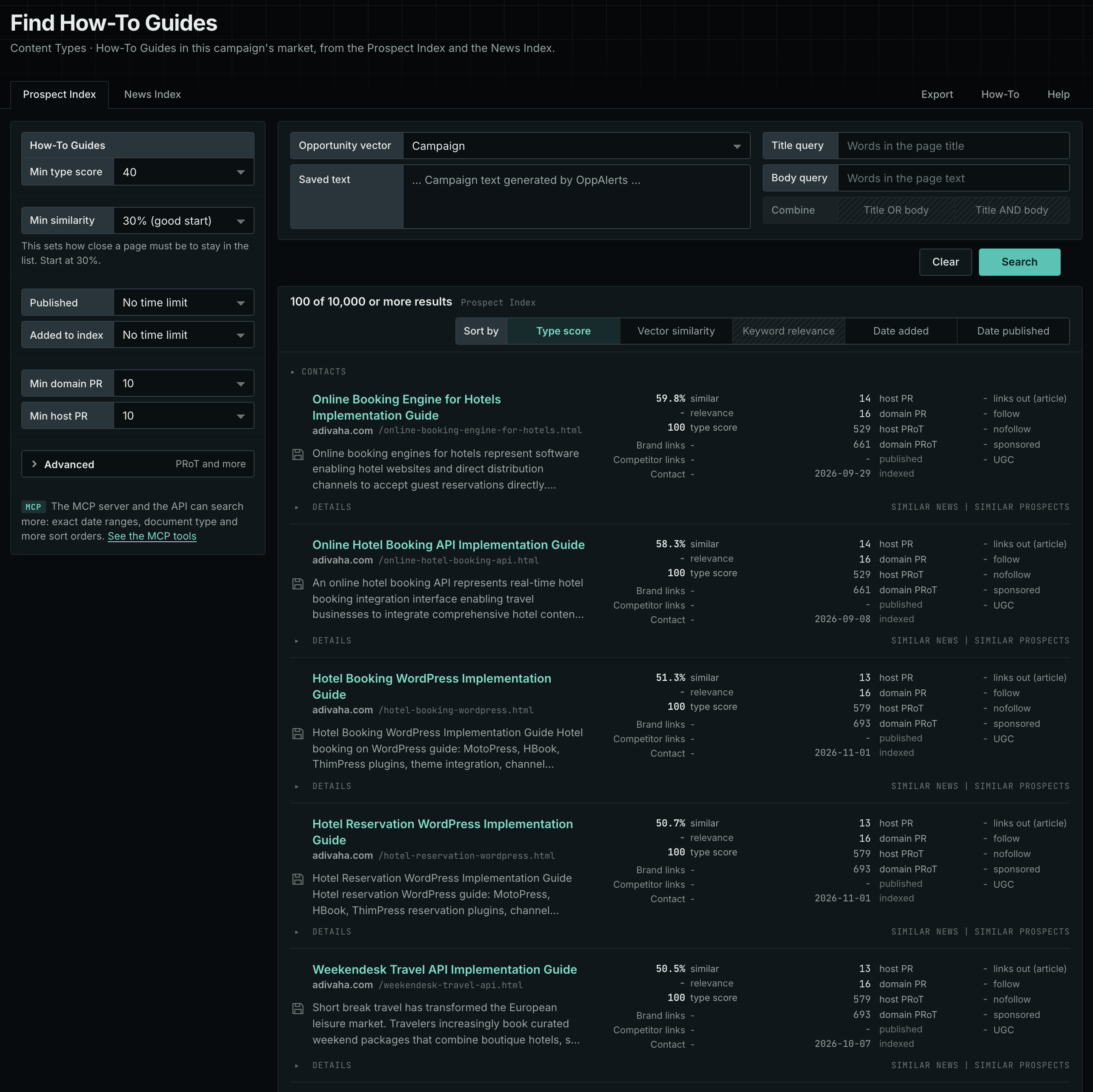
- Under Content Types, choose How-To Guides. The page searches as soon as it opens.
- Open the Prospect Index tab. It shows indexed pages of this type, with the closest matches to your market first. Min type score starts at 40, and Min similarity starts at 30%.
- Open the News Index tab to see what publishers are writing now. Set Published to a recent period. Most pages in the Prospect Index have no published date, so use Added to index there.
- Raise Min domain PR if the list includes sites that nobody knows. Open Details on a row to see how to reach the site.
See the new pages
The Search for menu of a saved opportunity in Edit Campaign lists the brand searches and the opportunity types. It does not include the content types. To follow new pages of this type, return to Content Types each week. Set Added to index to the last week on the Prospect Index tab, and set Published to the last week on the News Index tab. For the daily opportunities email for a campaign, read Daily Monitoring and Alerts.
In MCP and the API
Two tools search this type. One request body works for both:
{
  "campaign": 3,
  "similarity_target": "campaign",
  "type_scores": [{"content_type": "how-to-articles", "type_score_min": 50}],
  "sort": "type_score"
}- MCP:
news_searchsearches the News Index.prospects_searchsearches the Prospect Index. - API:
POST https://api.oppalerts.com/v1/news/searchandPOST https://api.oppalerts.com/v1/prospects/search, with the same JSON body.
In type_scores, type_score_min sets the minimum type score, from 1 to 100. Sorting by type_score puts the highest type score first. To keep only the newest pages, add published_from or indexed_from, with a date in YYYY-MM-DD format. The MCP pages list every parameter and include the full example response.
To connect your AI agent or to send API requests, read Use OppAlerts in Your AI Agent, Create an API Token, and Your First API Call.
How to judge the results
- Check the date. Steps for software and rules go out of date fast. An old guide can show a gap that you can fill with a current one.
- Check that the steps work. Read the guide as a beginner. A guide with missing steps is an opportunity to write a better one.
- Check the author. A named author with a track record in the field is a lead for an expert source.
- Check the depth. Compare a guide from a weak site and a guide from a strong site. The difference in depth and structure is the brief for your own guide.
- Check the audience. A guide for a beginner and a guide for a specialist answer different questions. Pick the one that fits your buyer.