Documentation / Getting Started / Free Account
Free Account
Use a limited version of OppAlerts for a small or local business with no budget for the full application.
Who it is for
- A small business or a local business with no budget for a paid plan.
- Someone who wants to explore one opportunity type for one business.
The free account is very limited. If link building, brand monitoring, or competitor monitoring is a regular part of your work, start a free trial and use the full application.
What it includes
- 1 active campaign.
- 1 opportunity type in addition to the brand reports. A campaign can have at most 7 active opportunities.
- 10 index searches a day, and at most 100 results for each search.
- 10 calls a day for each other tool, for example
campaigns_listorsiteinfo_site. The toolaccount_calls_leftallows 100 calls a day. - No team members.
- The web app, the MCP server, and the API, with the same low daily limits. Usage and Daily Limits lists them.
Get a free account
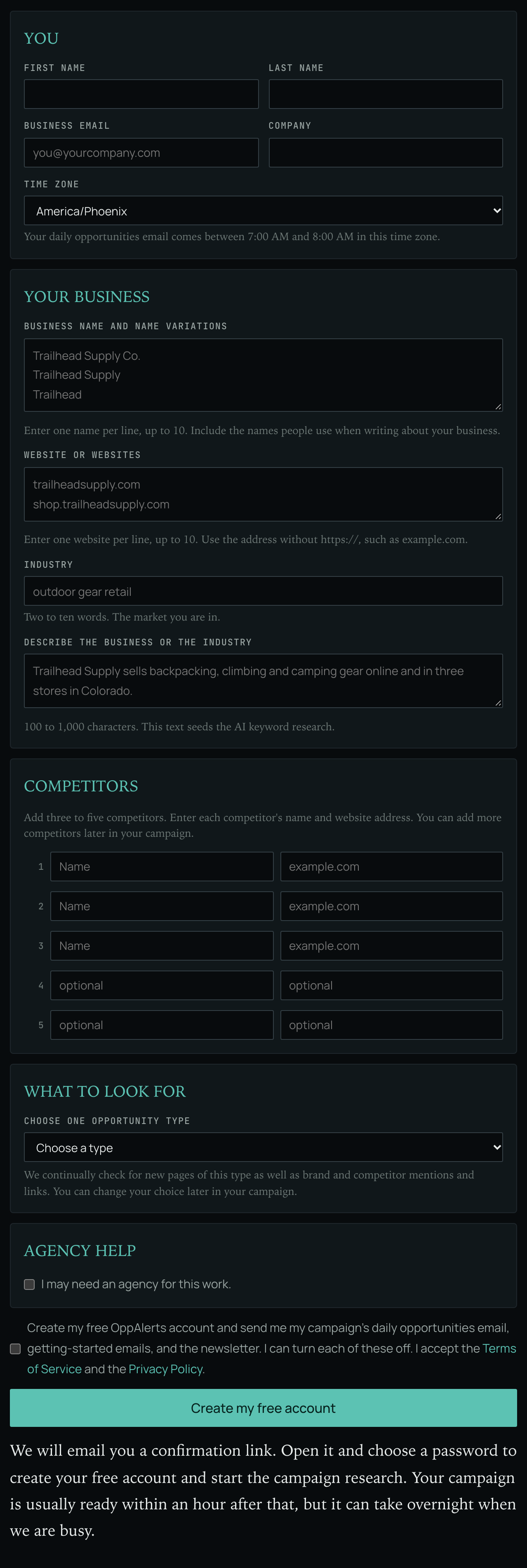
- Open the free account form at oppalerts.com/free-account.
- Fill in your first name and last name, your business email, your company, and your Time zone. The page says: "Your daily opportunities email comes between 7:00 AM and 8:00 AM in this time zone." A time zone outside the list is rejected: "Choose a time zone from the list."
- Enter your business name, variations of that name, and your website or websites.
- Enter your Industry in 2 to 10 words describing your market. One word or more than 10 words is rejected: "Say your industry in two to ten words."
- Describe the business or the industry, in 100 to 1,000 characters.
- Add three to five competitors, each with its name and its website address. The first three are required.
- Choose one opportunity type.
- Check the box to create the free account.
- Open the link in the email you receive, and set a password.
- OppAlerts creates your account and campaign, and starts the research.
Rules
- Use a business email. The form does not accept a free email address, for example a Gmail address.
- One free account for each email address.
- If you previously had a trial or paid plan, you can keep a free account with your login email.
Move to the full application
You can choose a paid plan or start a free trial at any time. Billing and Plans lists the plans.