Documentation / Content Types / How to Find Case Studies and Customer Success Stories
How to Find Case Studies and Customer Success Stories
Find the proof that a market publishes, and learn which companies have results to show.
What this type finds
This type finds pages that tell the story of one customer, client, or project. It groups these kinds of pages together:
- Case studies. A page with a problem, an action, and a result.
- Customer and client success stories. The same idea, in the voice of the company that sells the service.
- Customer and client spotlights. A short profile of one customer.
- Case study libraries. A page that lists many case studies, often with a filter.
- Project highlights and featured projects. Pages from agencies and builders that show finished work.
- Results pages. Pages showing the results a company achieved for its clients.
- Calls for case studies. Pages in which a publisher or a vendor asks for customer stories, with a template or a submission form.
Most pages are written by the company that did the work. They show how that company wants the market to see it.
Why it matters
This type is for research. When you take on a new client, case studies show you what buyers in the market want to see as proof. You learn which results matter, which numbers companies quote, and which kinds of customers they choose to show.
It also finds experts. A company with many strong case studies has real experience. A competitor with an extensive case study library shows you how it sells. A call for case studies shows you a publisher that wants stories like yours.
Find it in the web app
- Open Content in the web app menu.
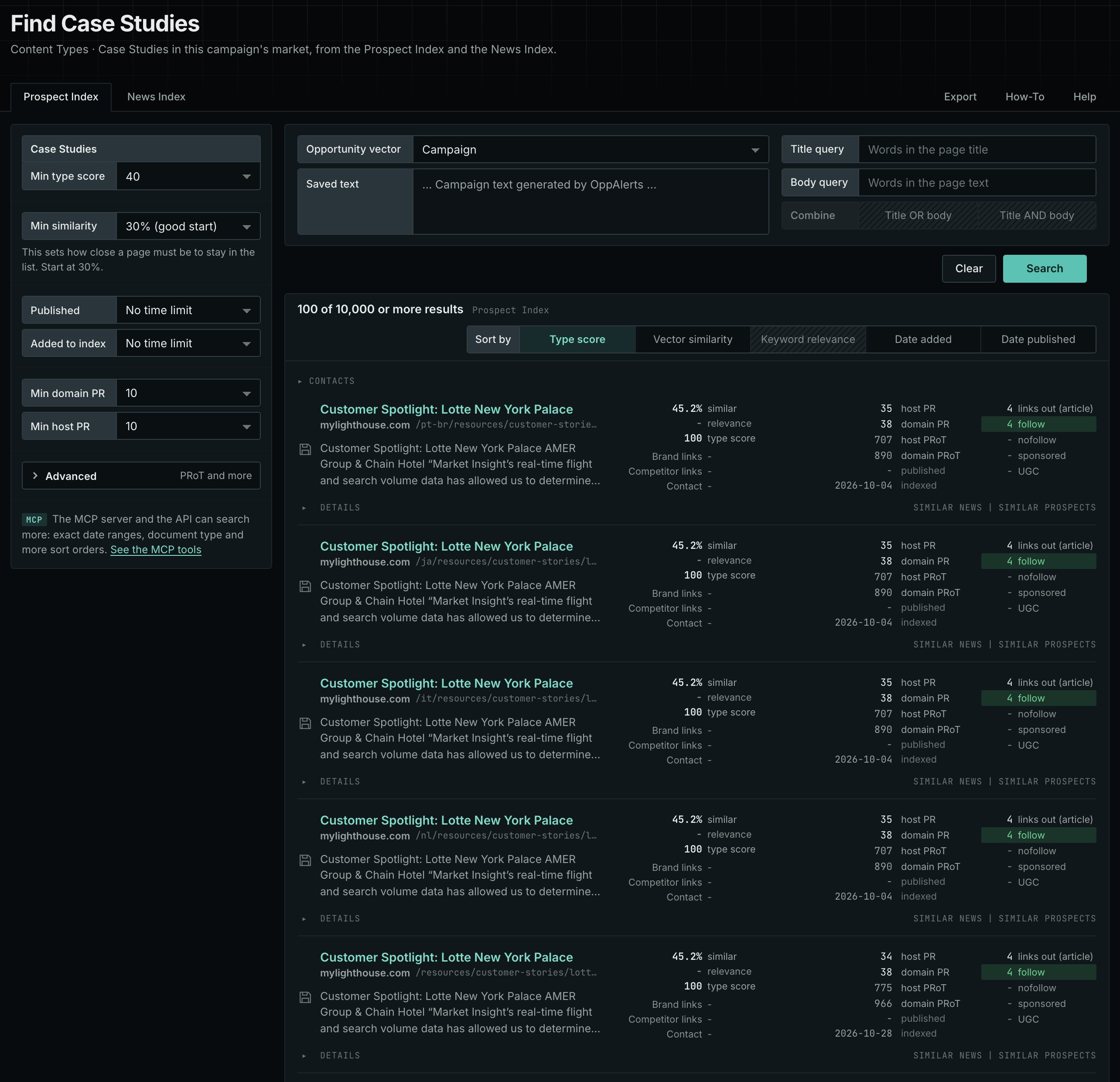
- Under Content Types, choose Case Studies.
- Start with the Prospect Index tab. It shows pages of this type from the OppAlerts index, with the closest semantic matches to your campaign first. To filter by date, use Added to index. Most pages on this tab have no published date, so using Published filters them out.
- Open the News Index tab. It shows what news sources, podcasts, and videos publish now.
- Read the first ten results of each tab. Note the results that companies quote, and the customers that they show.
Min type score starts at 40, and Min similarity starts at 30%. Raise Min domain PR if the list includes sites that nobody in your market knows.
See the new pages
The Search for menu on the Opportunities tab of Edit Campaign lists the brand searches and the opportunity types. To see new pages of this content type, open Content Types again and set Added to index to Last day. The tab then shows only pages added to the index in the last day.
For details about the daily opportunities email and the saved opportunities it uses, read Daily Monitoring and Alerts.
In MCP and the API
Two tools search this type. One request body works for both:
{
  "campaign": 3,
  "similarity_target": "campaign",
  "type_scores": [{"content_type": "case-studies", "type_score_min": 50}],
  "sort": "type_score"
}- MCP:
news_searchsearches the News Index.prospects_searchsearches the Prospect Index. - API:
POST https://api.oppalerts.com/v1/news/searchandPOST https://api.oppalerts.com/v1/prospects/search, with the same JSON body.
In type_scores, type_score_min sets the minimum type score, from 1 to 100. Sorting by type_score puts the highest type score first. To keep only the newest pages, add published_from or indexed_from, with a date in YYYY-MM-DD format. The MCP pages list every parameter and include the full example response.
To connect your AI agent or to send API requests, read Use OppAlerts in Your AI Agent, Create an API Token, and Your First API Call.
How to judge the results
- Check the numbers. A result with a number, a time, and a customer name is worth more than "great results".
- Check the date. An old case study can show a product that no longer exists.
- Check who wrote it. A company writes about itself. Treat its claims as claims.
- Check the customer. Check whether the customer is like your client in size, sector, and need.
- Check if it is gated. Some case studies require you to fill out a form before you can read them. Decide whether filling out the form is worth it.
- Check a call for case studies. Read the rules for who can submit one and what the publisher does with it.