Documentation / Account / Usage
Usage
Review account usage by token and day, and see why calls were rejected.
For each plan's daily limits, see Usage and Daily Limits. This page explains the Usage page itself.
Where it is
- URL: oppalerts.com/app/account/usage.
- In the profile menu at the top right, click Usage.
- This page is in the web app. The old address
/account/usageredirects here. - The page shows usage for the account currently open in the web app. If you are on more than one team, choose the account in the profile menu first.
What counts
The page says: "A search, a save, and each tool call of the API or MCP count against the daily limits. A refused call, and the calls that an MCP client makes to connect (initialize, tools/list, ping), do not count. A page that runs no search does not count."
- The API and MCP: each tool call counts.
- The web app: an index search, a lookup on a Site Info, Backlinks DB, or Link Graph page, a Content Optimizer score, and a save, for example a change on the Edit Campaign page, count. A web page that only reads your account data does not count: the campaign list, the Settings, Opportunities, and Dashboard tabs of a campaign, the Keyword Research and LLM Top Sites pages, Usage, Team, and the taxonomy list.
- Counted calls from the web app, API, and MCP use the same daily account count.
- A day runs from 04:00 to 04:00, New York time.
- A rejected call does not count toward the daily limit. A search that is stopped at 10 seconds counts as 1 search.
- Calls are listed even if they do not count toward the daily limit.
The tokens
The first card lists each token and each connected app that reads the account: its name, owner, type (API token or Connected app), creation date, expiration date, and last-used date. If there are no tokens, the card says "No token reads this account."
Calls per day
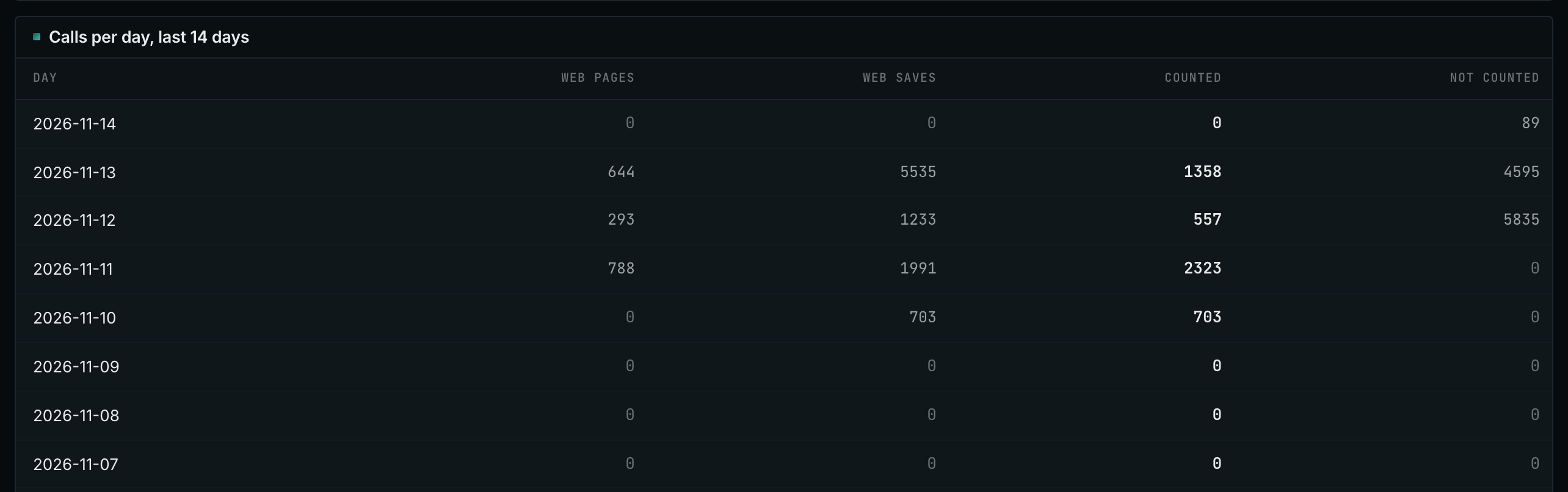
The table has one row for each of the last 14 days and one column for each token and connected app, followed by Web pages and Web saves. Counted is the number of calls that counted toward the daily limit that day. Not counted is the number of web page calls that did not count toward the limit.
Last calls
The table shows the last 20 calls for each token within the last 14 days, newest first. Each row includes the time (UTC), token, source (API, MCP, Web pages, or Web saves), route or tool, status, duration in milliseconds, and Counted: Yes or No.
- 200: the call succeeded.
- 429: the daily limit was reached.
- 403: the token lacks permission for the requested action.
- An MCP client writes rows when it connects:
initialize,tools/list, andping. These rows show No in Counted. Only a tool call counts. - A rejected call also shows No in Counted.
Who sees which rows
- The account owner, an account editor, and an account viewer see all account tokens and calls.
- A campaign editor and a campaign viewer see only their own tokens and their own calls. The page says "You see your own tokens and calls."
When calls are refused with 429
- In Calls per day, find the column with the most calls today.
- In Last calls, review that token's calls to see what it requests.
- If a tool repeatedly asks the same question, change its prompt or its schedule. If you do not recognize the token, revoke it on API & MCP Tokens.
The daily counts reset at 04:00, New York time.
In MCP and the API
account_calls_leftreturns the calls remaining today for each count and when the counts reset.account_usagereturns the data shown on this page: tokens that read the account, daily calls for the last 14 days, and recent calls. The same rule applies: a campaign editor and a campaign viewer get only their own tokens and calls.- Both tools only read.