Documentation / Opportunity Types / How to Find Link Roundups
How to Find Link Roundups
Find the recurring posts that link out to the best content of a week or a month, and the editors who choose it.
What this type finds
A link roundup is a recurring post published by a site. Each edition collects links to articles, tools, and news from around the web. This type finds those posts and the pages around them.
- Weekly link posts. A site lists the best articles that it read in the week, often on a fixed day.
- Monthly roundups. The same idea for a month. These posts are longer and come less often.
- Industry news roundups. A digest of the news of one market, with a link to each source.
- Reading lists. Posts that recommend articles or books for the weekend or for a topic.
- Thank-you posts. A post in which a site thanks the others that linked to it, and links back.
- Expert roundups. Posts that collect the comments, opinions, or predictions of several experts.
- Submission pages. A page that invites you to suggest a link for the next edition.
Why it matters
A roundup editor regularly links to outside pages. A link from a roundup sends visitors who were already reading about your subject.
This type fits a business that has a new guide, study, tool, or news story to share. It is a good first target because the editor expects suggestions. It does not fit a page that only sells.
Find it in the web app
- Open Opportunity Types in the web app menu.
- Choose Links.
- Choose Link Roundups.
- Read the Prospect Index tab first. It contains pages that OppAlerts fetched and has more results. Min type score starts at 40. Raise it to see only the pages that fit the type best.
- Read the News Index tab for news, podcasts, and video. It has fewer results and shows current content. It is normal for a type to return few results here.
- Raise Min domain PR to exclude sites with little standing. Click Vector similarity in the Sort by buttons to see the pages most relevant to your market first.
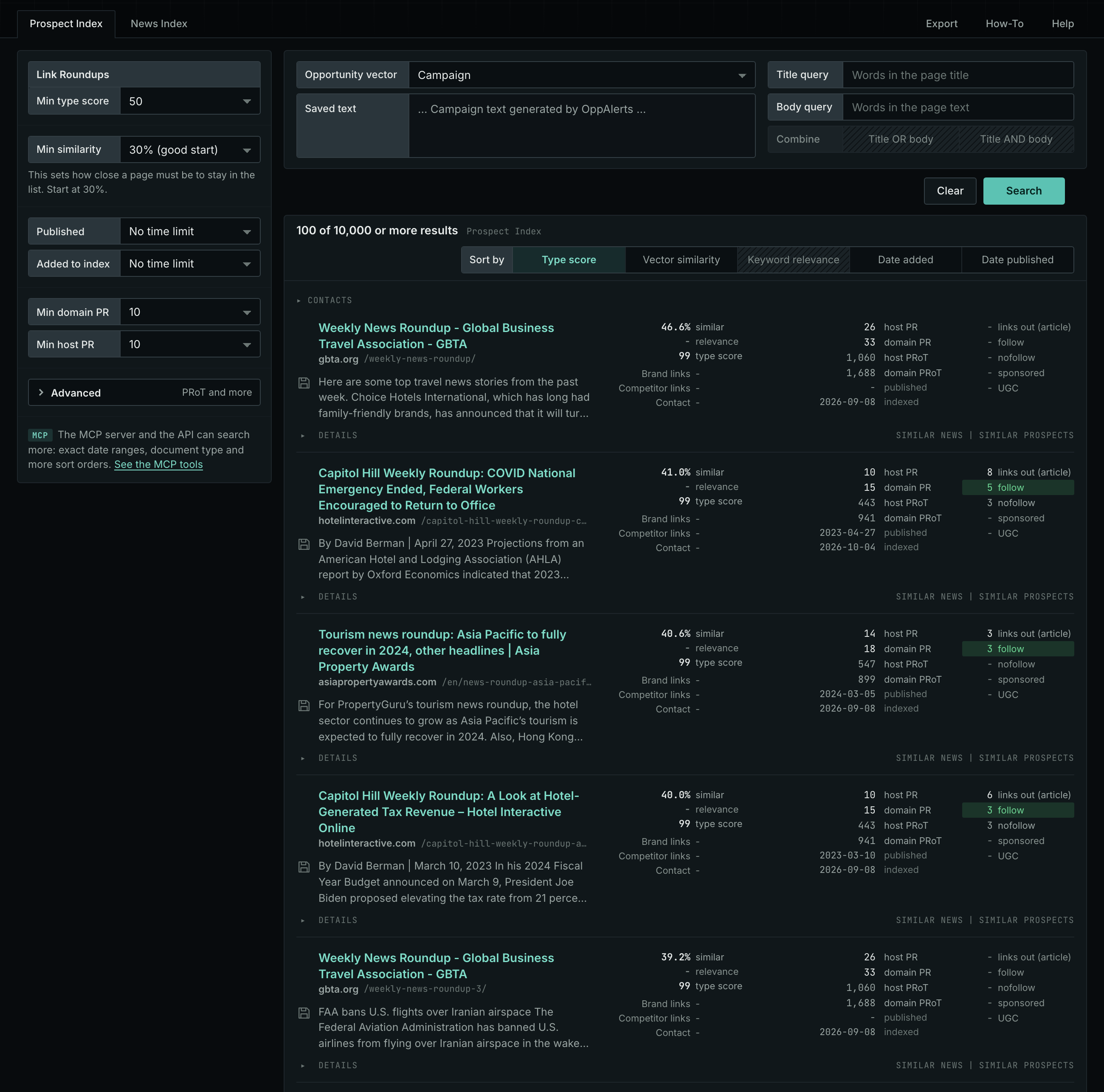
Each page receives a type score based on the words in its address, title, and opening text. The score does not indicate what the page is about. Your campaign supplies the subject. See Opportunity Types and Content Types.
Get new pages every day
- Open your campaign in Edit Campaign, and open the Opportunities tab.
- Add an opportunity. In Search for, choose Link Roundups under Links.
- In Opportunity vector, choose Campaign.
- Give it a Label, and click Add opportunity.
Each day, the Dashboard and the daily opportunities email show the new pages of this type. Read Daily Monitoring and Alerts to set up the daily opportunities email.
In MCP and the API
Two tools search this type. One request body works for both:
{
  "campaign": 3,
  "similarity_target": "campaign",
  "type_scores": [{"opportunity_type": "links/link-roundups", "type_score_min": 50}],
  "sort": "type_score"
}- MCP:
news_searchsearches the News Index.prospects_searchsearches the Prospect Index. - API:
POST https://api.oppalerts.com/v1/news/searchandPOST https://api.oppalerts.com/v1/prospects/search, with the same JSON body.
In type_scores, type_score_min sets the minimum type score, from 1 to 100. Sorting by type_score puts the highest type score first. To keep only the newest pages, add published_from or indexed_from with a date in YYYY-MM-DD format. The MCP pages list every parameter and include the full example response.
To connect your AI agent or to send API requests, read Use OppAlerts in Your AI Agent, Create an API Token, and Your First API Call.
How to judge the results
- Check the date of the last edition. A roundup that stopped last year will not publish your link.
- Check how often it runs. Several consecutive editions show that the editor publishes regularly.
- Check that it links out. Read the outbound link counts in the result row. A roundup that links only to its own pages is not a target.
- Read the items that it picks. Does the editor choose pages like yours? A guide that suits the topic has a chance. A page that sells a service has little chance.
- Find the way to suggest a link. Look for a form or an email address. Open Details in the result row for the contact routes.
- Check the cost. A real roundup does not charge to include a link. If the page asks for money, treat it as an advertisement.