Documentation / Opportunity Types / How to Find Forums and Message Boards
How to Find Forums and Message Boards
Find the discussion sites where your customers and experts ask questions and share advice.
What this type finds
The Forums, Message Boards type finds sites and pages where people hold public discussions in threads. It can find:
- Community forums run by a brand or product for its users.
- Industry discussion forums where professionals talk about their work.
- Support and help forums where customers ask for help.
- Older message boards and bulletin boards.
- The pages inside a forum: the board index, a topic, a thread, and a reply form.
- Lists and directories of forums, and guides about forum marketing.
A thread page shows a real conversation. A forum home page shows the whole site. Both are useful in different ways.
Why it matters
A forum shows a market's problems in buyers' own words. It is also a place to help people and become known for doing so. You can use it for research, for contact with an audience, and for ideas for new content.
The type fits support teams, community managers, content teams, and agencies entering an unfamiliar market.
Find it in the web app
- Open Opportunity Types in the menu.
- Choose the group Community. Its types open in a third column.
- Choose the type Forums, Message Boards.
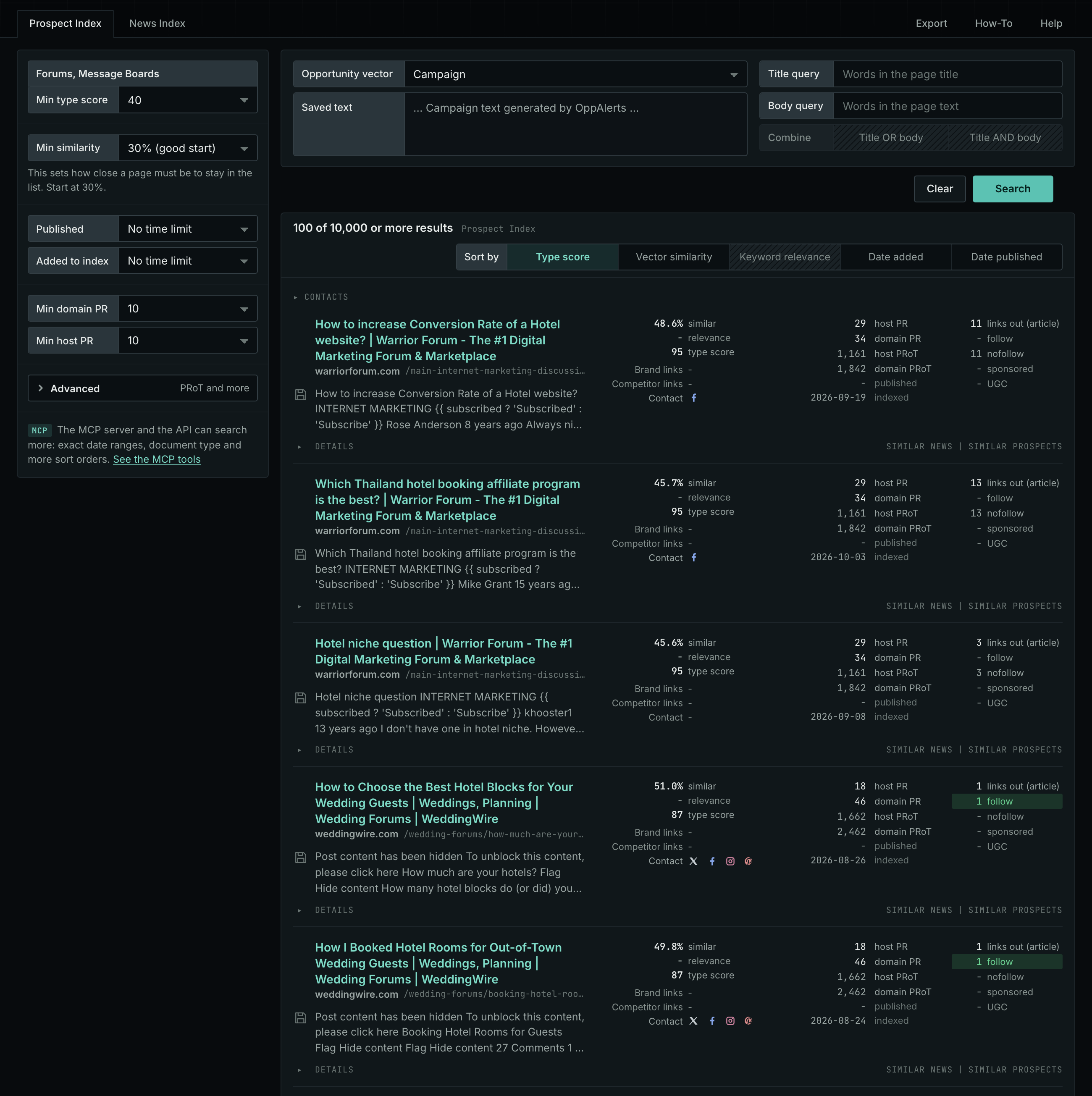
- Leave Min type score at 40, its starting value. Raise it to see only the strongest pages. Lower it to see more pages.
- Read the Prospect Index tab first. It shows both new and old pages. Raise Min domain PR to exclude sites with little standing.
- Read the News Index tab for pages published in recent weeks. Set Published to a recent period. It is normal for this tab to have few results for this type.
- The results are initially sorted by Type score. Click Vector similarity to show the pages most relevant to your market first.
Get new pages every day
- Open your campaign in Edit Campaign, and open the Opportunities tab.
- Add an opportunity. In Search for, choose Forums, Message Boards under Community.
- In Opportunity vector, choose Campaign.
- Give it a Label, and save it.
The Dashboard and the daily opportunities email then show the new pages of this type. Daily Monitoring and Alerts has the steps.
In MCP and the API
Two tools search this type. One request body works for both:
{
  "campaign": 3,
  "similarity_target": "campaign",
  "type_scores": [{"opportunity_type": "community/forums", "type_score_min": 50}],
  "sort": "type_score"
}- MCP:
news_searchsearches the News Index.prospects_searchsearches the Prospect Index. - API:
POST https://api.oppalerts.com/v1/news/searchandPOST https://api.oppalerts.com/v1/prospects/search, with the same JSON body.
In type_scores, type_score_min sets the minimum type score, from 1 to 100. Sorting by type_score puts the highest type score first. To keep only the newest pages, add published_from or indexed_from with a date in YYYY-MM-DD format. The MCP pages list every parameter and include the full example response.
To connect your AI agent or to send API requests, read Use OppAlerts in Your AI Agent, Create an API Token, and Your First API Call.
How to judge the results
- The date. Read the dates of the latest posts. A forum with no new post for many months is not active.
- The live page. Open the forum. Check whether you must register to read or to post.
- The rules. Read the rules on promotion, links, and signatures. Many forums remove posts that promote a business.
- The audience. Check that the members are your buyers, your experts, or the people who advise them.
- The cost. Helping people takes time. Plan to participate over time rather than just once.
- The quality. A forum with many replies from real members is better than a forum with spam and no answers.