Documentation / Opportunity Types / How to Find Blog Commenting Opportunities
How to Find Blog Commenting Opportunities
Find blog posts and threads with open comment sections, and join existing discussions in your market.
What this type finds
The Blog Commenting type finds pages where a reader can write a public reply. It can find:
- Blog posts with an open comment form.
- Posts with a comment policy explaining which comments the site welcomes.
- Article pages and discussion threads on news and community sites where readers write comments.
- Posts with no comments yet, which give the first commenter more attention.
- Pages that give advice about blog commenting, and services that sell it.
Pages offering advice or services do not let you comment. Skip them. A page with a closed comment form can also appear in the results. Check each page before you act.
Why it matters
A good comment can start a relationship with the author and the readers, and it shows that you know the subject. It can bring some visits from readers who want to know who you are.
Many sites mark the links in comments with the nofollow or ugc value. Do not plan on link value. The result rows show a page's links by type, so you can check what a site does. The type fits people who want to take part in the market they work in.
Find it in the web app
- Open Opportunity Types in the menu.
- Choose the group Community. Its types open in a third column.
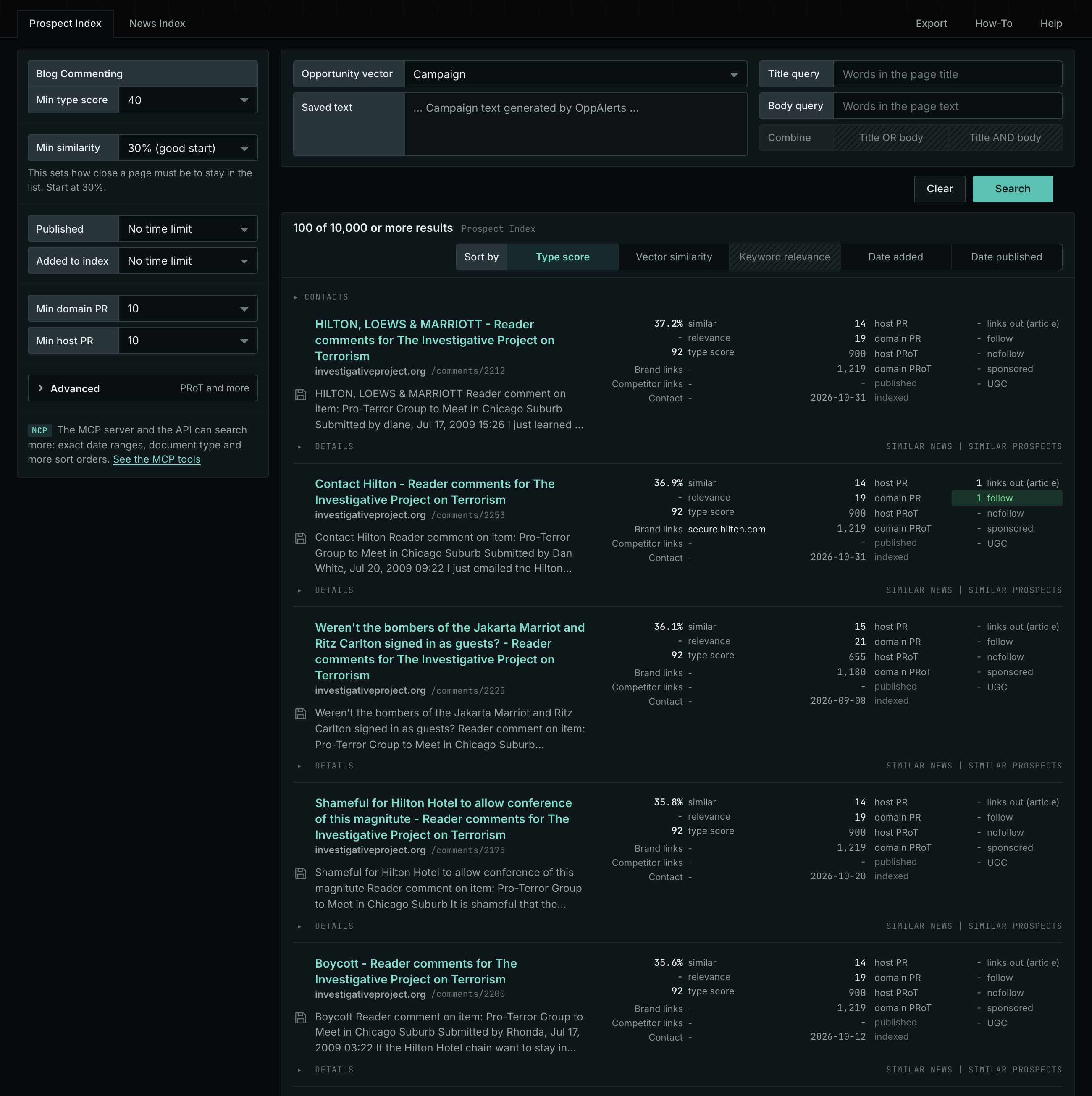
- Choose the type Blog Commenting.
- Leave Min type score at 40, its starting value. Raise it to see only the strongest pages. Lower it to see more pages.
- Read the Prospect Index tab first. It shows both new and old pages. Raise Min domain PR to exclude sites with little standing.
- Read the News Index tab for pages published in recent weeks. Set Published to a recent period. It is normal for this tab to have few results for this type.
- The results are initially sorted by Type score. Click Vector similarity to show the pages most relevant to your market first.
Get new pages every day
- Open your campaign in Edit Campaign, and open the Opportunities tab.
- Add an opportunity. In Search for, choose Blog Commenting under Community.
- In Opportunity vector, choose Campaign.
- Give it a Label, and save it.
The Dashboard and the daily opportunities email then show the new pages of this type. Daily Monitoring and Alerts has the steps.
In MCP and the API
Two tools search this type. One request body works for both:
{
  "campaign": 3,
  "similarity_target": "campaign",
  "type_scores": [{"opportunity_type": "community/blog-commenting", "type_score_min": 50}],
  "sort": "type_score"
}- MCP:
news_searchsearches the News Index.prospects_searchsearches the Prospect Index. - API:
POST https://api.oppalerts.com/v1/news/searchandPOST https://api.oppalerts.com/v1/prospects/search, with the same JSON body.
In type_scores, type_score_min sets the minimum type score, from 1 to 100. Sorting by type_score puts the highest type score first. To keep only the newest pages, add published_from or indexed_from with a date in YYYY-MM-DD format. The MCP pages list every parameter and include the full example response.
To connect your AI agent or to send API requests, read Use OppAlerts in Your AI Agent, Create an API Token, and Your First API Call.
How to judge the results
- The date. A very old post can have a comment form that nobody reads or reviews. Choose posts that have a recent date or recent comments.
- The live page. Open the post. Check that the form is open and that the page does not say that comments are closed.
- The rules. Read the comment policy. Many sites remove comments that only promote a business or that add a link with no value.
- The audience. Read the other comments. Real readers with real questions are a better sign than a list of short, generic comments.
- The cost. A useful comment takes time to write. Do not write the same comment on many sites.
- The moderation. Some sites hold each comment for review. Allow for a delay or the possibility that your comment will not be published.