Documentation / Content Types / How to Find Industry Statistics and Survey Data
How to Find Industry Statistics and Survey Data
Find the numbers that a market quotes, and the publishers that produce them.
What this type finds
The Statistics type finds pages that are built around numbers. It includes these kinds of pages:
- Statistics roundups. One page that gathers many numbers on one subject, with a source for each.
- Facts and figures pages. Short pages of key numbers about a field or a company.
- Survey results. Pages that report what a group of people answered, often with percentages.
- Benchmark results. Numbers that let a business compare itself with its peers.
- Data portals and open data pages. Sites that publish raw figures for others to use.
- Poll results. A short report of one question put to a group.
A content type describes the format of a page rather than its subject. The same subject can appear in many formats. The search keeps pages that match this format and are semantically similar to your market.
Why it matters
The numbers that a market quotes tell you what the market cares about. When you enter a new market, read its statistics pages. You learn the size of the market, the trends that people measure, and the figures that appear again and again.
The people and organizations that produce these numbers are experts. A company or a body that runs a survey each year is a publisher that others cite. Note who produces each set of numbers. A statistics roundup is also a page that links to its sources. A new study of your own can earn a place on it.
Content types are for research. Use them when you take on a new client or enter an unfamiliar market. They show you what people in the market write and who writes it.
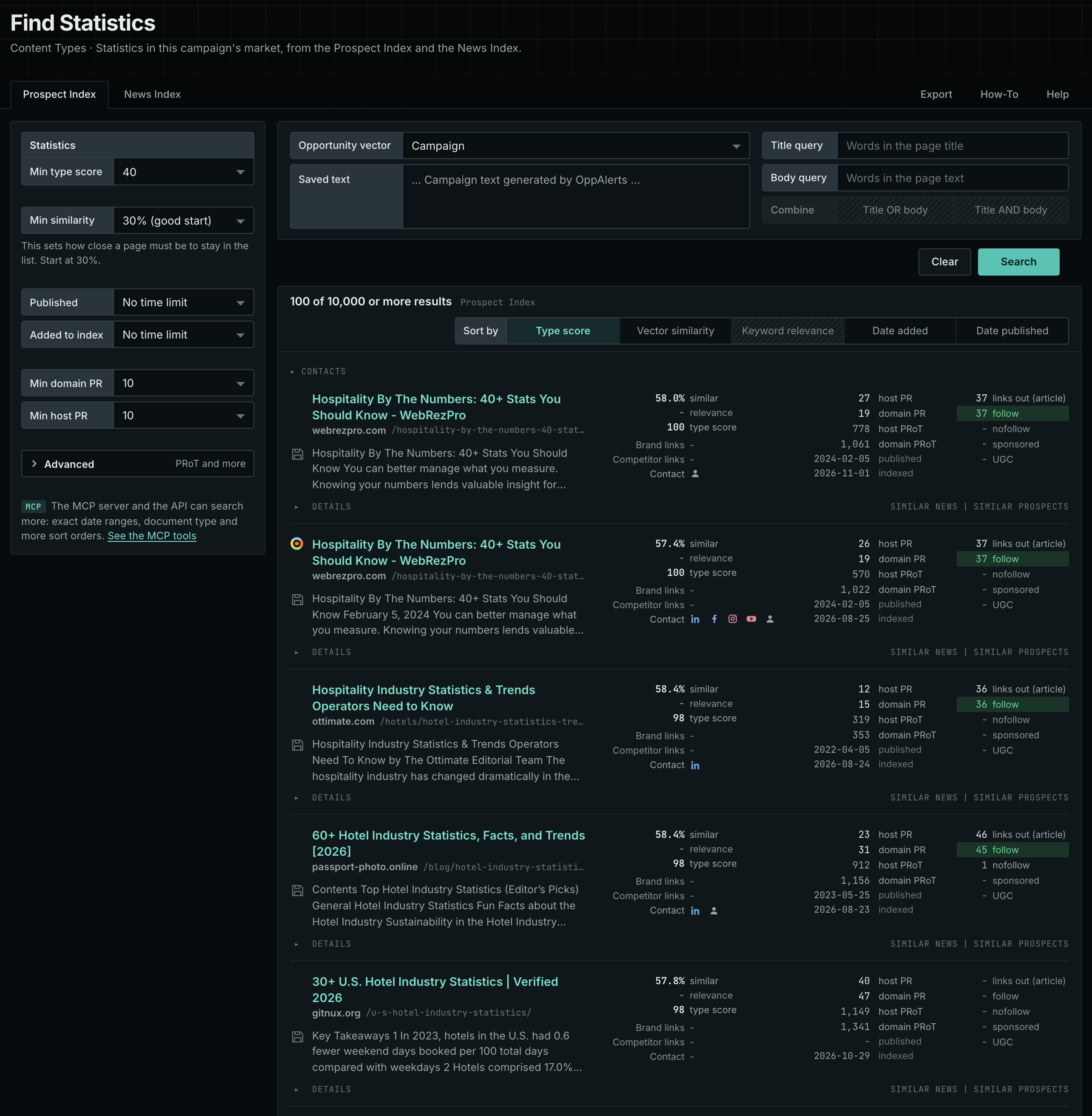
Find it in the web app
- Open Content in the web app menu.
- Under Content Types, choose Statistics. The page searches as soon as it opens.
- Open the Prospect Index tab. It shows indexed pages of this type, with the closest matches to your market first. Min type score starts at 40, and Min similarity starts at 30%.
- Open the News Index tab to see what publishers are writing now. Set Published to a recent period. Most pages in the Prospect Index have no published date, so use Added to index there.
- Raise Min domain PR if the list includes sites that nobody knows. Open Details on a row to see how to reach the site.
See the new pages
The Search for menu of a saved opportunity in Edit Campaign lists the brand searches and the opportunity types. It does not include the content types. To follow new pages of this type, return to Content Types each week. Set Added to index to the last week on the Prospect Index tab, and set Published to the last week on the News Index tab. For the daily opportunities email for a campaign, read Daily Monitoring and Alerts.
In MCP and the API
Two tools search this type. One request body works for both:
{
  "campaign": 3,
  "similarity_target": "campaign",
  "type_scores": [{"content_type": "statistics", "type_score_min": 50}],
  "sort": "type_score"
}- MCP:
news_searchsearches the News Index.prospects_searchsearches the Prospect Index. - API:
POST https://api.oppalerts.com/v1/news/searchandPOST https://api.oppalerts.com/v1/prospects/search, with the same JSON body.
In type_scores, type_score_min sets the minimum type score, from 1 to 100. Sorting by type_score puts the highest type score first. To keep only the newest pages, add published_from or indexed_from, with a date in YYYY-MM-DD format. The MCP pages list every parameter and include the full example response.
To connect your AI agent or to send API requests, read Use OppAlerts in Your AI Agent, Create an API Token, and Your First API Call.
How to judge the results
- Check the source of each number. A statistics page that does not name its sources is weak. Go to the original source.
- Check the date. A number from five years ago can be wrong today. Use the latest figure.
- Check the sample. A survey of 50 people says little. Look for the number of respondents.
- Check the repeat. A number that appears on many pages can trace back to one old study. Find the original source.
- Check the owner. A vendor can use numbers to sell. A trade body or a research firm is more neutral.