Before choosing a content optimization tool, decide what you want help with. You might want to compare your draft with pages ranking for a query, check whether it addresses the right audience, or produce a first draft. Different tools can give you different advice about the same text because they use different references.
Imagine a payroll page written for finance directors. It explains payslip processing, but says very little about oversight or financial reporting. The product is described, yet the buyer still has questions. A useful review helps you notice those gaps and decide what to explain.
OppAlerts publishes this guide and is included in the comparison. The vendor plans are examples from September 2026 research.
Find out what the tool compares your draft with
Surfer, Frase, and Clearscope provide topic research and writing guidance using their own methods. A comparison with competing pages can help you see what other content covers for a target query. Look at the actual references and suggestions in each tool to understand how its advice is produced.
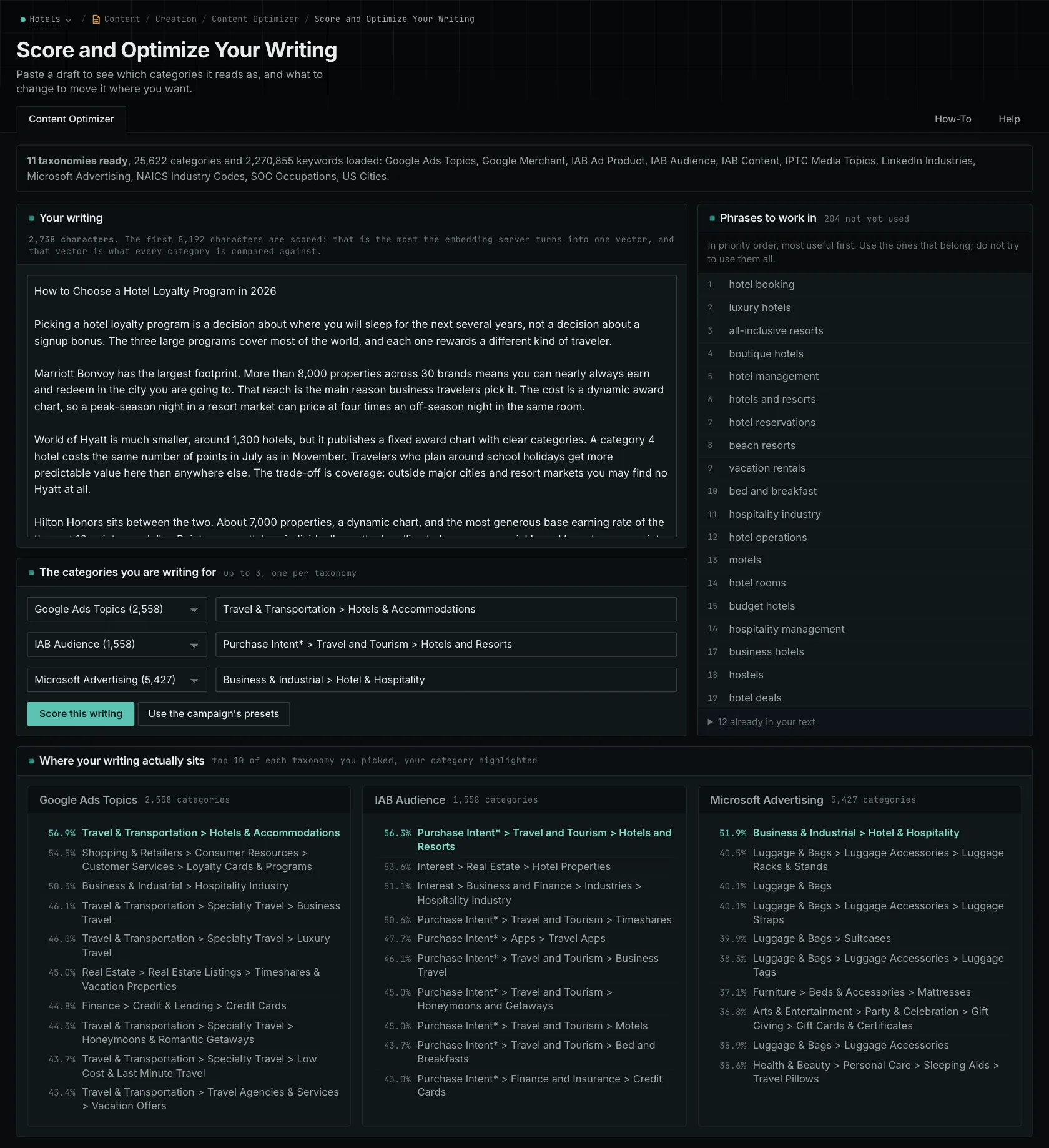
OppAlerts compares your draft with categories you select. There are 11 taxonomies with 25,622 categories, including 4,117 US cities. Choose up to three categories, one from each taxonomy. You'll see the ten closest categories in each selected taxonomy, your target's position if it falls outside that list, and related phrases missing from the text.
For the payroll page, choose an audience category and run the draft. Read the closest matches, then look back at the passages explaining the offer. That helps you investigate whether you're addressing the finance director's concerns. The guide to similarity and keyword matching explains the different ways to examine the text.
Match the plan to your content workload
In the reviewed annual pricing, Frase's $39 monthly plan includes ten articles, 50 audit pages, and Content Guard monitoring for ten published pages. The $103 plan includes three users, five sites, 40 articles, 250 audit pages, and 75 watched pages. Extra users cost more, and you can add AI prompt capacity. Content Guard helps you find pages with declining Google performance to review.
Surfer Standard is $99 a month billed yearly, with 360 documents per year and 25 prompts refreshed weekly. The separately researched AI Search Analytics offer was $158 a month billed yearly for 100 daily prompts and MCP. Check that dated tier against the current offer. Standard already combines content work and tracking; its 360-document allowance is annual.
Clearscope Essentials is $129 a month for 50 pages, 20 topic explorations, 20 drafts, and 50 tracked prompts. Business is $399, with 300 pages and prompts and 50 explorations, but still 20 drafts. If drafting is your main workload, check that allowance as well as monitored pages.
The researched Semrush Pro+ plan is $299 a month with content optimization and 100 daily prompts. SE Ranking's dated $129 package includes an AI Writer, 250,000 audit pages, and 100 daily prompts. Consider those broader packages when your team also needs their SEO tools.
Decide whether you need help writing or reviewing
Surfer, Frase, Clearscope, and SE Ranking can produce text as well as help review it. Profound Agents creates briefs and drafts for review and CMS publication. If you need a first draft, try those functions with a real assignment.
OppAlerts reviews text you supply. It doesn't write, rewrite, or publish. You can submit up to 8,192 bytes at a time and check longer drafts in sections, though the section scores don't combine into a whole-article score. The semantic editing guide shows how to use the results when revising.
In OppAlerts, the categories you select are what the text is compared with. Your campaign's business description doesn't automatically become the scoring reference.
For ongoing reviews, Frase's Content Guard monitors published pages for declining performance. OppAlerts doesn't automatically alert you to declines; you start the content review yourself. Include that difference when deciding which parts of the work you want the tool to handle.
For local content, check the business facts alongside any city comparison. A city category can help you review local emphasis, but it can't verify an address or project. Use accurate details that help the local customer understand the service.
A similarity score or a suggestion based on search results doesn't predict a ranking or citation. For our payroll example, judge the proposed edit by whether it gives finance directors the information they need to understand the offer.
Compare individual tools
Browse all comparisons and alternatives.
See how OppAlerts fits your work.
Tell me what you are working on and what you need to find out. I can walk you through the relevant reports and explain what OppAlerts can help you do.
You can explore the demo first, or use this form to ask about a task or arrange a demonstration with me.