Clearscope and OppAlerts both assess content. To compare them, you need to understand what each assessment measures and what it helps you change. That's where the differences matter to an editor. OppAlerts publishes this comparison.
Imagine a service page for Boulder. It mentions the city several times, but most of the text could describe the company's work anywhere. What does a customer in Boulder actually need to know? Whether you serve their address, how an appointment works, and which local details affect the job. That's the information the page needs to explain.
Start with the work your editor needs to do
In the September 2026 research, Clearscope Essentials was $129 a month and Business was $399, with Enterprise priced by quote. Essentials included 50 tracked prompts, 50 pages, 20 topic explorations a month, and 20 drafts a month. Business increased the first three allowances to 300 prompts, 300 pages, and 50 explorations. It still included 20 drafts.
If you need more first drafts, that last detail matters. The upgrade in the reviewed plans didn't give you more drafts. Essentials described a 14-day trial and no contracts. Business added a dedicated account manager, while Enterprise listed crawler whitelisting and SSO. Check the current plan and trial terms before you buy.
Clearscope provides topic research, content grading, and drafts. OppAlerts doesn't write or publish content, and it has no equivalent to Enterprise crawler whitelisting. If you still need to write that Boulder page, account for that work separately from checking the finished text.
Look at what the assessment helps you change
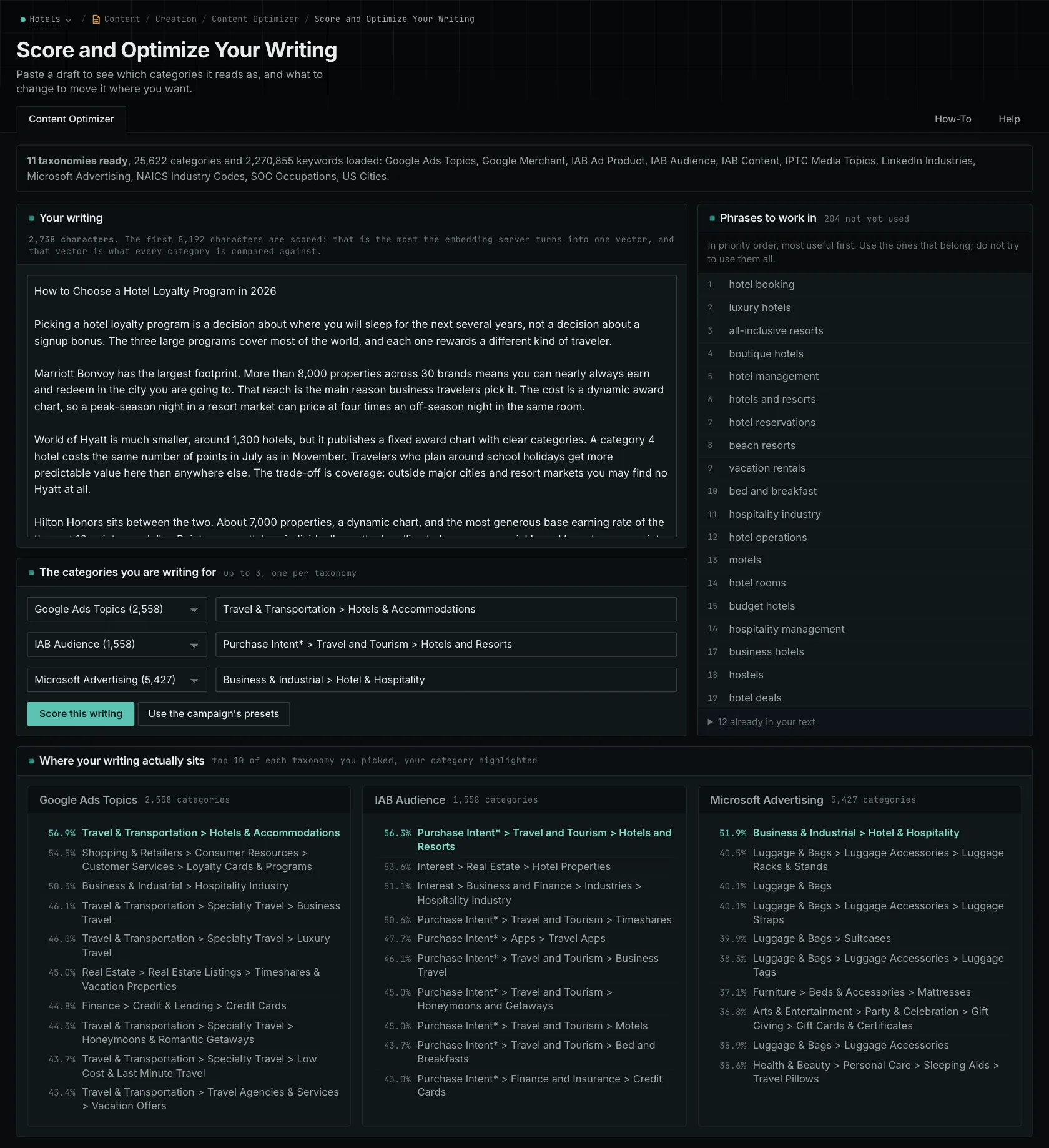
The OppAlerts Content Optimizer compares your draft with categories you select. These include subject, audience, industry, product, and location categories. You can choose up to three, with one per taxonomy. It shows the ten closest categories, reports your intended category's position separately if needed, and lists related phrases missing from the draft.
Choose Boulder in the US Cities taxonomy, and you can see how the draft compares. That doesn't verify that the company serves Boulder or understands a local requirement. If customers need to know where your service area ends, get that information from the business. Adding a suggested phrase won't answer it.
Now take the same page and brief to Clearscope and look at what its topic research and grading suggest. The tools use different references for their assessments. This example doesn't measure a disagreement between them. What matters is whether the revision answers a customer's question as well as improves the score.
OppAlerts accepts up to 8,192 bytes per check. For a longer article, you'll need to review sections separately, and those results don't combine into an overall article score. A category comparison or content grade also doesn't establish whether an AI or search engine will cite your page.
OppAlerts also helps you research content questions and unlinked brand mentions. Its campaign research also shows which businesses AI models recommend.
Work through what happens after publication
Clearscope's reviewed plans included 50 and 300 tracked prompts, but the sources didn't settle every engine and refresh condition. Check those before comparing how much data you can collect. OppAlerts continually checks for new opportunities.
OppAlerts also provides opportunity searches, published contact research, observed link gaps, news research, content questions, and monthly link history. Use those to investigate relevant coverage after you publish. Before you contact a site, check the current page. Your campaign description informs the research; you select content categories and search terms separately.
Which one fits your work?
Look at Clearscope if your editorial process centers on topic exploration, drafting, and page monitoring. Look at OppAlerts if you have writing to assess against selected categories and need publication research alongside it. Try both with that Boulder page and see which guidance helps you explain what customers need to know.
Other alternatives
Compare Surfer, Frase, Clearscope, and other content optimization tools by how much drafting they include, how they assess content, and how they monitor published pages.
See all comparisons and alternatives.
See how OppAlerts fits your work.
Tell me what you are working on and what you need to find out. I can walk you through the relevant reports and explain what OppAlerts can help you do.
You can explore the demo first, or use this form to ask about a task or arrange a demonstration with me.