Surfer and OppAlerts both assess text, but they use different references and editing tools. Surfer also creates and optimizes documents. OppAlerts reviews writing you already have. To compare them, start with a real brief and see what each helps you change for the reader.
Imagine a guide for facilities managers choosing a maintenance contractor. It uses all the expected industry terms, but most of it talks about the supplier. The manager still needs to know what the contract covers, how emergency visits work, and which charges fall outside the agreement. That's what the revision needs to explain.
OppAlerts publishes this comparison. The prices and allowances below come from research done in September 2026. Check the current plans and billing terms before you buy.
Check what the document allowance covers
The Surfer Standard offer researched was $99 a month billed yearly. It included 360 documents allocated annually and 25 AI prompts refreshed weekly. AI Search Analytics was listed at $158 a month billed yearly, with 100 prompts refreshed daily, Mention Gap, Brand Sentiments, five Brand Spaces, and MCP access.
Surfer's usage documentation says annual plans receive yearly limits and monthly plans use monthly limits. So those 360 documents are an annual allowance. If you need monthly billing, check that offer separately.
Surfer includes drafting, optimization, plagiarism checking, and collaboration. You may need those before you ever look at a content score. OppAlerts doesn't create, rewrite, or publish the guide. If you need a tool to produce the draft, account for that separately.
Understand what the recommendation is based on
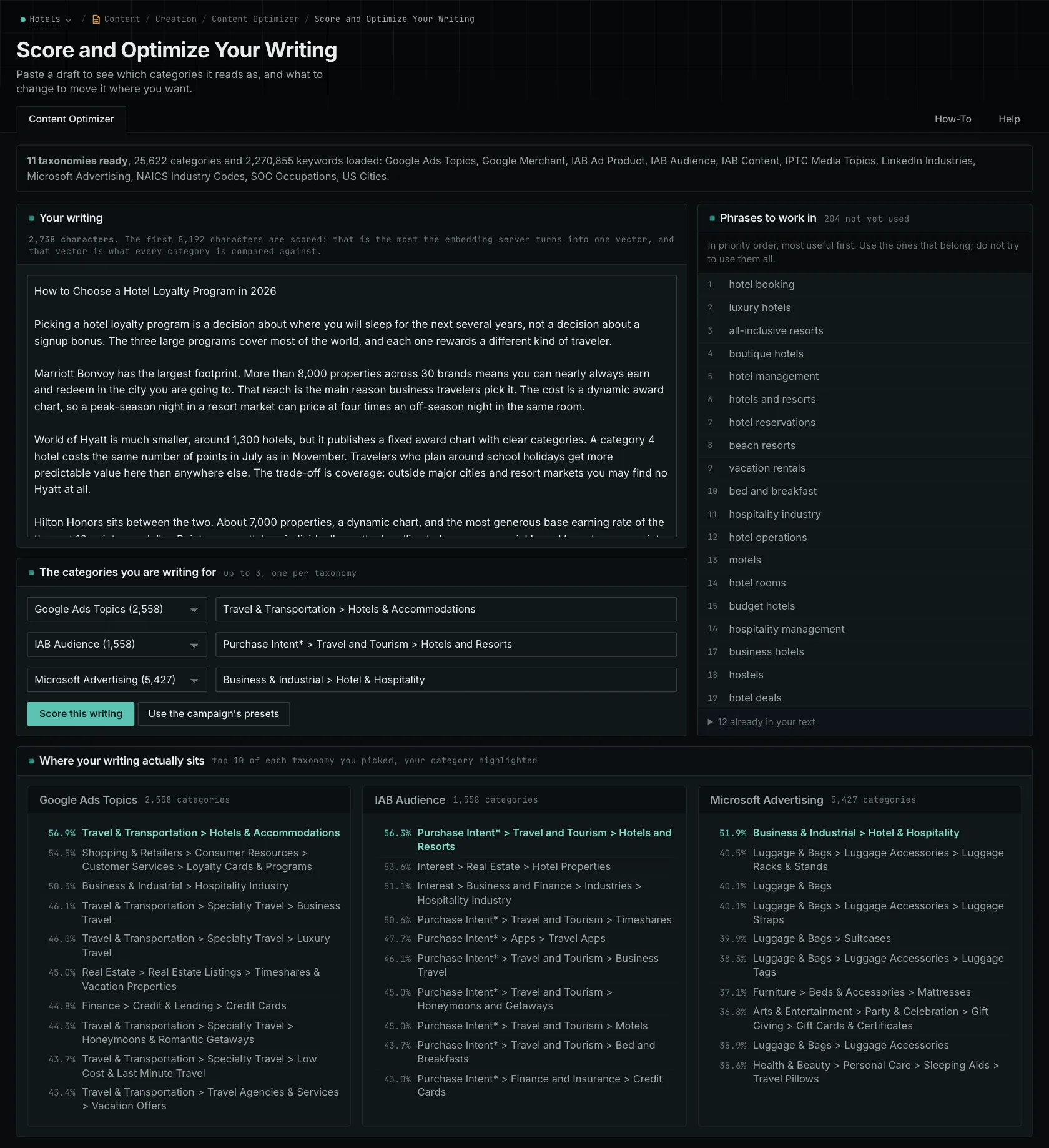
Surfer gives you guidance based on pages ranking for a target term, with 1-click Content Optimization toward that target. The OppAlerts Content Optimizer compares the meaning of your draft with categories you choose. There are 11 taxonomies containing 25,622 categories, including 4,117 US cities.
You can choose up to three categories, with one per taxonomy. OppAlerts shows the ten closest categories for each taxonomy, reports your intended category separately if it's outside those ten, and lists related phrases missing from the draft. Subject, audience, industry, product, and location categories let you examine what the draft emphasizes without first choosing a search query.
For the maintenance guide, an audience comparison may help you look more closely at how much of the draft talks about the supplier. It doesn't verify which contract terms are accurate or needed. Read the actual agreement, then explain emergency visits, exclusions, and charges in language the manager can use. Adding category phrases won't fill in those details.
This is a way to evaluate the tools, not a measured finding that another assessment would miss the problem. Semantic similarity supports editing by giving you another reference. It doesn't predict a search or AI citation. OppAlerts accepts up to 8,192 bytes per check, and separate section results don't combine into one article score.
OppAlerts doesn't check for plagiarism. If your editorial process requires that, keep it on the list alongside drafting and publication.
Compare tracking needs and publication research
The Surfer plans reviewed have substantially different prompt schedules. They also include sentiment and gap reports with no direct OppAlerts equivalent. Confirm the exact engines available for your needs. OppAlerts continually checks for new opportunities. API and MCP access are read-only.
OppAlerts also provides opportunity searches, available published contacts, news and question research, observed link gaps, unlinked mentions, and monthly Domain and Host PageRank history. Use those to investigate suitable publications for the maintenance guide, then read the current submission requirements. The Surfer pages reviewed didn't describe these tools in the same form.
Which one fits your work?
Look at Surfer for drafting, guidance from search results, optimization, and collaboration. Look at OppAlerts to compare writing you supply with categories and research publications. Judge the revision by whether it helps the facilities manager choose a contractor. Then compare document allowances, daily research limits, and any tracking you need from Surfer.
Other alternatives
Compare Surfer, Frase, Clearscope, and other content optimization tools by how much drafting they include, how they assess content, and how they monitor published pages.
See all comparisons and alternatives.
See how OppAlerts fits your work.
Tell me what you are working on and what you need to find out. I can walk you through the relevant reports and explain what OppAlerts can help you do.
You can explore the demo first, or use this form to ask about a task or arrange a demonstration with me.