A campaign tells OppAlerts what you sell, who you're trying to reach, and which brands and competitors you want to follow. That gives your research a common starting point, so the tools can work with the same business and market context.
Imagine you sell scheduling software for independent restaurants with 10 to 60 staff. Those customers need to replace paper schedules and make changes between shifts. That description gives the research much more to work with than simply saying you sell software for businesses.
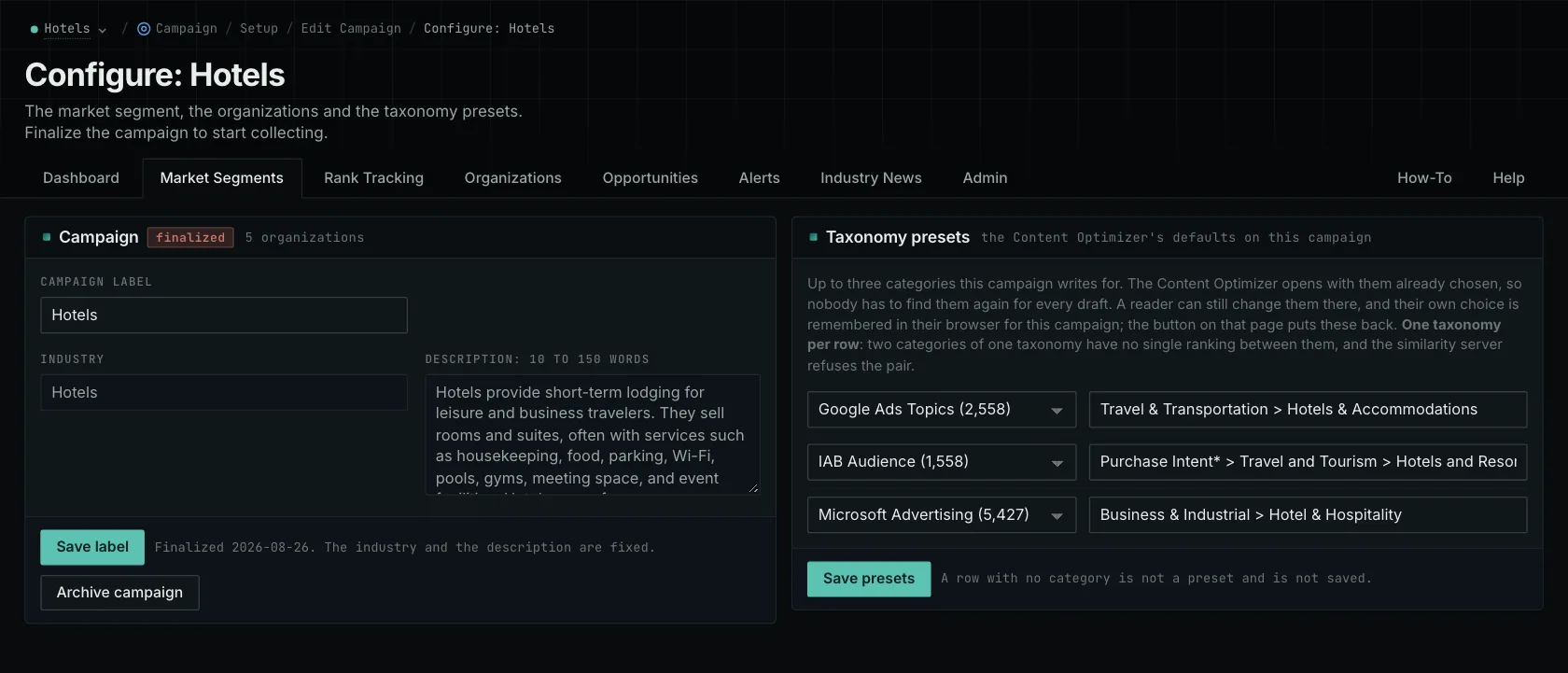
Get clear on who you're trying to reach
To set up a campaign, write a business description of 10 to 150 words. Add at least one owned brand with a website. The form shows you which requirements still need to be filled in.
Different buyers can want different things. A manager of one restaurant needs to change tonight's schedule quickly. An owner running several restaurants needs to see staffing across locations. Both might buy your product, but the reasons they choose it can be different. Describe the buyers and situations that matter to your business.
Review the campaign before finalizing it
Finalizing starts the research and permanently fixes the industry and the business description. The campaign label stays editable. Read the description with the person responsible for the product or service before finalizing. If you need to change the core definition later, create a new campaign.
You can keep editing Organizations after finalizing. A campaign can hold up to 100 organizations in total, including up to 10 competitors. Most reports apply organization labels when you view them, so adding a competitor can identify it in existing results.
Use the campaign across your research
The campaign gives the tools context, and each tool also has its own inputs. A search can use a similarity text you add to an opportunity. A site lookup uses a website address. Content Optimizer compares your text with selected categories, starting from the campaign's taxonomy presets. The dashboard counts matches for the opportunity searches you've configured.
Your brand can have up to 10 names and 10 websites in a campaign. Archiving a campaign keeps its history and immediately frees its active slot. You can activate no more than your plan's number of campaigns within any seven-day period.
Spend a little time getting the business description right before you finalize. If the research points toward the wrong market, come back to that definition and decide whether you need a revised campaign.
The campaign-planning guide and new-client research guide walk through this in more detail.
See how OppAlerts fits your work.
Tell me what you are working on and what you need to find out. I can walk you through the relevant reports and explain what OppAlerts can help you do.
You can explore the demo first, or use this form to ask about a task or arrange a demonstration with me.