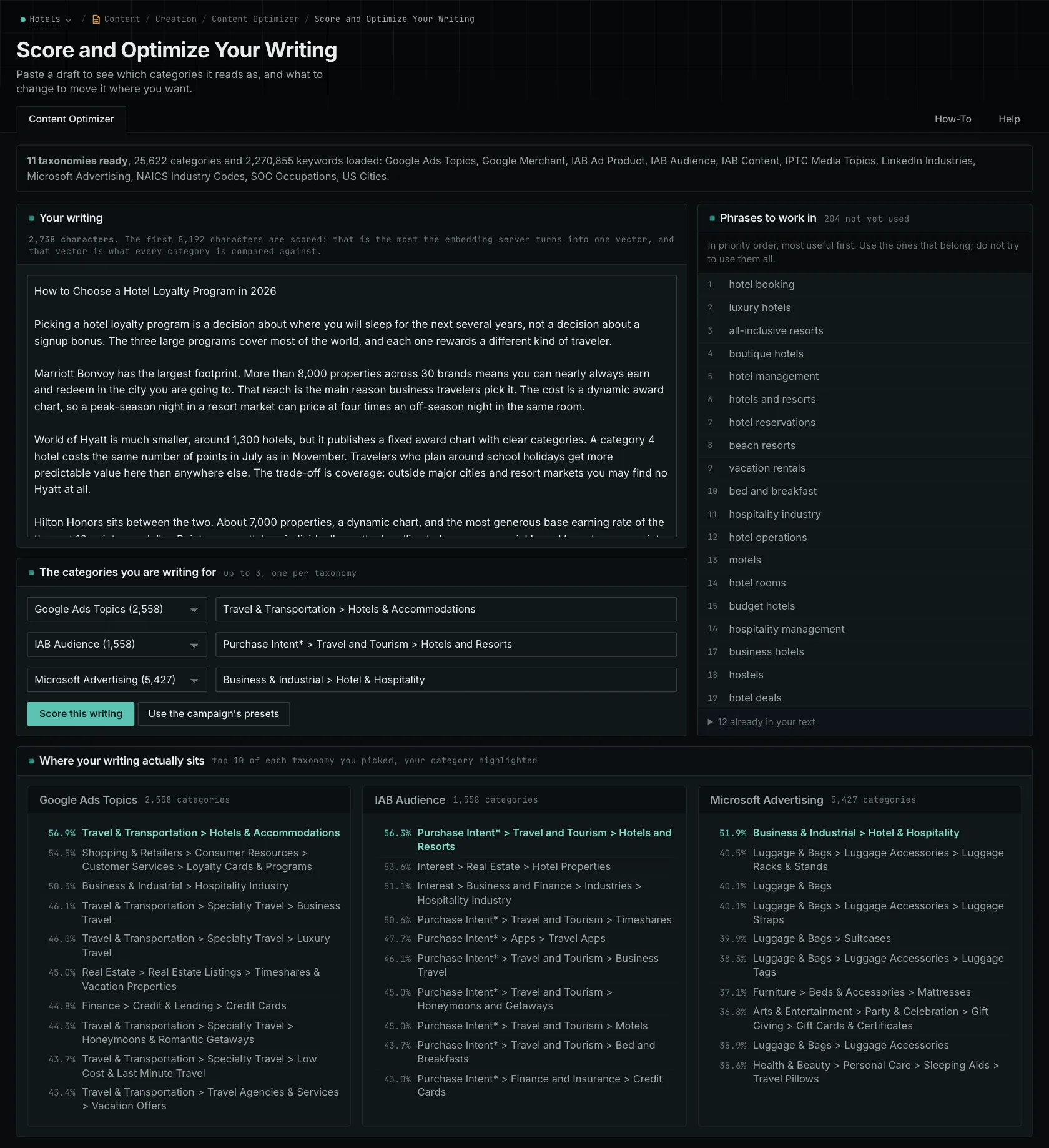
Content Optimizer shows you how similar your writing is to the topics, audiences, and locations you want it to be about. Paste in your draft, choose the categories you're targeting, and see which categories the text is actually closest to.
Imagine you're writing a guide for facilities managers choosing a maintenance contractor. You might spend most of the draft explaining how contractors staff and price their services. But the buyer needs to know how to compare offers and what happens when something is excluded. The topic is related; the emphasis may need work.
Choose up to three categories, each from a different taxonomy. A taxonomy is a set of categories organized around a subject. OppAlerts has 11 of them, with 25,622 categories in total, including 4,117 US cities. You can choose categories for different aspects of your draft, but you can't select two from the same taxonomy.
How the similarity score works
The score tells you how close your text is to a category in a mathematical comparison. A result of 70% means that comparison returned 0.70. It's a measure of similarity, so it doesn't mean the article is 70% correct or 70% finished.
Here's how that works. A text embedding model converts your draft into 768 numbers. Together, those numbers are called a vector. The categories have been converted into vectors using the same model, so OppAlerts can compare your text with them on the same basis. Vectors from unrelated models wouldn't provide that shared basis.
The calculation is called cosine similarity. Both vectors are normalized to unit length, which lets OppAlerts calculate it using their dot product. Multiply that result by 100 and you get the percentage shown in the report. There's no extra step turning it into a grade or a probability.
What matters for editing is that similar subject matter can produce similar vectors. That gives you a way to examine what the draft is about. You'll still need to check the facts: an inaccurate article about maintenance can be very similar to other content about maintenance.
See which categories your draft is closest to
For each selected taxonomy, the report shows the ten closest categories. Your chosen category is highlighted. If it's outside the top ten, its position is shown separately. The list tells you which categories are closest to this text, even if none is a particularly good fit.
For the maintenance guide, imagine your intended audience appears below several categories about running a contracting business. That would give you something to investigate. Read the opening and pricing sections again to see how much they explain the contractor's operations and how much they help the buyer choose.
You might then revise the draft to explain response commitments and exclusions using the actual contract terms. The category comparison helped you notice the emphasis. The revision gives the facilities manager more of the information they came for.
Use the similarity scores alongside your own review. They don't measure accuracy, completeness, or expected search performance, and they don't ask a search engine whether it would cite the page.
Find relevant details you may have left out
The phrase list shows associated wording that's already in your draft and wording that's missing. Read through the missing phrases to see whether they point to an explanation your reader needs. Some will concern parts of the category that your article doesn't need to cover.
For example, a phrase about emergency cover could prompt you to explain what the contract includes. A phrase about hiring technicians might be relevant to the industry but unnecessary for someone choosing a contractor. Add the detail when it helps answer the buyer's question.
You can submit up to 8,192 characters at a time. Longer text is refused, with the excess marked, so it won't quietly score just the beginning. For a long article, check sections separately and keep track of which section each result describes. Those scores don't combine into a score for the whole article.
Your campaign's taxonomy presets provide the default selections. The browser remembers your choices for that campaign, and you can restore the presets. Keep the same categories selected when comparing revisions so you can see how the writing changed against the same targets.
Read the draft-review guide or learn about checking content for a local audience.
See how OppAlerts fits your work.
Tell me what you are working on and what you need to find out. I can walk you through the relevant reports and explain what OppAlerts can help you do.
You can explore the demo first, or use this form to ask about a task or arrange a demonstration with me.