A draft can be about the right subject and still speak to the wrong person. One relevance score won't necessarily show you that. Content taxonomies let you compare the writing from several angles: its topic, audience, industry, product, or location.
A taxonomy is an organized set of categories. OppAlerts has 11 taxonomies with 25,622 categories. You can use them to compare a draft with what you intended to write. First, decide what you want each comparison to help you understand.
Check who the explanation is actually for
Imagine you're writing a business-insurance guide for small-business owners. You explain the insurer's products and internal processes accurately, but you never help the owner decide which cover to buy. A topic comparison could still show a strong relationship to insurance. That's what the article discusses.
Now compare the audience. If categories for insurance professionals appear ahead of your intended buyer category, go back and read the draft's assumptions. Are you explaining the policy terminology, or assuming the reader knows it? Are you showing how exclusions affect the decision, or just listing them?
The numbers don't decide whether those passages belong. They give you something to investigate that a subject check alone wouldn't resolve. You still need to answer the audience question, even when the topic matches well.
Decide what you're checking before you run the comparison
A topic category describes what the writing is about. Audience and industry categories help you examine who it seems to address and which professional context it resembles. Product and location categories give you other comparisons when those are part of the brief.
Read the category descriptions and choose the one that best fits the page you intend to write. A broad overview may need a broad category. A focused explanation may have a more precise one available. If none fits well, the comparison will have limits. That doesn't mean the draft's purpose is wrong.
Don't simply choose whichever category comes first in the results. That changes what you're checking. With the insurance guide, you wanted to know whether it serves a policy buyer. Changing your intended audience to match the result leaves that question unanswered.
Understand what the category order tells you
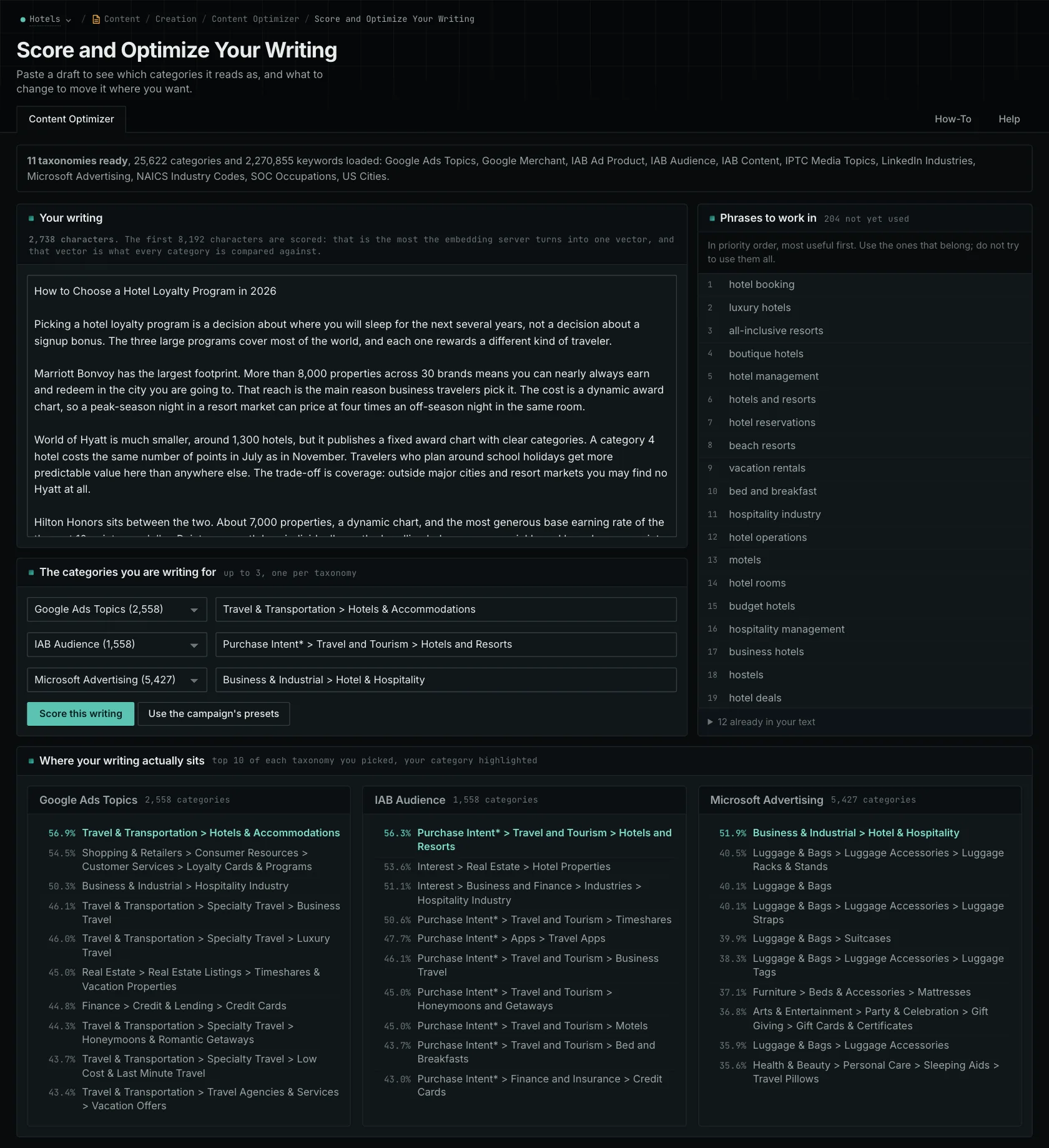
You can choose up to three categories, each from a different taxonomy. The editor won't accept two targets from the same taxonomy because each result places one target within its own set. That keeps your topic and audience checks separate while you examine the same text.
Each taxonomy returns its ten nearest categories. If your target falls outside that list, its position appears separately. The lower entries are simply the nearest remaining categories available. Some may have little to do with what you intended to write. Read their descriptions before treating them as suggestions.
This comparison helps you review the writing. It doesn't assign a category on behalf of a search engine or decide which subject would be most valuable to publish.
Use the brief to decide what to change
For the insurance guide, choose the subject and audience before writing and put them in the brief. Once you have a draft, compare the opening and body separately. That lets you examine what the reader encounters first and what the rest of the explanation develops.
If the opening mostly describes the insurer's operations, decide whether the buyer needs that background before understanding the choice. You might introduce the buying question sooner and explain the supplier's process where it affects the decision. The reader's task gives you the reason to edit. The taxonomy result helps you find what to reread.
Next, read about semantic content editing, follow an audience-review walkthrough, or explore Content Optimizer.
See how OppAlerts fits your work.
Tell me what you are working on and what you need to find out. I can walk you through the relevant reports and explain what OppAlerts can help you do.
You can explore the demo first, or use this form to ask about a task or arrange a demonstration with me.